Slide 1 of 22
MCI Management Center Innsbruck Logo Design Decomposition Diagram

Project Systems Engineering

Lecture Notes 2026

Prof. Erwin Rauch and Prof. David Cochran

12 Step Design Process Primer
Purdue University Fort Wayne · Center of Excellence in Systems Engineering
PFW Center of Excellence Logo

12 Step Design Process Primer

A guide to understanding and applying the 12 Step Collective System Design Process.

Use this primer alongside the 12 Step Template in Lucid.


Prof. David S. Cochran, Ph.D.
Joseph J. Smith

Version 0.1 · 2026-04-28

Table of Contents

Introduction

Purpose
Flame Model of a System
The Engineer's Tone
The Foundations of CSD
Collective System Design (CSD) Language
List of Questions
Parking Lot
Tips and Tricks for Using the 12 Step Template in Lucid

The 12 Steps

Step 1 · Project Introduction and Background
Step 2 · Problem Statement
Step 3 · Conceptual Design Alternatives and Selection
Step 4 · Design Decomposition
Step 5 · Design and Process FMEA
Step 6 · Detailed Design
Step 7 · Design For X (DFX) Methods
Step 8 · Verification Test Plan
Step 9 · Validation Test Plan
Step 10 · Build a High-Quality Solution
Step 11 · Standard Work Instructions
Step 12 · Verification, Validation, and Final Cost

Why FRs?

Why FRs?
Purpose
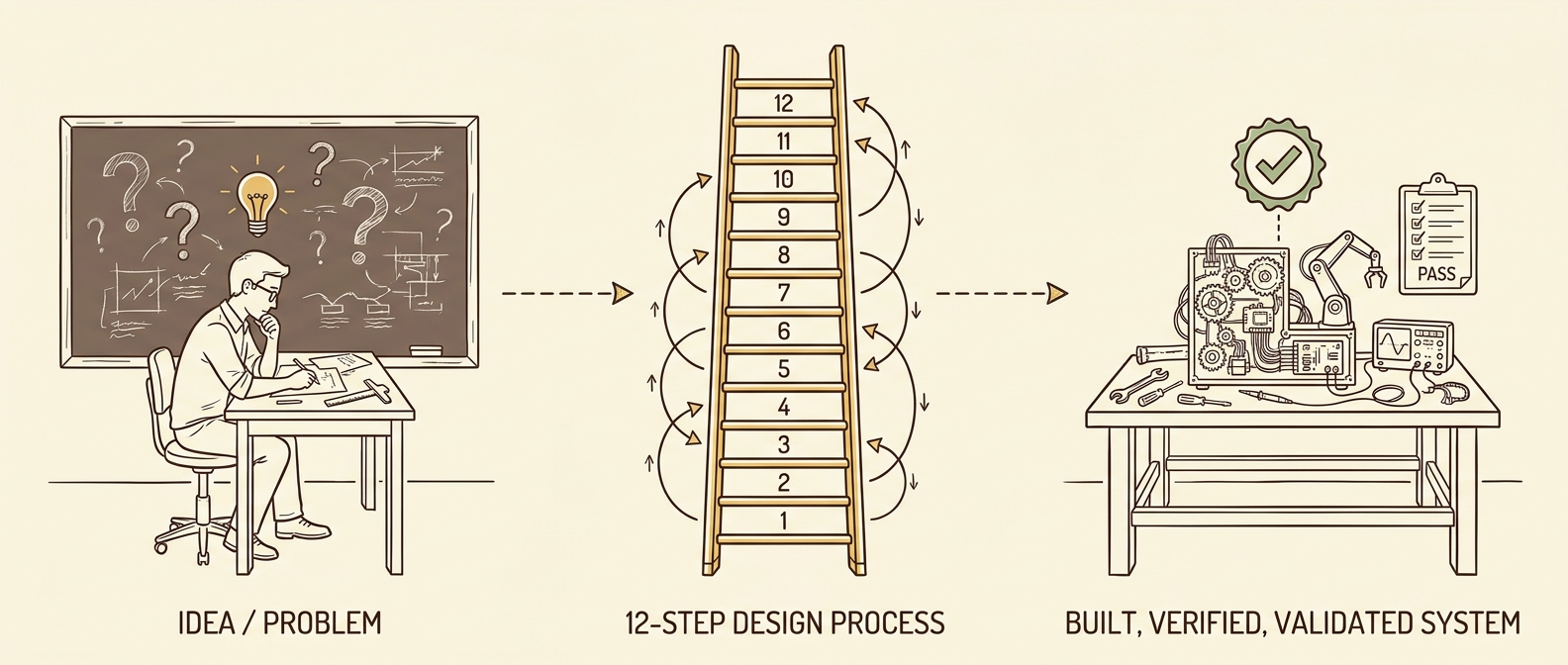
Three-stage flow: Idea / Problem → 12-Step Design Process → Built, Verified, Validated System
  • Provides one method for transforming an idea or problem into a build-able, testable, and improvable design.
  • Provides a Systems Engineering (SE) Lifecycle approach that includes the best methods for design (e.g., Axiomatic Design, Use Cases, System Boundary, FMEA, DFX techniques).
  • Provides a common language (the System Design Language) to ensure consistency in how designers describe the problem and solution domains.
  • Recognizes that design is NOT linear12-Step Collective System Design requires re-design as you learn more.
Flame Model of a System
DIAGNOSIS
Starts with the Work and the 5 Whys at each layer of the flame — tracing symptoms inward to root cause.
DESIGN
Starts with the Tone and works its way "out of the flame" — from mindset to thinking to structure to work.

Work: Implemented with Standard Work.

Structure: Defines the operation of the system.

Thinking: Establishes the logical design of the system.

Tone: Perspective — a team consciously establishes and evaluates its attitude, mindset, and spirit toward problem solving.
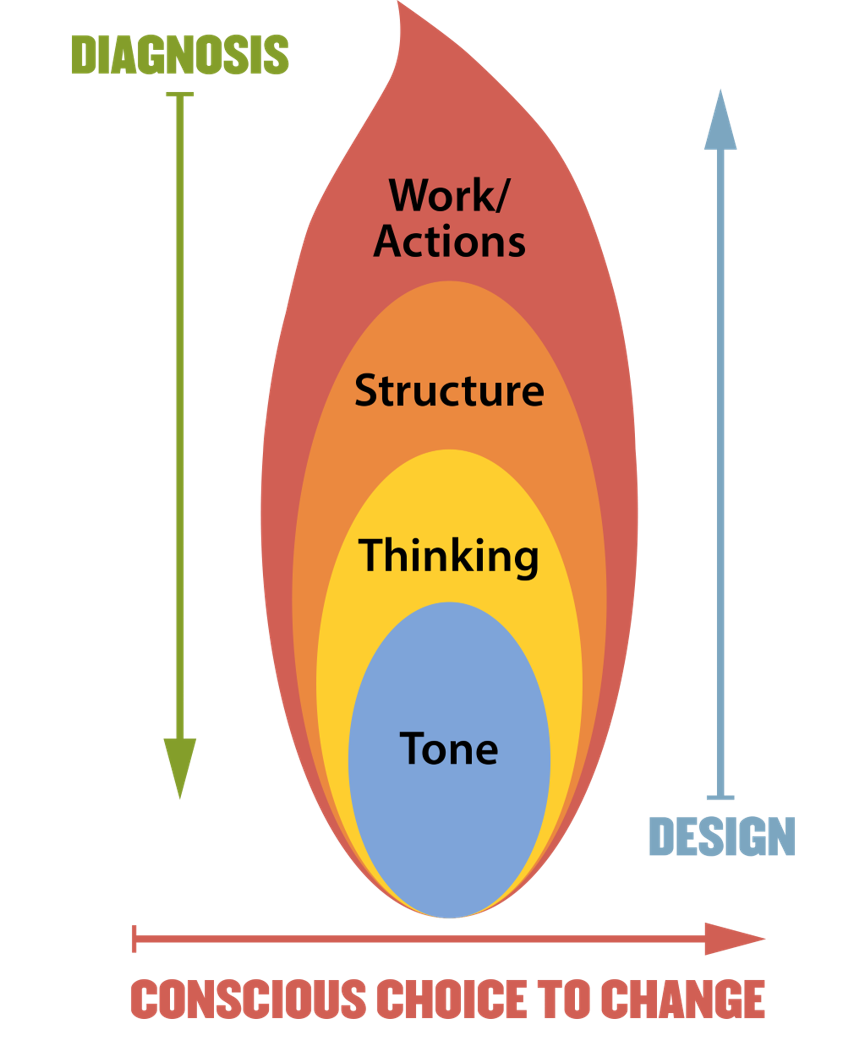
Flame Model of a System diagram

Reference: Cochran, D. S. (2010). "Enterprise Engineering, Creating Sustainable Systems with Collective System Design – Part II," The Journal of Reliability, Maintainability, Supportability in Systems Engineering, Spring Journal. pp. 16–21.

Key Points
  • Poorly designed systems fail people — people are NOT the cause of system failures.
  • The goal is collective agreement on the design — not a "perfect" design in your eyes.
  • A well-functioning team comes first; only then can you reach a buildable, testable, and improvable solution.
  • All four aspects of a system must work together.
The Engineer's Tone

As a Professional Engineer, I dedicate my professional knowledge to the advancement and betterment of public health, safety, and welfare.

I pledge:

  • To give the utmost of performance;
  • To participate in none but honest enterprise;
  • To live and work according to the highest standards of professional conduct;
  • To place service before profit, the honor and standing of my profession before personal advantage, and the public welfare above all other considerations.

In humility, I make this pledge.

Reference: Engineers' Creed. National Society of Professional Engineers. Retrieved July 24, 2025, from nspe.org/career-growth/ethics/more-ethics-resources/engineers-creed

Note the phrase: "In humility, I make this pledge."

Having humility as an engineer means:

  • Recognize that you do not have all of the answers.
  • Freely admit when you do not know something and search for an answer. Ask questions!
  • Recognize that someone else knows more than you about solving the problem — you could learn a lot from them.
  • Embrace failure as a wonderful opportunity to learn something that you did not know.
Flame Model of a System diagram

Collective System Design — Diagnosis to Design Process
The Foundations of CSD
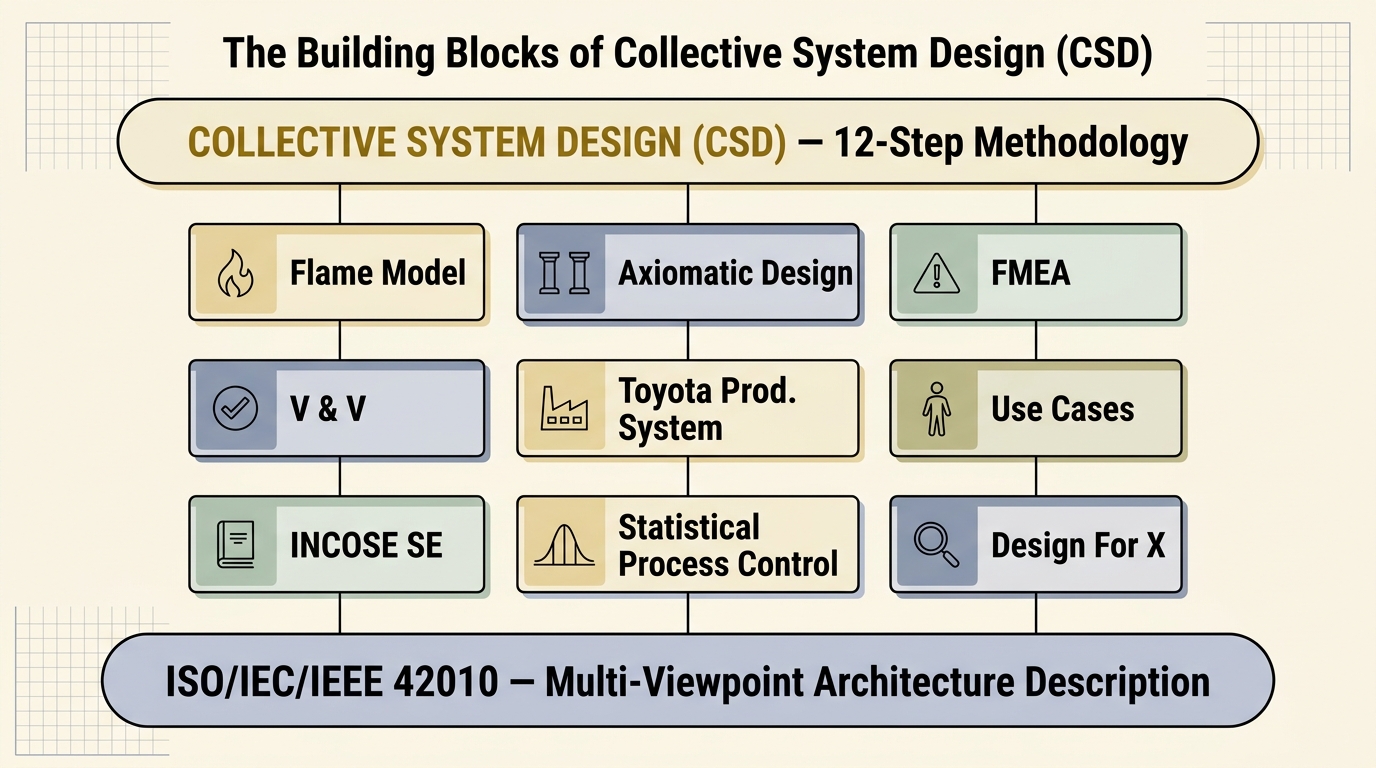
Building Blocks
ISO/IEC/IEEE 42010 establishes the foundational principle that a complex system cannot be understood from a single perspective. Collective System Design (CSD) is built on multiple complementary viewpoints — each discipline below contributes a viewpoint we use across the 12 steps.
Building Blocks of CSD — layered diagram with 42010 foundation, 9 viewpoints (Flame Model, Axiomatic Design, FMEA, V&V, Toyota Production System, Use Cases, INCOSE SE, Statistical Process Control, Design For X), and CSD 12-Step Methodology at top
Each block shown is covered briefly in this section (Foundations of CSD) and used throughout the 12 Steps.
Key Points
  • CSD is not a single technique — it's a synthesis of multiple disciplines, each contributing a viewpoint.
  • 42010 is the meta-framework: it tells us a system needs multiple viewpoints to be fully understood.
  • Every Step in this deck draws on one or more of these blocks — e.g., Step 4 leans on Axiomatic Design; Step 5 on FMEA; Steps 8–9 on V&V; Step 11 on the Toyota Production System.
The Foundations of CSD
ISO/IEC/IEEE 42010

ISO/IEC/IEEE 42010 is the international standard for architecture description of systems and software. It introduced the foundational idea that a complex system cannot be understood from a single perspective — instead, the system is described through multiple viewpoints, each capturing the concerns of a specific stakeholder.

An architecture description per the standard consists of:

  • Stakeholders — the people with interests in the system.
  • Concerns — what each stakeholder cares about (cost, safety, maintainability, performance, lifecycle).
  • Viewpoints — the conventions used to construct a particular kind of view.
  • Views — the actual representation of the system from a specific viewpoint.
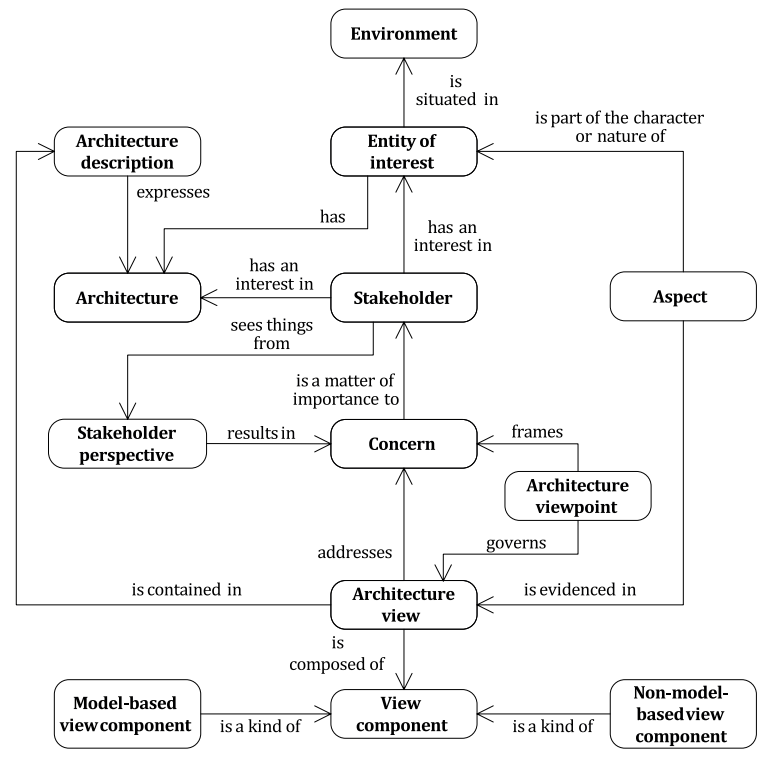
Why it matters for CSD: the idea that a system must be described through multiple viewpoints — functional, structural, behavioral, lifecycle — comes directly from 42010. CSD's emphasis on the FR (functional view), the PS (physical view), and decomposition across structure, behavior, footprint, interface, and lifecycle rests on this multi-viewpoint foundation.
ISO/IEC/IEEE 42010 conceptual model — Environment, Entity of Interest, Architecture, Architecture Description, Stakeholder, Concern, Architecture Viewpoint, Architecture View, View Component

Reference: ISO/IEC/IEEE 42010 — Figure A.1, Conceptual model of an architecture description.

The Foundations of CSD
ISO/IEC/IEEE 42010-2011

Published in 2011 as the first jointly-issued ISO/IEC/IEEE standard, 42010 unified two earlier documents (IEEE 1471:2000 and ISO/IEC 42010:2007) into one architecture-description framework. It established the vocabulary the systems-engineering community still uses today.

  • System-of-interest — the entity whose architecture is being described.
  • Stakeholder — an individual / team / organization with an interest in the system.
  • Concern — what a stakeholder cares about (cost, safety, performance, lifecycle).
  • Architecture viewpoint — conventions for constructing one kind of view.
  • Architecture view — the actual representation built from a viewpoint.
  • Architecture model — one component inside a view (a diagram, a table).
  • Correspondence rule — a stated relationship between elements across views.
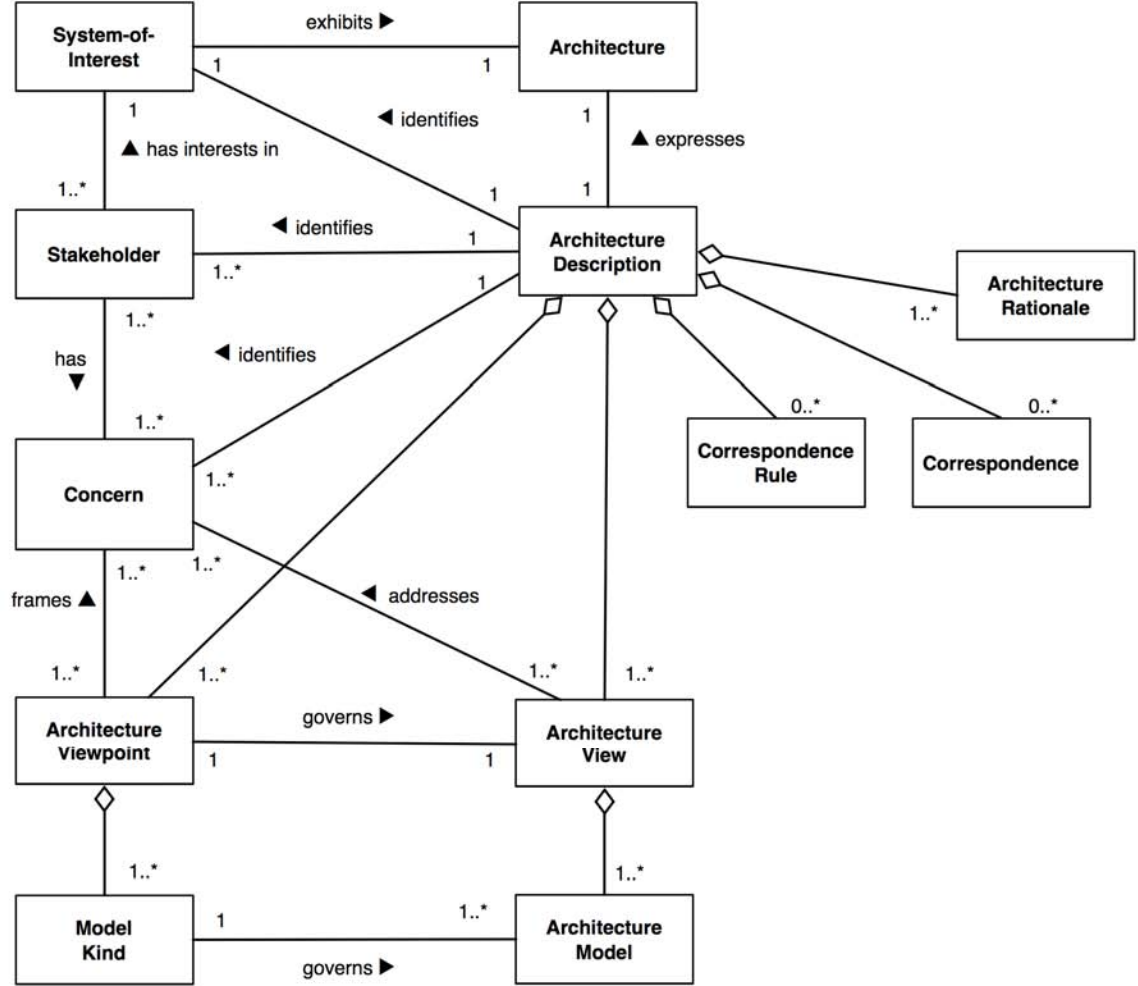
The big idea: a system's architecture cannot be captured in one drawing. It is a set of views, each governed by a viewpoint that addresses a stakeholder's concern.
ISO/IEC/IEEE 42010-2011 conceptual model — System-of-Interest, Stakeholder, Concern, Architecture, Architecture Description, Architecture Viewpoint, Architecture View, Model Kind, Architecture Model, Correspondence, Correspondence Rule, Architecture Rationale

Reference: ISO/IEC/IEEE 42010-2011 — Conceptual model of an architecture description.

Why we still teach 2011: the original framework is the simplest, cleanest version. Once students grasp stakeholder → concern → viewpoint → view, the 2022 additions (decisions and rationale) are easy extensions.
The Foundations of CSD
MBSE Part 1

MBSE is the formalized application of modeling to support system requirements, design, analysis, verification, and validation throughout the lifecycle. It replaces the document-centric tradition (Word + Excel + Visio handoffs) with an integrated model as the authoritative source of truth.

DOCUMENT-BASED
Requirements in Word, architecture in Visio, traceability in Excel. Sync drift is constant — each artifact tells its own story.
MODEL-BASED
One integrated model with formal relationships. Diagrams, requirements, and traces are views of the same underlying data.
  • Consistency — one source of truth eliminates document-sync drift.
  • Traceability — FRs ↔ PSs ↔ verification cases linked in the model itself.
  • Analyzability — models can be queried and simulated; documents cannot.
  • Communication — views generated from one model speak the same language across teams.
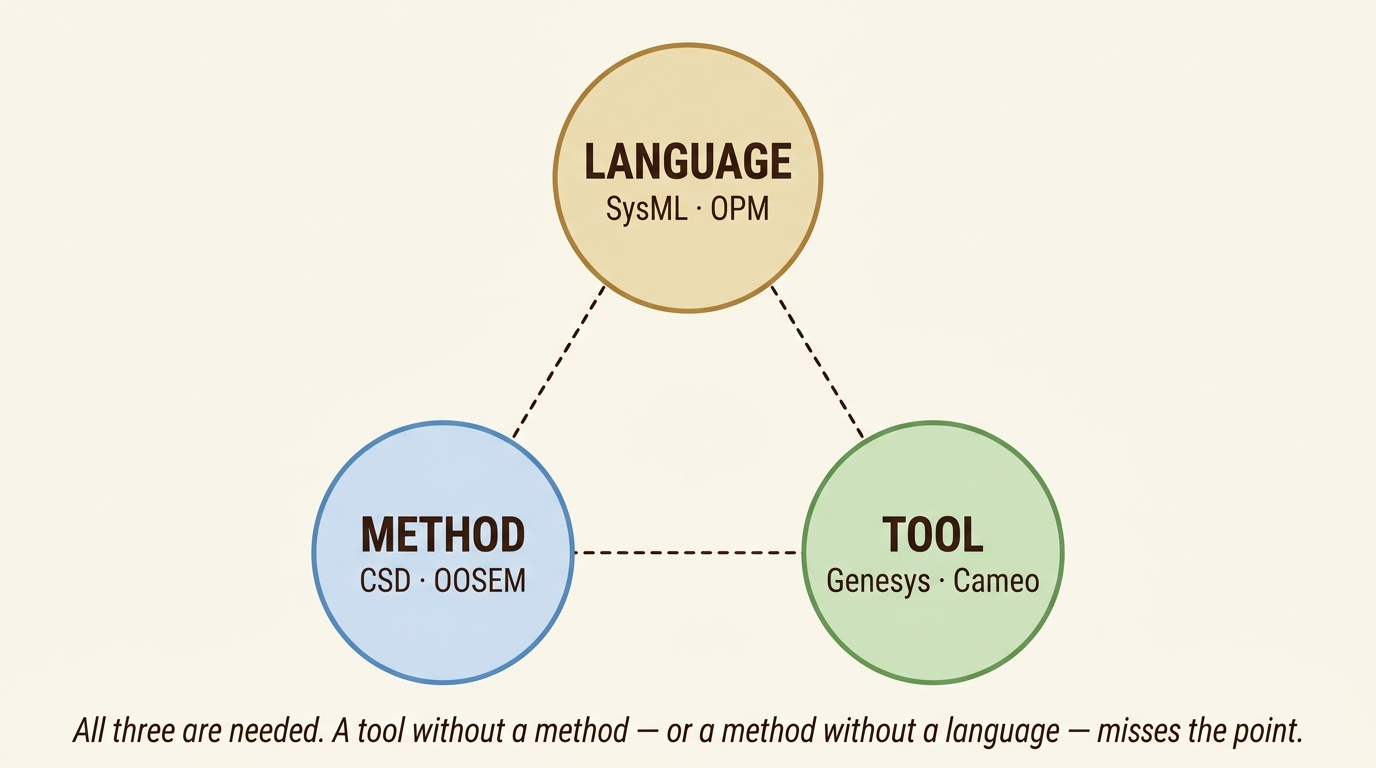
MBSE rests on three pillars: Language (SysML, OPM), Method (CSD, OOSEM), and Tool (Genesys, Cameo)
Acronyms & Terms
MBSEModel-Based Systems Engineering. Modeling-driven approach to SE across the full lifecycle.
SysMLSystems Modeling Language. Standard graphical language (OMG-maintained) for specifying, designing, and verifying systems.
OPMObject-Process Methodology. Alternative MBSE language combining function, structure, and behavior in one diagram type.
OOSEMObject-Oriented Systems Engineering Method. INCOSE-developed top-down SysML-based method.
CSDCollective System Design. The 12-step method this primer teaches.
Genesys — MBSE authoring tool from Zuken / Vitech with a schema-driven repository (the tool we use).
CameoCameo Systems Modeler, a SysML-based MBSE tool (now part of Dassault Magic Systems of Systems Architect).
Connection to CSD: the 12-step process IS a method. Pair it with a language (FR / FRm / PS-ALT) and a tool (Genesys MBSE), and you have a working MBSE practice.
The Foundations of CSD
MBSE Part 2

MBSE tools don't know what a "Functional Requirement" is — they know typed entities and typed relationships. Plug in a meta-model (a schema that names the entity types and how they connect) and the tool can host any methodology that conforms. CSD already has one — the Information Architecture section defines every entity and relationship CSD uses.
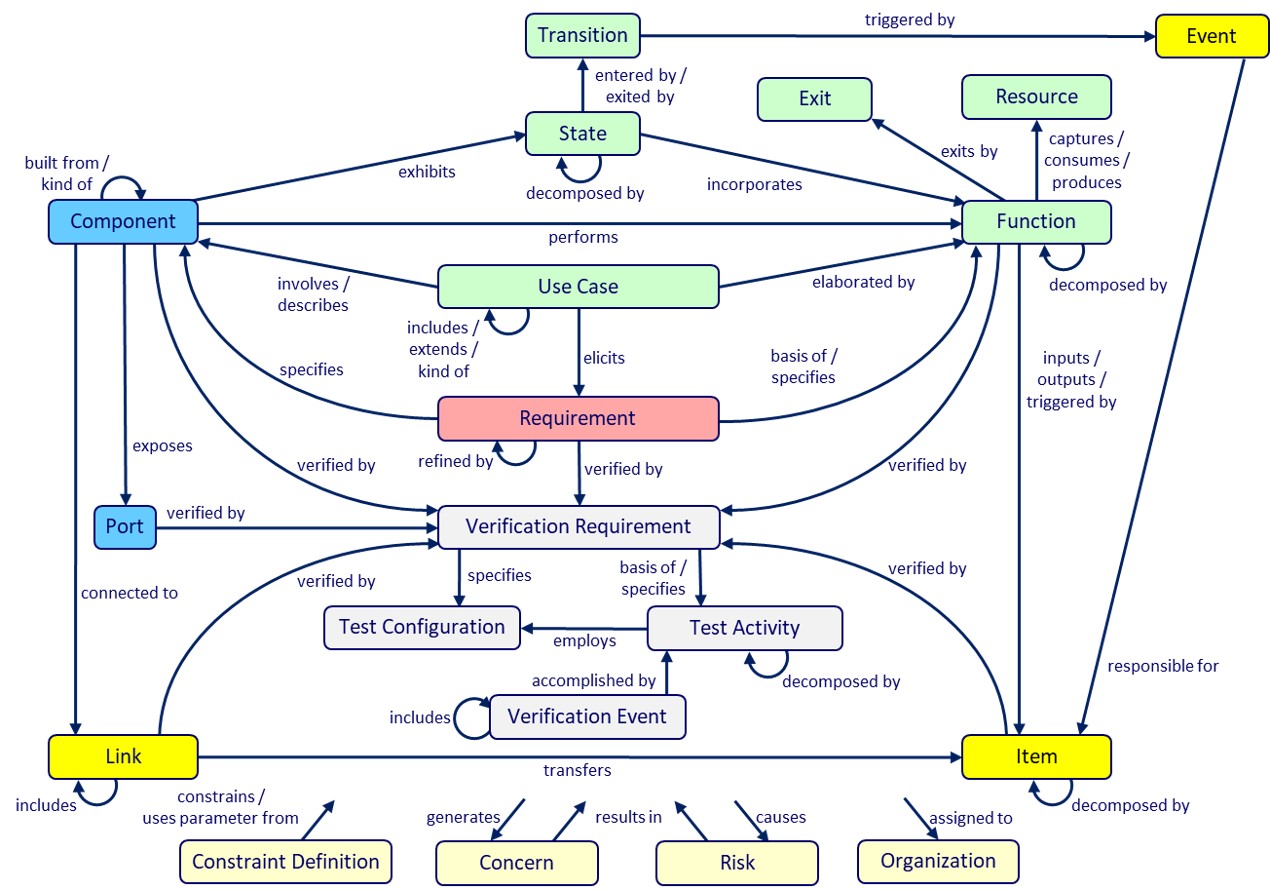
The bridge: CSD's information model defines what exists and how it relates. Genesys's schema enforces what may exist and how it must relate. When the two align, the tool becomes a CSD authoring environment.
Genesys MBSE information model — Component, Function, State, Use Case, Requirement, Verification Requirement, Test Configuration, Test Activity, Verification Event, Resource, Event, Item, Link, Port, Constraint Definition, Concern, Risk, Organization, Transition — with named relationships
Every entity is typed. Every relationship is named. The graph IS the meta-model. Reference: Vitech / Zuken Genesys MBSE schema.
The payoff: because the meta-model is formal, an MBSE tool like Genesys can enforce it. Orphan FRs, dangling PSs, unverified Functions, and Failures with no Mitigation become schema violations — the tool flags them automatically.
Axiomatic Design
What is Axiomatic Design?
Axiomatic Design is a design approach used to ensure that the resulting design (system) is both functional and process capable.1 The methodology uses two axioms to guide the design process — the Independence Axiom guides the decomposition of the design, while the Information Axiom gives a method to ensure the most capable design is chosen.
Design Axiom 1 — The Independence Axiom
Maintain the independence of the Functional Requirements (FRs).
Design Axiom 2 — The Information Axiom
Minimize the information content of the design.
1 Suh, N. P. (2001). Axiomatic Design: Advances and Applications. Oxford University Press.
CUSTOMER
{CNs}
Customer Needs
What does the customer want?
"Quiet ride," "easy to clean," "lasts 10 years"
map
FUNCTIONAL
{FRs}
Functional Requirements
What must it do?
"Maintain interior noise"
{FRms}
FR Measures (How Well)
How well must it do it?
"< 65 dBA @ 60 mph"
map
PHYSICAL
{PSs}
Physical Solutions (DPs)
How is it physically built?
"Triple-laminated glass + hydraulic damper"
map
PROCESS
{PVs}
Process Variables
How is it manufactured?
"Lamination temp 135°C, cure time 22 min"
Why it matters: design proceeds left→right through the domains. The Independence Axiom applies to the FR→PS mapping — choices in one domain must not break independence in the previous one.
Axiomatic Design
Axiom 1
Design Axiom 1 · The Independence Axiom
Maintain the independence
of the Functional Requirements (FRs).
Why "Maintain"

FRs are independent to start with — each describes a distinct function the system must perform.

The designer introduces coupling through the choice of physical solution. A poorly chosen PS lets one decision affect multiple FRs at once — those unintended interactions break independence.

Axiom 1's job isn't to make FRs independent. It's to preserve the independence they already have.
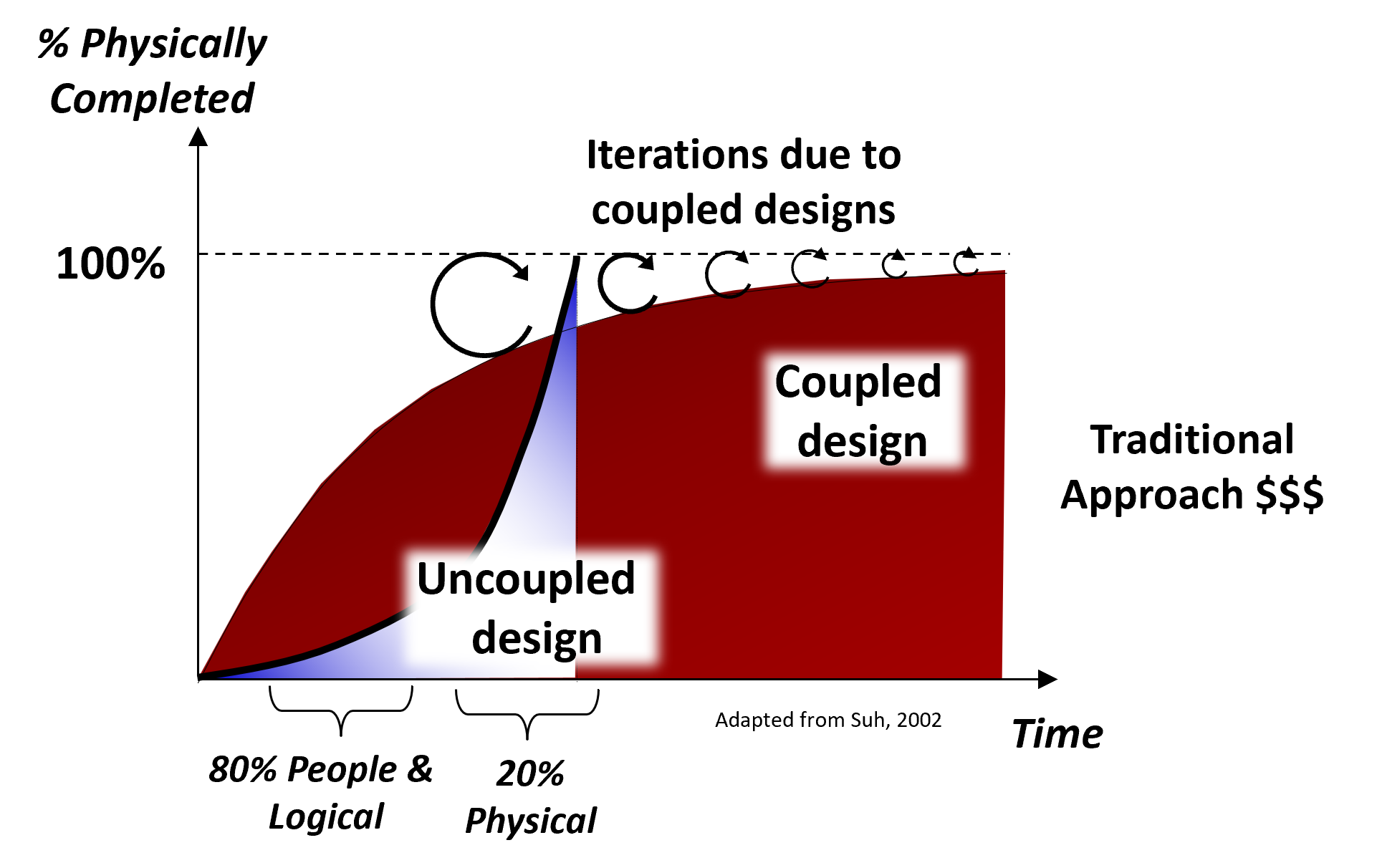
Time vs. percent-completed curves; uncoupled designs converge directly while coupled designs require many iterations
Coupled designs require costly iteration; uncoupled designs converge directly. (Adapted from Suh, 2002.)
Why it matters · coupled designs require iteration after iteration. Choosing physical solutions that keep the FR × PS mapping diagonal preserves independence and lets each FR be tuned without touching the others.
Axiomatic Design
Axiom 2
Design Axiom 2 · The Information Axiom
Minimize the information content
of the design.
Information Content (Ii)

Defined in terms of the probability of success (Pi) of satisfying FRi with PSi.2 Pi is the probability that the outcome falls within the Common Range (CR) — the overlap between the Design Range and the System Range (SR).

Ii = log2(1 / Pi)
where
Pi = P(CR / SR)
thus
Ii = log2(SR / CR)
2 Suh, N. P. (2001). Axiomatic Design: Advances and Applications. Oxford University Press.
DESIGN RANGE System Range Common Range FRm value
Probability density function — System Range overlaps Design Range to form the Common Range
Why it matters · a smaller Ii means the System Range fits more snugly inside the Design Range — the design more reliably hits its target. Among competing solutions that all satisfy Axiom 1, choose the one with the lowest information content.
The Foundations of CSD
Shingo

Shigeo Shingo (1909–1990) was the Japanese industrial engineer whose work with Toyota turned the Toyota Production System into something teachable. While Ohno owned the system view, Shingo made it operational — he showed how to design each operation so the system functions as intended. CSD inherits two ideas directly from him: functions before solutions, and error-proof at the source.

SMED
Single-Minute Exchange of Die — a structured method to reduce changeover time.
Separate internal setup (machine stopped) from external setup (machine running). Convert internal → external. Eliminate adjustments.
CSD link: small batches & flow are only feasible when changeover is short. SMED makes the FR "produce in customer-pull quantities" achievable.
POKA-YOKE
Mistake-proofing — design the operation so the defect cannot occur.
USB connector that only fits one way. Gas-pump nozzle that won't enter a diesel filler. Surgical-tray count built in.
CSD link: Step 5 FMEA asks "what failure modes does this PS introduce?" Poka-yoke is the preferred mitigation — design the failure out, don't inspect for it.
SOURCE INSPECTION
Detect at the cause, not the symptom. Catch the condition that creates a defect before the defect exists.
Stop the press if the sheet is misaligned. Don't measure the resulting bad part — that's already too late.
CSD link: verification (Step 8) lives at the FRm level — we measure the function, not the artifact. Catch the cause, not the consequence.
Op A Op B Op C unit PROCESS (horizontal) — flow of the unit through operations Op B OPERATION (vertical) — worker / machine action AT a station
Shingo named these axes explicitly: the horizontal axis is the process (material flowing through operations) and the vertical axis is the operation (work performed at a station). His rule: improve the process before improving the operation. Speeding up Op B without smoothing the flow just builds inventory in front of Op C — the same trap CSD names in "Salt Water PSs."
The throughline to CSD: Shingo treats every operation as a function-first question. "What is this operation supposed to achieve?" Once the function is named, the failure modes — and the poka-yoke that prevents them — become obvious.
Reference: Shingo, S. A Study of the Toyota Production System from an Industrial Engineering Viewpoint (Productivity Press, 1989).
The Foundations of CSD
Fresh Water — The Concept
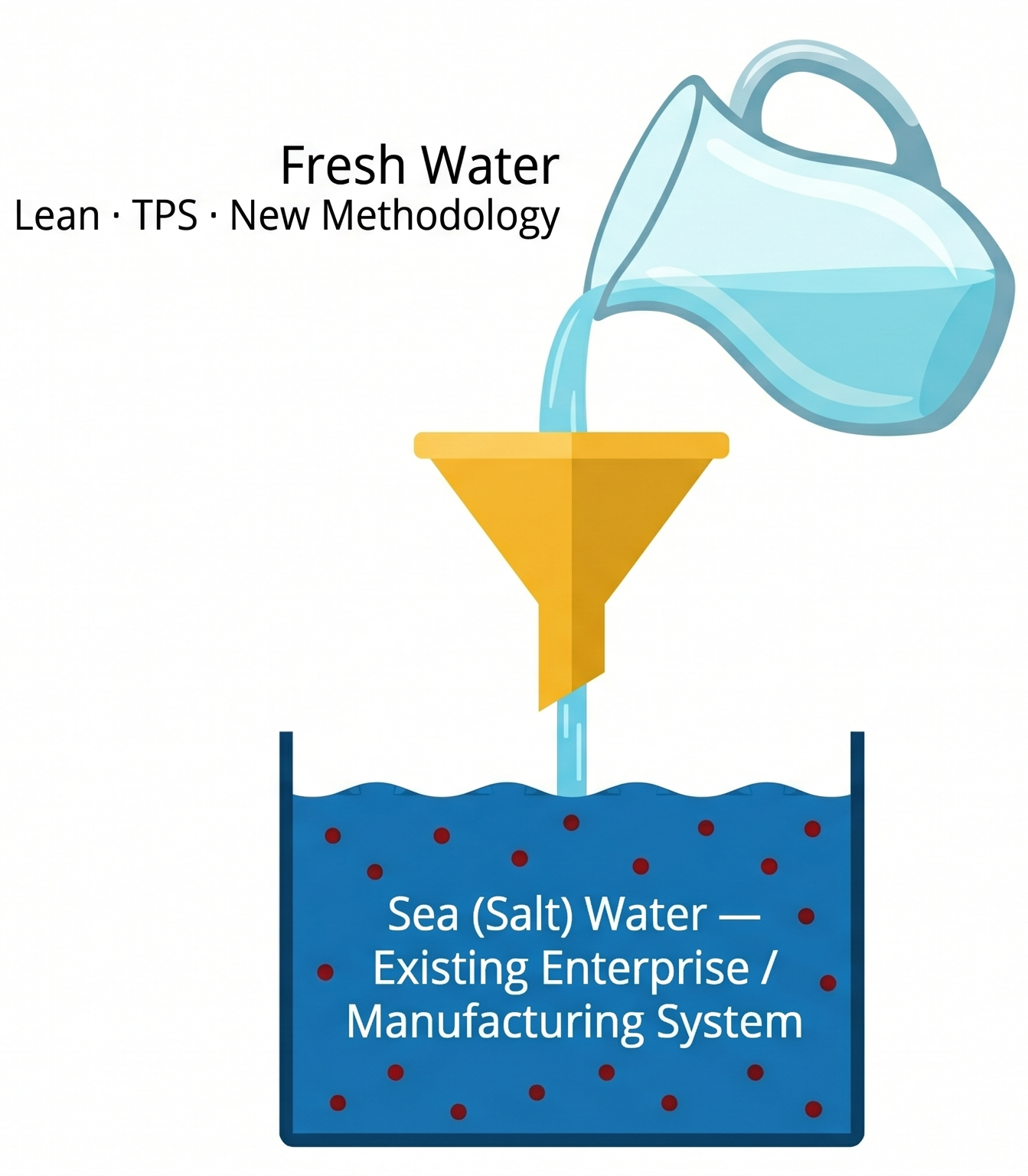
The Goal: achieve all FRs with the least resources, without compromise. The Manufacturing System Design (MSD) framework names seven such FRs — the fresh-water alternative to optimizing single operations.
Fresh Water (Lean / TPS / New Methodology) being poured through a funnel into a tank of Sea (Salt) Water — the Existing Enterprise / Manufacturing System

We fail because we try to pour fresh water (the new system) into the old system (salt water) — and we're left with salt water.

We have to build a container — a term coined by David Kantor and William Isaacs in their work on dialogue — to hold the new system design.

The old system is the one driven by unit cost of an operation instead of achieving the functions of the system well.

Key Points
  • The collective agreement of an FR is the foundation of system change — if the team can't name the FR, they can't achieve it.
  • The challenge to implementing systems change within an organization is building a team comfortable working together without fear of negatively impacting their careers — Kantor and Isaacs call this a "container" at the most fundamental level.
  • Without the container, the new methodology (fresh water) gets diluted by the existing culture (salt water). Without the FRs, the design degrades.
Collective System Design (CSD) Language
Information Architecture
Term Definition
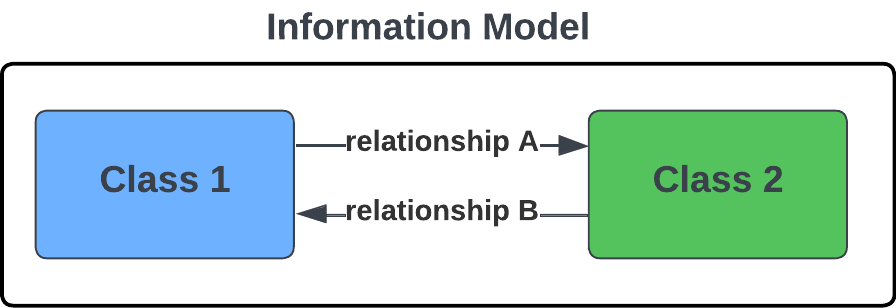
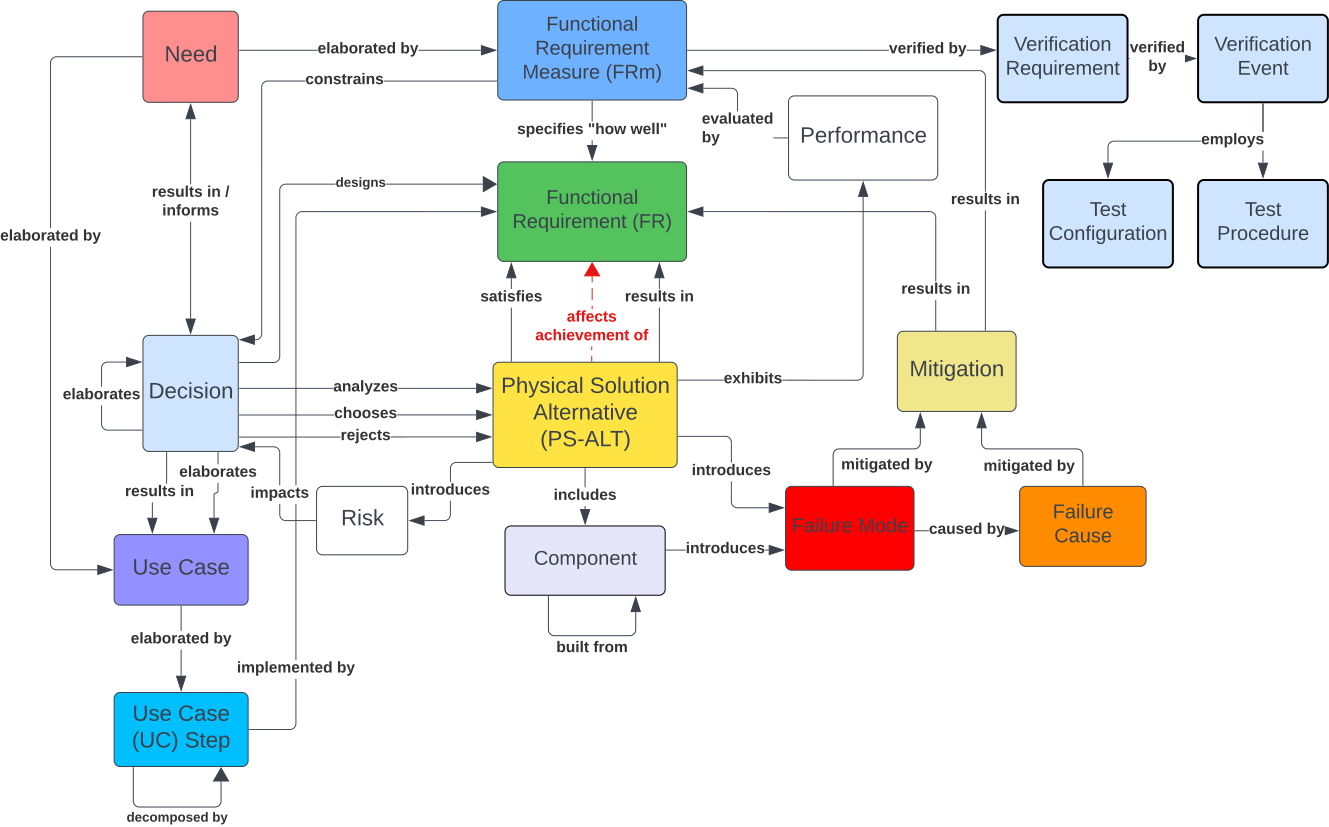
Collective System Design Language A language that consists of predefined classes and relationships to classify and relate information relative to a design.
Information Model (Meta Model) A graphical representation of the classes of information and the relationships between the classes that form a System Design Language.
Information "Class" A category or type of information. For example: Need, Functional Requirement, Physical Solution, Failure Mode.
Information "Relationship" A defined connection between two classes of information. The connection implies that one class has an impact or interaction with the other. Relationships are bidirectional and can be read in either direction (e.g., X "elaborates" Y, Y is "elaborated by" X).
Information Model example: two Classes connected by labeled bidirectional Relationships
Collective System Design (CSD) Language
Information Model
Collective System Design Language — Full Information Model
Collective System Design (CSD) Language
FR — FRm — PS-ALT
FR — FRm — PS-ALT
Term Abbr. Definition
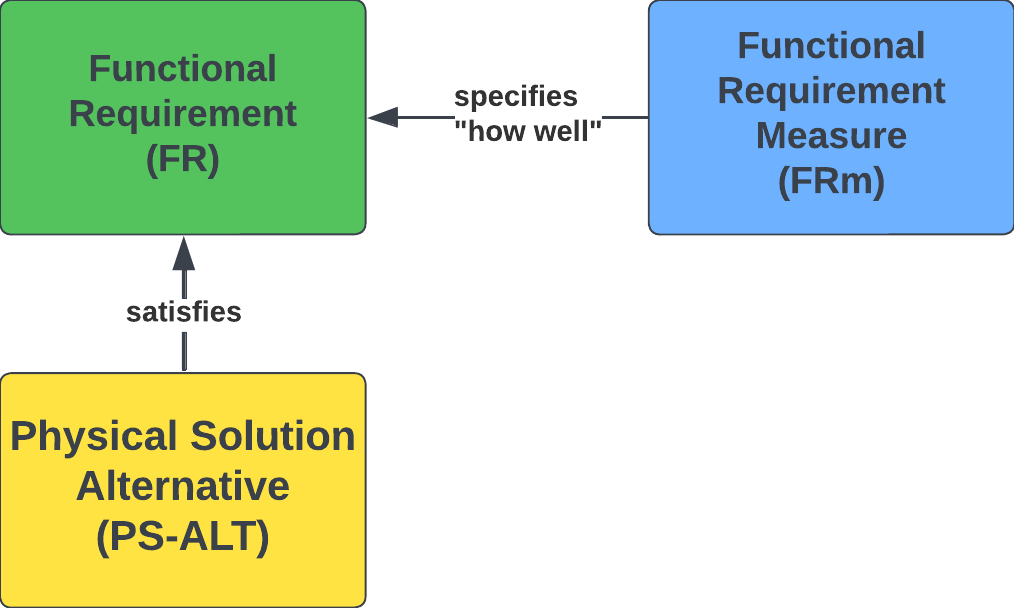
Functional Requirement FR "What" must be achieved. An FR represents a required function of the product / system / service.
Functional Requirement Measure FRm A performance measure that defines "how well" an FR is achieved. Each FRm includes a Threshold (acceptable performance) and a Goal (desired ultimate performance).
Physical Solution Alternative PS-ALT "How" the design (product / system / service) will achieve a stated FR.
FR — FRm — PS-ALT relationships diagram

The diagram below shows how a design relationship is formatted for use in a design decomposition — the FR and its FRm (with threshold) are stacked together, and the PS-ALT(s) that satisfy the FR sit beneath.
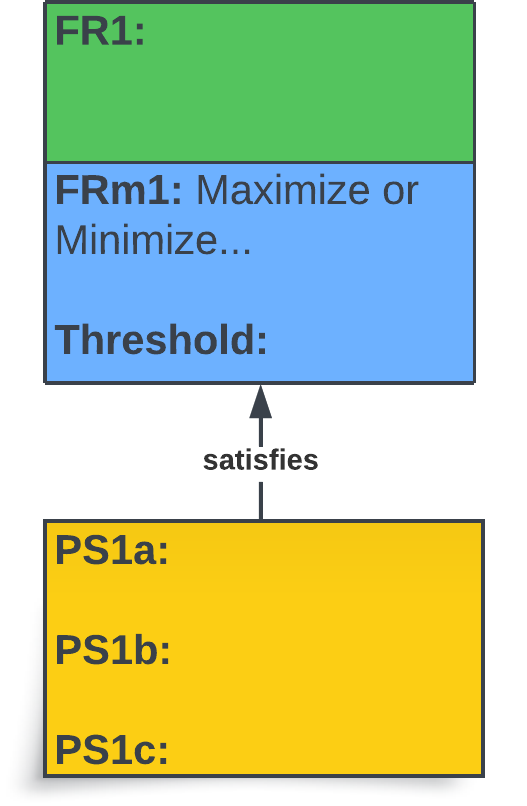
Design relationship formatted for a design decomposition (FR / FRm / PS-ALT stack)
Collective System Design (CSD) Language
Use Case — Use Case Step — FR
Term Abbr. Definition
Use Case UC A scenario for which the design in question will be used.
Use Case Step UC.ST A step (task / function) performed during a Use Case. The steps the customer and system take together to achieve the desired outcome.
Functional Requirement FR "What" must be achieved — a required function of the product / system / service.
Key insight: Functional Requirements (FRs) are derived from the customer's interaction with the system, step-by-step. Walking through each Use Case Step — what the customer does and what the system must do in response — surfaces the functions the design must deliver.
Use Case — elaborated by — Use Case Step — implemented by — Functional Requirement

“We don't know the functions if we don't know how we're going to use the product or service.”

Collective System Design (CSD) Language
PS-ALT — Failure — Cause — Mitigation
PS-ALT — Failure Mode — Failure Cause — Mitigation
Term Abbr. Definition
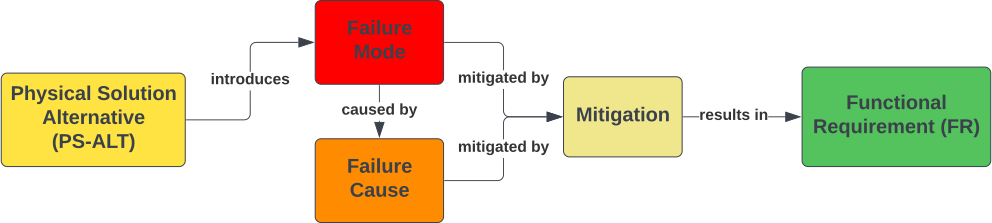
Failure Mode FM A way in which the design or process could fail.
Failure Cause FC The cause of a particular Failure Mode.
Mitigation M The means to prevent a Failure Cause (prevention), or to reduce the impact of a Failure Mode (detection).
Key insight: A designer chooses a PS-ALT — The PS-ALT introduces a Failure Mode. As soon as a PS is chosen, the designer should immediately ask: "How could this PS fail?"
PS-ALT introduces Failure Mode (caused by Failure Cause), mitigated by Mitigation, results in Functional Requirement

“The Designer's Selection of a Physical Solution Introduces Failure.”

List of Questions
Capture everything you are uncertain about as the design unfolds — assumptions to confirm, gaps to fill, decisions still open. Each question is directed at the person best positioned to answer:
A designer at the center surrounded by five question sources — Customer, SME, Stakeholder, Project Advisor, Yourself — each with a speech-bubble question mark
List of Questions
Question Who should answer the question? From Step Answer Name + Email of the person who provided the answer OR Cited Reference Date Answered
How much is the customer willing to spend? Potential customer(s) 1.6 $85 Sarah Smith — SSmith@loa.com 2026-04-12
What type of fittings are standard to residential faucet installations? Design Team 2.6 – 2.7 3/8" compression on faucet, 1/2" female NPT on supply Luxuryhome. (2024, October 29). Understanding Faucet Supply Line Sizes: Essential Guide. Luxuryhome Faucet Manufacturer. https://www.luxuryhomefaucet.com/faucet-supply-line-sizes/ 2026-04-15
Key Points
  • Ask questions without fear — the only bad question is one that is not asked.
  • Always write down the name of the person who answered, the answer given, and the date — the log is the audit trail behind every design decision.
Parking Lot
  1. The parking lot is tracking what you know (or your ideas) about the design, but you may be unsure where to document the information right now. Brainstorm and generate as many ideas as possible — and classify them according to the information class in the Parking Lot.
  2. Remove information from the parking lot once it finds its home in the design. The parking lot is tracking what has not yet been incorporated into the design.
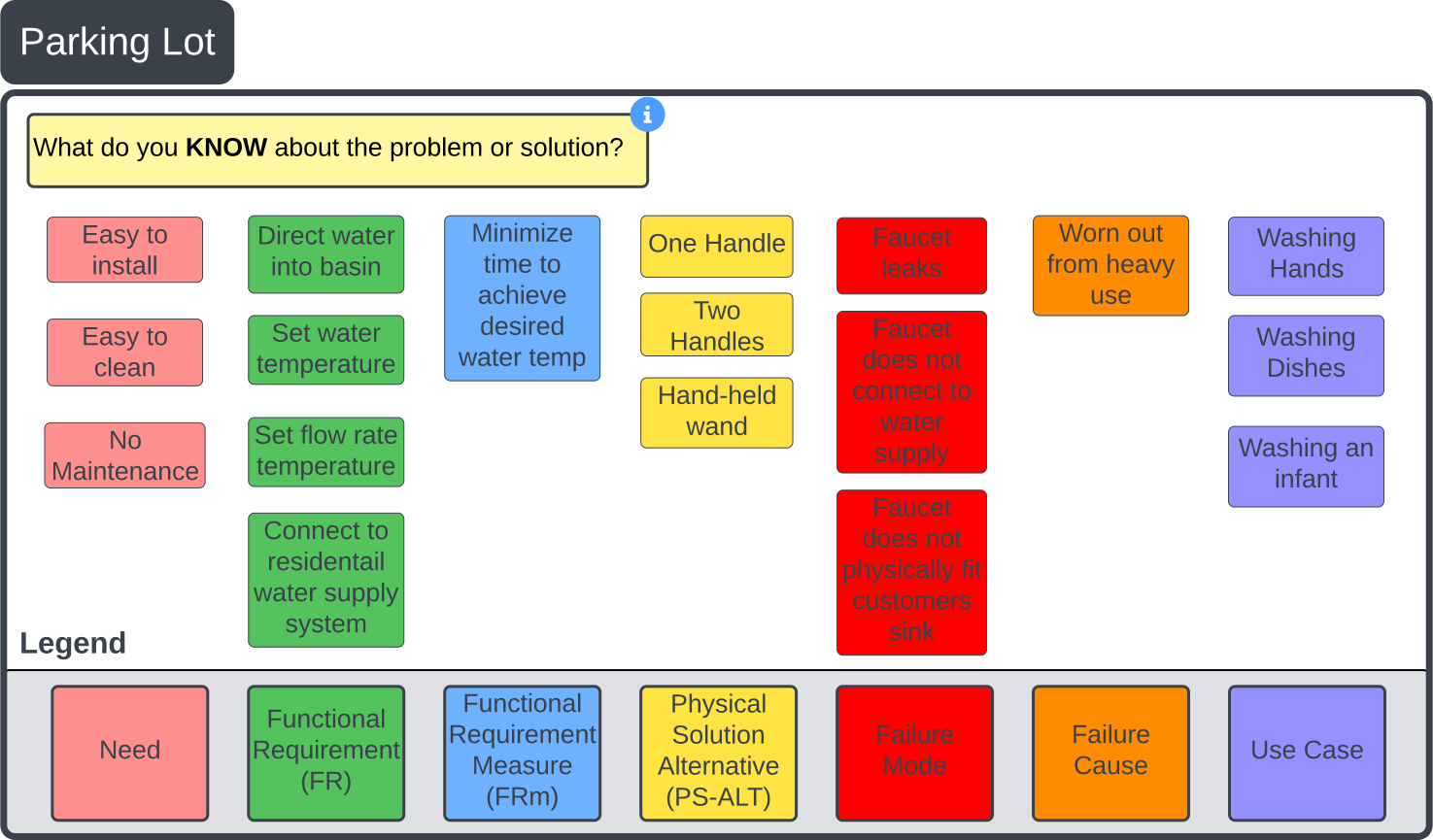
Parking Lot example
Lucid Templates
Full Lucid template — Parking Lot and List of Questions at the top, Steps 1 through 12 stacked vertically below
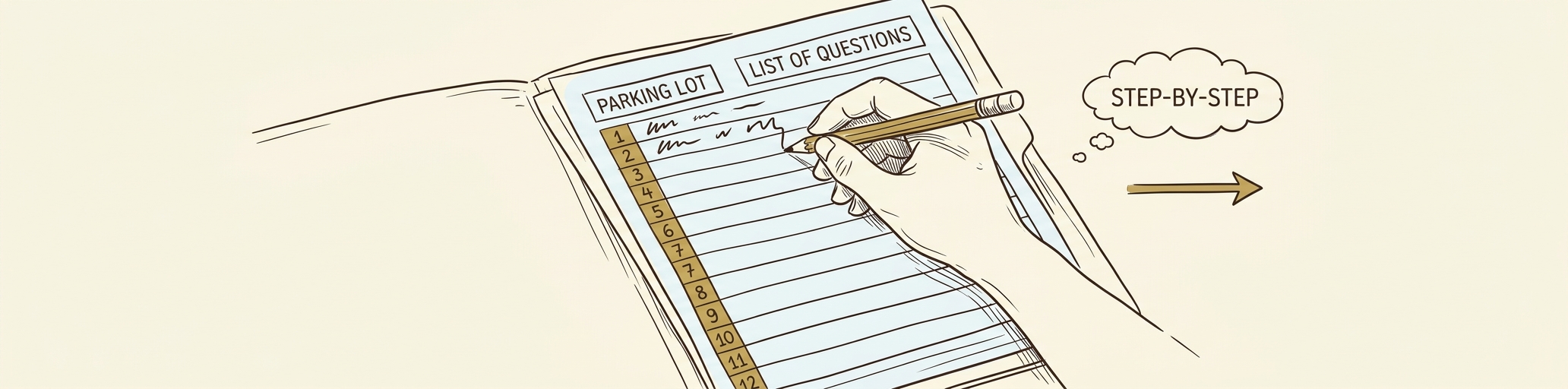
A hand with a pencil mid-stroke, filling in the first row of an open 12-section worksheet template — Parking Lot and List of Questions at the top, sections 1 through 12 stacked down the side — with a 'step-by-step' thought bubble
Every worksheet, table, and diagram referenced in this deck lives in one Lucid template. Copy it once, then fill it in as you walk Steps 1→12.
Template Layout (Top → Bottom)
At the top
Parking Lot
List of Questions
Then Steps 1 → 12
1 Project Intro & Background
7 Design For X (DFX)
2 Problem Statement
8 Verification Plan
3 Conceptual Alternatives
9 Validation Plan
4 Decomposition
10 Build Plan
5 FMEA
11 Standard Work
6 Detailed Design + BOM
12 V&V + Final Cost
Define (1–3) Design (4–7) Verify & Validate (8–9) Build & Close (10–12)
Prep / Prework
Setting Up Your Lucid Account
Lucidchart logo

Joe Smith (smitjj09@pfw.edu) handles your Lucid setup. You don't need to create your own account — Joe does these two things for you:

1 — SET UP YOUR LUCID ACCOUNT
Joe creates your account. You'll receive an email asking you to reset your password to finish setting it up.
Heads up: the email often lands in your spam / junk folder. Check there if you don't see it in your inbox.
2 — SET UP YOUR 12-STEP TEMPLATE
Joe creates a Lucid 12-Step template for your team and sends invitations to each group member.
  • You'll receive an invitation email explaining you've been added.
  • The template appears under "Shared with Me" in Lucid.
Direct all setup questions to Joe.  smitjj09@pfw.edu
Password-reset link expired? Email Joe with the address tied to your Lucid account and ask for a fresh reset.
Tips and Tricks for Using the 12 Step Template in Lucid
Navigation, Editing, and Formatting Shortcuts
Action What It Does
Right Click + Hold Drag the mouse to center the screen on the desired content.
Mouse Wheel Scroll to zoom in and out on the content.
×2 Double-Click Edits "Grouped" content. After the double-click, you can click a 3rd time on the specific area you want to enter or edit text in.
Shift + Enter Advance to the next line when editing a shape or table cell. (Plain Enter still works for normal text boxes.)
Ctrl + Shift + V Paste content while retaining the formatting of the 12-Step Template.
Spacebar + Drag Pan around the canvas without selecting anything — faster than scroll bars on a busy page.
Ctrl + D Duplicate the selected shape, cell, or row — useful for adding more table rows or copying a card.
Nudge the selected shape by 1px. Hold Shift to nudge by 10px for finer-grain alignment.
Step 1 - Project Introduction and Background
Step 1.1

Who is on the design team? What is their background? What role will each member assume for this project?

1.1 — Team Members
Name Background Info. Contact Information
(Email and Phone)
Role
David Cochran PFW SE Center — Director, Professor of Systems Engineering dcochran@pfw.edu
(260) 481-XXXX
Project Lead
Joe Smith PFW SE Center — Associate Director smitjj09@pfw.edu
(260) 481-XXXX
Electrical Lead
Onkar Sonur PFW Student — Industrial Engineering Technology Major sonur01@pfw.edu
(XXX) XXX-XXXX
Manufacturing Lead
Key Points
  • Step 1 starts with people: capture name, background, and role for every team member.
  • Roles establish ownership early — each FR group will trace back to a Lead.
  • Leave the open row available; teams grow as scope expands.
Step 1 - Project Introduction and Background
Steps 1.2 & 1.3

What is the main problem you are going to solve?

Example answer

Our project is to design the next generation of residential water faucets to meet specified use cases. The solution will connect to existing residential water supply systems and deliver water to a basin.

When and what time will you meet with your project advisors?
Tuesdays at 4 pm
Who is your project sponsor and who will be your point of contact?
UC Inc. — Shahab Shah — shah@ucinc.com
When and how often will you meet with your customer / project sponsor?
Every other Thursday at 3 pm
Key Points
  • The Project Description clarifies in one or two sentences the problem that the project solves.
  • Lock in cadence with both advisors and the sponsor/customer at the start; recurring meetings keep the project from drifting.
  • Capture the sponsor's named point of contact and email — ambiguity here causes scope and approval delays.
Collective System Design (CSD) Language
CSD Language
Why this refresher first? Step 1.4 (next slide) will ask you to label every given "requirement" by its class of informationNeed, FR, FRm, or PS-ALT. Those are the same foundational classes defined by the CSD Language. Use the four terms below — Function, FR, FRm, PS — as the lens to correctly classify what the customer, SME, stakeholder, or advisor gives you.
FUNCTION — what the system must do
via collective agreement
FRm
how well
FR
agreed-to function
PS
physical solution
  • Function — what the system must do.
  • Functional Requirement (FR) — the function the team agrees MUST be implemented for the design to be successful.
  • Functional Requirement Measure (FRm)how well the FR is achieved (can be more than one FRm per FR).
  • Physical Solution (PS) — what thing implements the FR.
  • The designer chooses the PS to achieve the FR — it is a decision.
Step 1 - Project Introduction and Background
Step 1.4

"Requirements" provided by a customer, a subject matter expert (SME), a stakeholder, a project advisor, or yourself are often a mixture of different classes of information. As the designer, it is essential that you understand and can organize the information you receive. You will use this information throughout the design process to ensure your solution meets the needs of your customer.

Step 1.4 — State any "requirements" you have been given and determine which class of information is the best fit. Sources include the customer, SMEs, stakeholders, project advisors, and yourself.

1.4 — Given "Requirements"
Stated "Requirement" Class of Information
(Need, FR, FRm, PS-ALT…)
Provided by
(name)
Must-have or nice-to-have? Why? Date Modified on
Must be made of titanium PS-ALT Joe Smith Maybe not — what is the FR? 4/1/2026 4/30/2026
Must accelerate from 0–100 km/h in less than 3 seconds FRm Joe Smith Clarify whether this metric is the threshold or the goal… 4/1/2026 4/30/2026
Hold liquid FR David Cochran Yes 4/1/2026
Energize circuit FR David Cochran Yes 4/1/2026 4/15/2026
Key Points
  • Question every requirement — especially the ones that look obvious. A stated "requirement" is often a hidden PS-ALT (a solution someone already has in mind). Keep asking "why?" until you reach the underlying function (the FR). The strongest designs come from challenging given requirements, not accepting them.
  • Customer "requirements" usually mix several classes of information — Needs, FRs, FRms, and PS-ALTs — sort each one before you act on it.
  • Refer to the glossary at the beginning of this document to better understand the CLASSES of information.
  • The Modified-on column is essential — requirements evolve as you talk to advisors and the customer.
Step 1 - Project Introduction and Background
Step 1.5
1.5 — Cost Considerations — Part 1
Estimated price that the Market will support $100
Desired profit $/unit $50
Required manufacturing cost/unit that the market will support $50
— OR —
How much is the client willing to pay for the solution? (i.e., the project budget) $2,400

Values shown are example answers. Part 2 (final-cost reconciliation) is completed in Step 12.

  1. Determine what your customer is willing to pay for your product / system / service. Base it on research of similar product offerings, or by talking to the customer to understand their budget.
  2. Determine your desired profit per unit. Make sure the amount is reasonable by understanding common profit margins for your particular product / system / service.
  3. Required manufacturing cost = Estimated price − Desired profit/unit. This is what it must cost to produce the product.
Key Points
  • As designers, we want to achieve a market-acceptable cost AND the design FRs without compromise.
  • This trade-off is the engineer's / system designer's central challenge — cost discipline cannot come at the expense of FRs.
  • Two valid framings: market price (consumer goods) or a fixed client budget (custom builds). Pick whichever applies to your project.
Step 1 - Project Introduction and Background
Step 1.6

Step 1.6 — What standards might your solution have to meet?

1.6 — Standards
Standard Description and Link to Standard
NSF/ANSI Standard 61 Faucets and plumbing products intended for contact with drinking water should be tested and certified to NSF/ANSI Standard 61: Drinking Water System Components. Link to Standard
Key Points
  • Standards are unique to the problem you are solving and the solution you are designing.
  • Your design choices will impact which standards ultimately apply — e.g., wireless communication vs. hard-wired changes the regulatory picture.
  • Capture the link to each standard up front so the team can verify exact requirements during Verification (Step 8).
Step 1 - Project Introduction and Background
Step 1.7

Step 1.7 — What safety concerns and responsibilities must you consider?

Concerns Description FR Introduced
Risk of scaldingFaucet unexpectedly emits hot water on user.Limit hot-water exposure to the user.
Risk of flooding the homeFaucet leaks from installation issues, wear and tear, regular use.Prevent water leakage from the faucet.
Growth of potentially harmful germs in residential water systemDesign of faucet enables / fosters bacteria growth.Prevent bacterial growth within the faucet.
Responsibilities Description FR Introduced
Safe MaterialsChoose materials that are safe for contact with drinking water.Use drinking-water-safe materials.
Safe InstallationEnsure installation process accounts for safe procedures (tools, adhesives, no sharp edges).Enable safe installation of the faucet.
Safe UseEnsure user does not receive injuries through operation — cuts, abrasions, fatigue.Operate the faucet without injuring the user.
Key Points
  • List safety concerns first — the failure modes the design must prevent — before listing the responsibilities the design must uphold.
  • Each concern should map to one or more responsibilities in the design.
  • Safety considerations identified in Step 1.7 feed Step 5 (Design & Process FMEA) and Step 8 (Verification Test Plan).
Step 1 - Project Introduction and Background
Step 1.8

Step 1.8 — What lifecycle steps must you consider during the design of your solution?

Lifecycle Step / "-ility" Description FR Introduced by "-ility"
ProducibilityThe solution must be able to be built / produced.Build the solution.
ScalabilityThe solution should be scalable to fit different needs and applications.Scale the solution to different needs.
PortabilityThe design needs to be portable to perform tasks at different locations.Transport the solution to different locations.
ReliabilityThe design needs to work in spite of variation and potential operating conditions.Operate within specified conditions despite variation.
MaintainabilityMaintenance tasks and frequency must be documented for the customer. The design should enable easy maintenance and replacement of high-wear points.Maintain the solution.
RecyclabilityThe materials should be able to be recycled.Recycle the solution's materials.
DisposabilityThe method to dispose should be made clear to the customer.Dispose of the solution safely.
RemanufacturabilityIf possible, some parts may be able to be reused in future applications.Reuse parts in future applications.
Key Points
  • The "-ilities" force you to think about the full lifecycle — not just the working product, but how it is built, used, maintained, and retired.
  • Different problems weight the "-ilities" differently. Identify the dominant ones for your project early.
  • Each relevant "-ility" should later trace to one or more FRs in the Decomposition (Step 4).
Step 2 - Problem Statement
Steps 2.0 / 2.1 / 2.2
2.0 — Problem Statement
Step 2.0 — What is the main problem you are solving? Who has this problem?
(Try to keep the problem statement concise — 1–2 sentences.)
Step 2.1 — What is the main function (FR0) that your solution must perform?
Step 2.2 — How will you measure (FRm0) the success of your solution in achieving the main function?
FR0 — main function diagram
Key Points
  • The Problem Statement describes the purpose of the project in 1–2 sentences. If the problem statement is not brief, the problem is not understood.
  • FR0 is the single top-level functional requirement — everything else in the design decomposes from it.
  • FRm0 is the measurable form of FR0 (there can be more than one FRm0) — the metric(s) you'll use in Verification (Step 8) to confirm the solution achieves the main function.
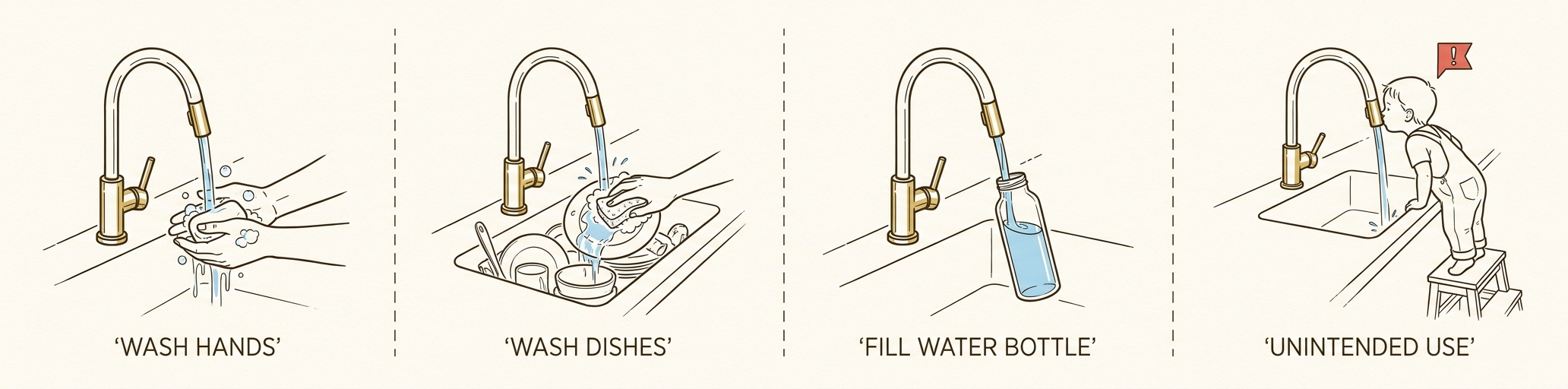
Step 2 - Problem Statement
Step 2.3
The same faucet used in four contexts: wash hands, wash dishes, fill water bottle, unintended use (child drinking from spout)

A Use Case is a scenario or task a customer performs with your product / system / service. Different Use Cases impose different FRs.

The Use Case list should be exhaustive — capture every scenario up front to avoid requirements creep.

Toaster: toast bread · toast a bagel · store when not in use · clean the toaster.

Car: grocery trip · road trip with luggage · pull a trailer · routine maintenance.

Important — Watch for unintended Use Cases. A flat-head screwdriver is often used as a chisel or pry tool. Account for these in safety considerations; revise or add FRs as needed.
Use Cases
Step 2.3 — Use Cases to Support
Wash hands in sink
Wash dishes due to medical procedure
Drink water from sink
Install water filtering system
Key Points
  • Use Cases drive Functional Requirements — capture them exhaustively before locking down FRs.
  • Engaging customers and additional research helps surface Use Cases the team may not see on its own. The designer ultimately decides which Use Cases the design will support.
  • Plan for unintended Use Cases too — they create new safety considerations and may add or revise FRs.
FRs and FRm's
  • ALWAYS start an FR with a VERB.
  • State the name of the function in active verb — direct object (noun) format, where the verb represents an explicit transformation of inputs into outputs — i.e., WHAT is to be done.
Correct
FR: Adjust temperature of water
Incorrect
FR: Turn knob to adjust temperature
Solution embedded in FR statement
Do NOT:
  • Include measures of performance (i.e., do not describe "how well" the FR needs to be performed).
  • Embed or state solutions in the FR statement.
  • Use the word AND. If you want to say "and" in an FR statement, you are probably describing two separate FRs.
FRs and FRm's
Example FRs
FR Good or Bad? Rationale Refined FR or FRm
Use Titanium
Maximize acceleration of car
Decelerate car
Ensure material is recyclable
Accelerate car with maximum efficiency
Hold device securely
Identify and report error conditions
Hit nail with hammer
Key Points — What Makes a Good FR
  • FRs start with a verb + direct object (e.g., Adjust temperature).
  • Don't embed a solution (e.g., Use Titanium, Turn knob).
  • Don't include a measure of performance ("how well") — that belongs in the FRm.
  • Don't use "AND" — usually a sign of two separate FRs.
FRs and FRm's
Example FRs
FR Good or Bad? Rationale Refined FR or FRm
Use Titanium Bad PS is embedded in the FR. Does not represent a function that must be performed. FR: Support structure under load
FRm: Minimize weight
Threshold: <10 kg
Maximize acceleration of car Bad Maximize is describing the function and should be included in the FRm instead. FR: Accelerate car
Decelerate car Good A clear function of a car with no metrics of "how well."
Ensure material is recyclable Bad "Recyclable" describes a choice of material which is better stated as an FRm: Maximize use of recyclable material.
Accelerate car with maximum efficiency Bad Maximum efficiency describes "how well." FR: Accelerate car
Hold device securely Bad Securely describes "how well." FR: Hold device
Identify and report error conditions Bad Two functions are stated as one. Avoid the use of AND. FR: Identify error conditions
FR: Report error conditions
Hit nail with hammer Bad Starts with a verb, BUT a hammer and nail are solutions. FR: Install fastener  OR  FR: Fasten structural components together
Maintain water level Good Starts with a verb and explains what the system must do.
FRs and FRm's
Definition: An FRm is a performance measure that defines how well the system must perform the FR.
Expression: Measurable characteristic stated as a vector including units (e.g., Minimize temperature in °C) above the threshold. (1:m relationship — one FR may have many FRms.)
Key Points:
  • An FRm provides a measure to quantify the performance required to successfully deliver a function (achieve the FR).
  • A vector that expresses, in measurable terms, how well an FR must be performed — including threshold, maximize, minimize, or a target range / level of desired performance (goal).
  • FRms enable a designer to determine which alternative solution best satisfies the FR.
Start with
the FR
+
What we
are measuring
(with units)
+
Direction
of "Goodness"
+
Threshold
=
FRm
Functional Requirement FRm: What are we measuring? (include units) FRm: Maximize or Minimize? (Direction of Vector) FRm Threshold — What is considered acceptable?
Accelerate car Acceleration (m/s2) Maximize 0 to 100 km/h < 3.1 sec  (> 7.94 m/s2)
Stop car Stopping distance (m) Minimize 100 to 0 km/h < 50 m
FRs and FRm's
Are KPIs also FRm's?  No, not necessarily.
KPIs are measures to assess if a predefined goal is achieved. A goal could be an FR, but in many cases the relationship between a goal and an FR of the system is not well understood.
If we cannot relate the KPI and its goal to an FR of the system, improvement is often ineffective — we don't know what to fix because we don't know what the system isn't doing (FR) well.
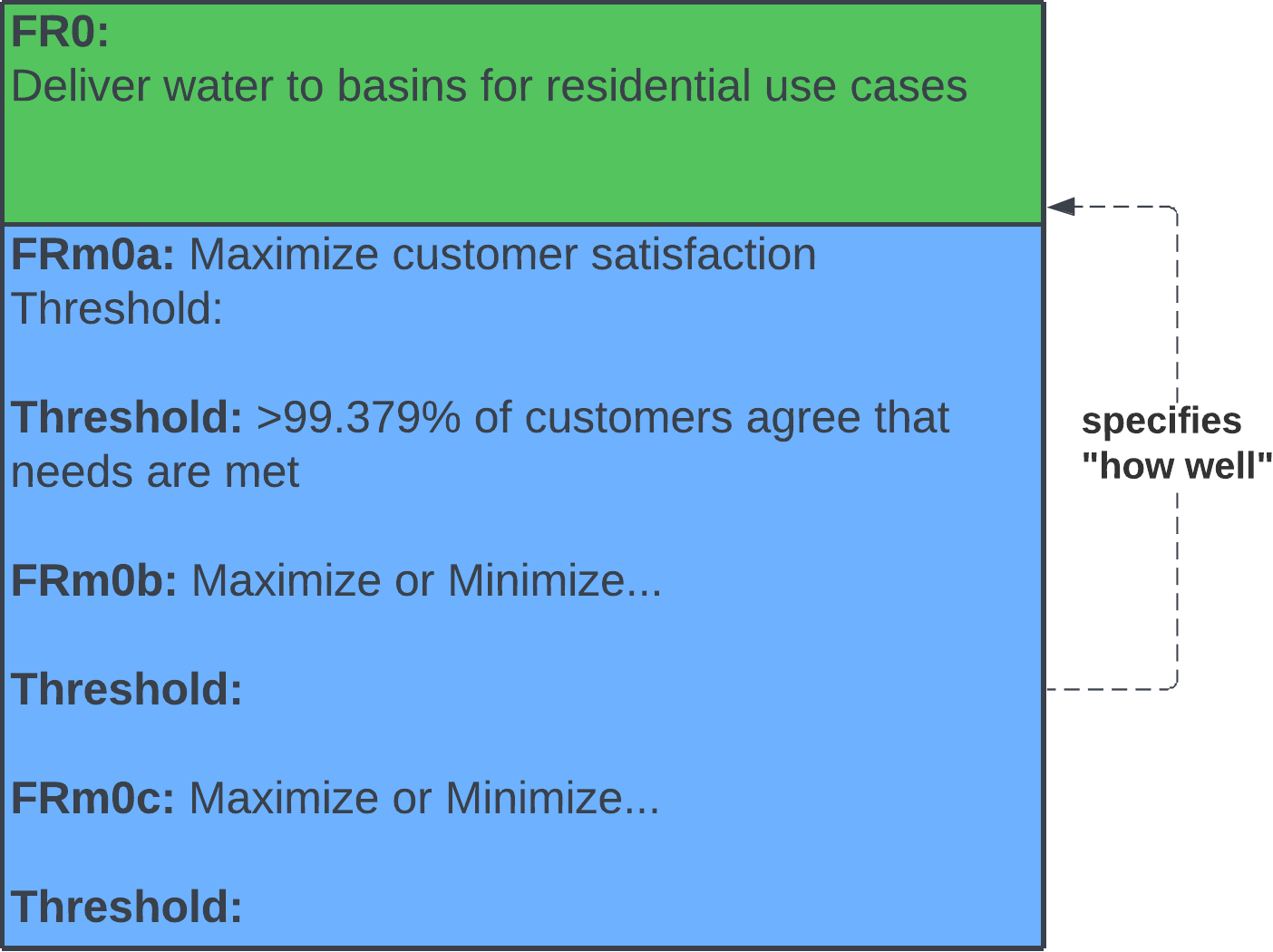
Remember: an FRm specifies "how well" the system must perform an FR, and an FR states what a system MUST DO to deliver value to the customer.
Functional
Requirement Measure
(FRm)
specifies "how well"
Functional
Requirement
(FR)
For any given KPI, the FR of the system should be understood. Therefore, KPIs should be derived from FRs of the system and would represent FRm's.
EXAMPLE
Example KPI — Abandon rate of calls for customer service (how many customers drop the call before reaching an operator)
What is the FR?    FR: Answer customer calls
How would we measure success?
FRm: Minimize wait time for customer to reach operator — Threshold: < 30 seconds
Step 2 - Problem Statement
Step 2.4

In Step 2.4, the designer identifies discriminating factors (unique and attractive features) of the design in relation to each supported Use Case from Step 2.3.

For each Use Case, answer: "What value does my product provide that an existing product does not?" and "Why would the customer buy my product over an existing one?"

Tip — One method is to state the value proposition in mathematical terms: A + B + C, where each term is a component of value that pleases the stakeholders in that Use Case. Determine discriminating factors per Use Case, not for the product overall.
Use Cases
Step 2.3 — Use Cases to Support Step 2.4 — Value Proposition
Wash hands in sink (before meal) Ease of flow / temperature adjustment + flow rate consistency + operational lifetime
Wash hands prior to medical procedure (antiseptic hand wash) Hands-free turn-off + precision of flow / temperature adjustments
Wash dishes in sink Ease of flow rate & directional adjustment + temperature stability
Bathe infant Over-temperature (scald) prevention + hands-free operation
Install water delivery system Ease of installation + minimal tool requirements + fits wide variety of sink basins
Key Points
  • The Value Proposition is per Use Case, not for the product as a whole — different Use Cases can highlight different value.
  • Stating value as A + B + C forces clarity on what each component contributes; vague language hides weak value.
  • Example — for a toaster, the designer would explain how the new toaster out-performs others at toasting bread, toasting a bagel, storage, and cleaning.
Step 2 - Problem Statement
Step 2.5

A Use Case Flow describes how the product (or service) is used — or experienced — by the customer for each Use Case, as a series of steps.

A Use Case Flow diagram should include the steps (Functions) that the user performs in addition to the steps (Functions) that the system / solution must perform.
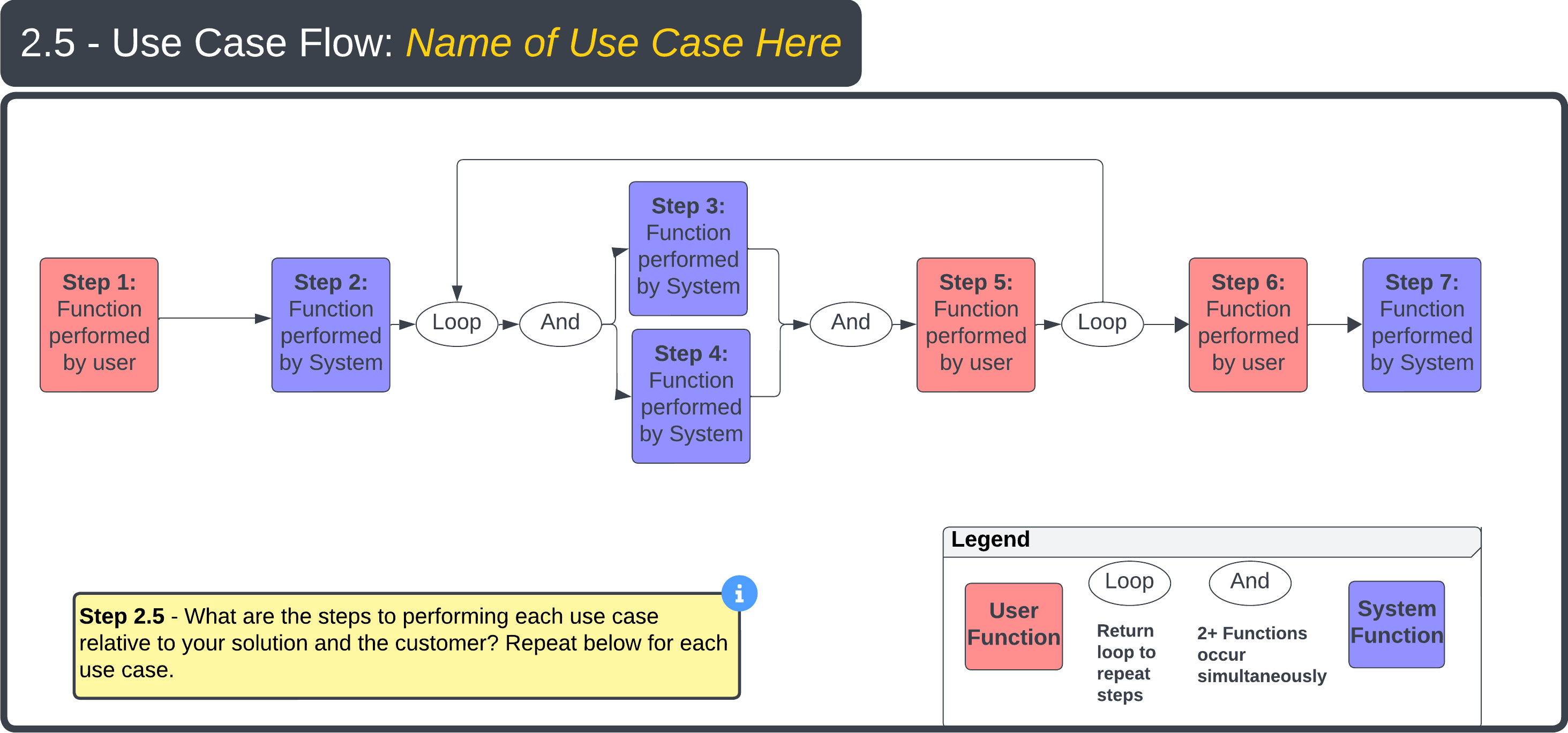
Step 2.5 — Use Case Flow template
Key Points
  • Capture both user-performed steps and system-performed steps — the boundary between user and system is what defines the design's interface requirements.
  • Each Use Case (from Step 2.3) should have its own Use Case Flow.
  • The Functions surfaced in the Flow feed directly into the Functional Requirements (FRs) used in the Decomposition (Step 4).
Step 2 - Problem Statement
Step 2.5 Example

For example, with a toaster, think about how to describe the use of the toaster to someone who has never used one before. Be sure to explain to the user what their tasks are in addition to what the toaster will do in response.
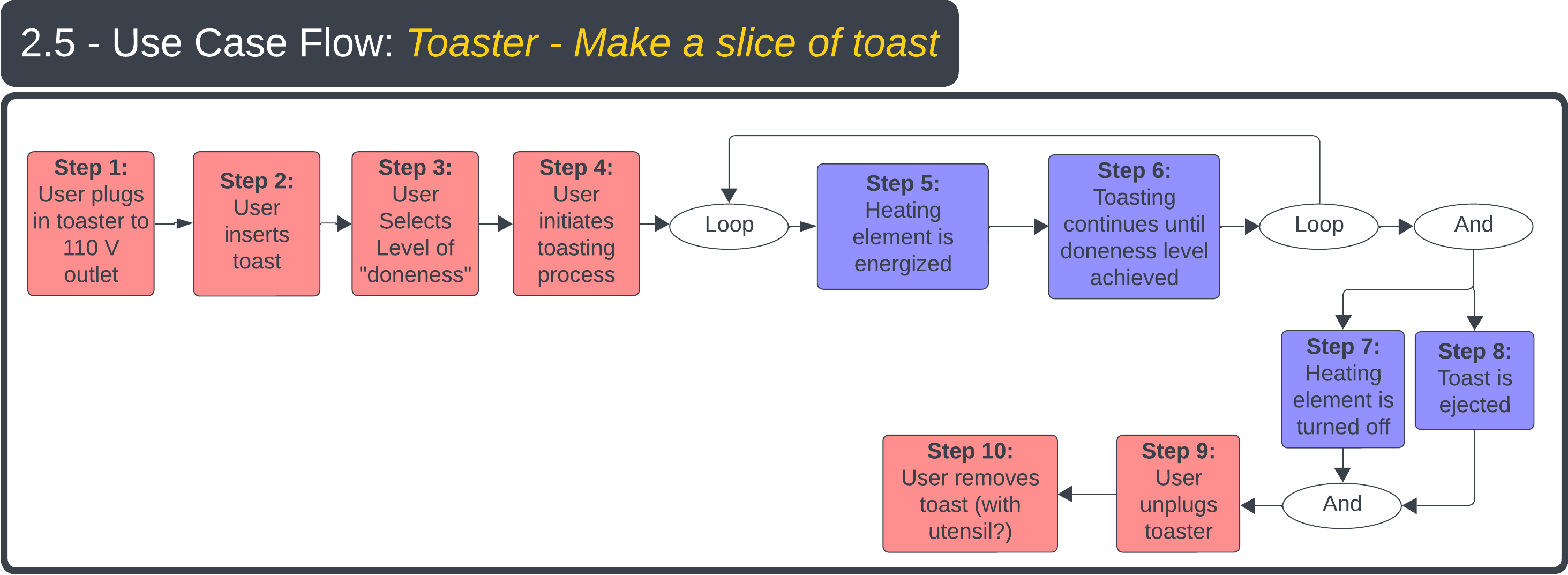
Step 2.5 Example — Toaster Use Case Flow
Key Points
  • Use Case steps are described from the viewpoint of the customer and detail what the customer wants/needs the system to do, step-by-step.
  • Each Use Case should be represented with a unique Use Case Flow diagram.
  • Review or simulate the Use Case Flow with the customer to ensure you are delivering the desired experience.
  • The more rigor the designer applies to capturing Use Case steps, the more the team truly understands the Functional Requirements needed to deliver the desired user experience.
Step 2 - Problem Statement
Step 2.6

A System Boundary diagram captures all elements required for the system to function. The designer decides which elements live inside the boundary and which stay outside; arrows crossing the boundary represent inputs (into the system) and outputs (from the system). For every external element, the designer must define a working interface.
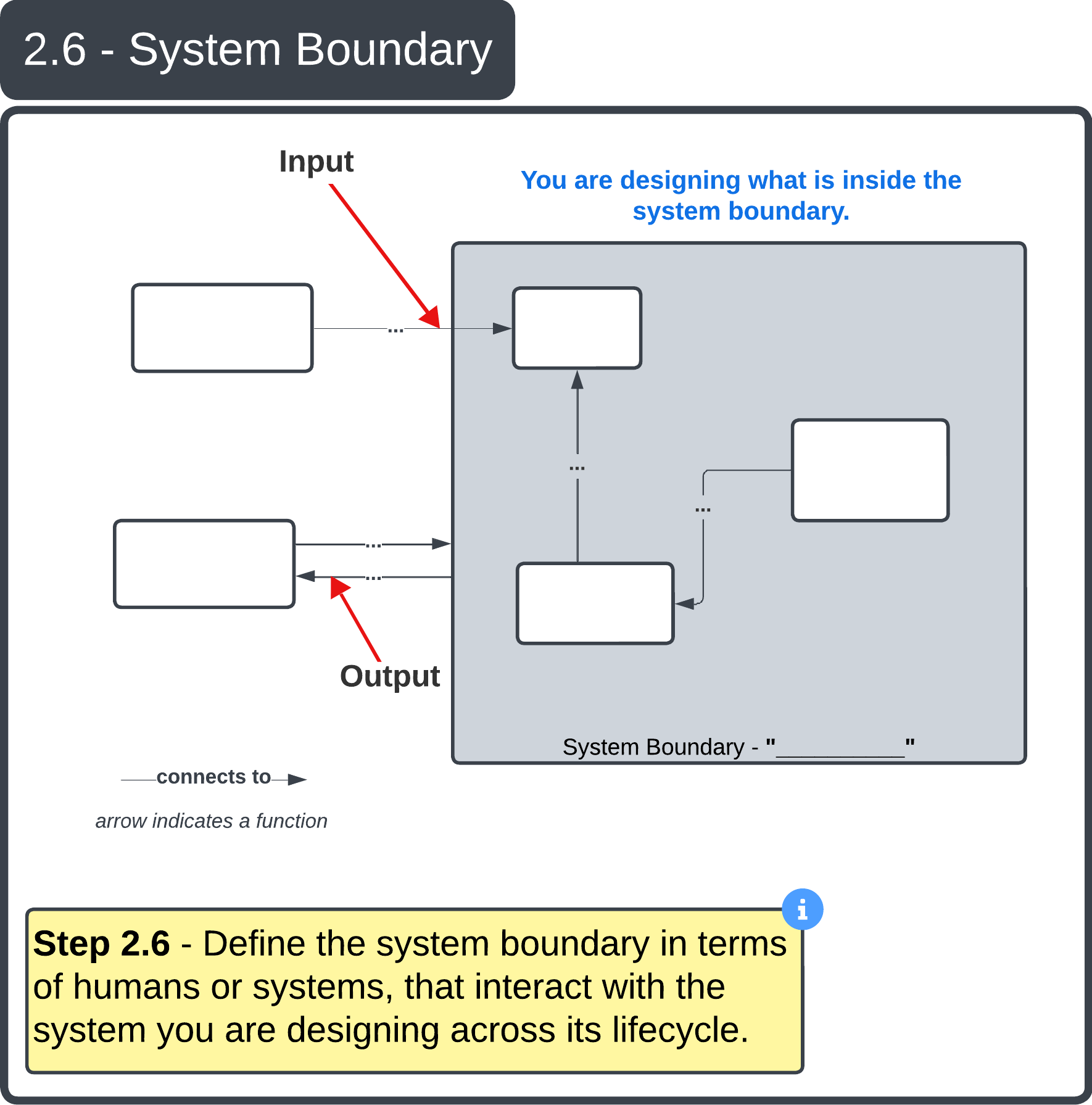
Step 2.6 — System Boundary diagram
Key Points
  • The designer chooses what is inside vs. outside the boundary.
  • Every external element needs a working interface.
  • Arrows in → inputs; arrows out → outputs.
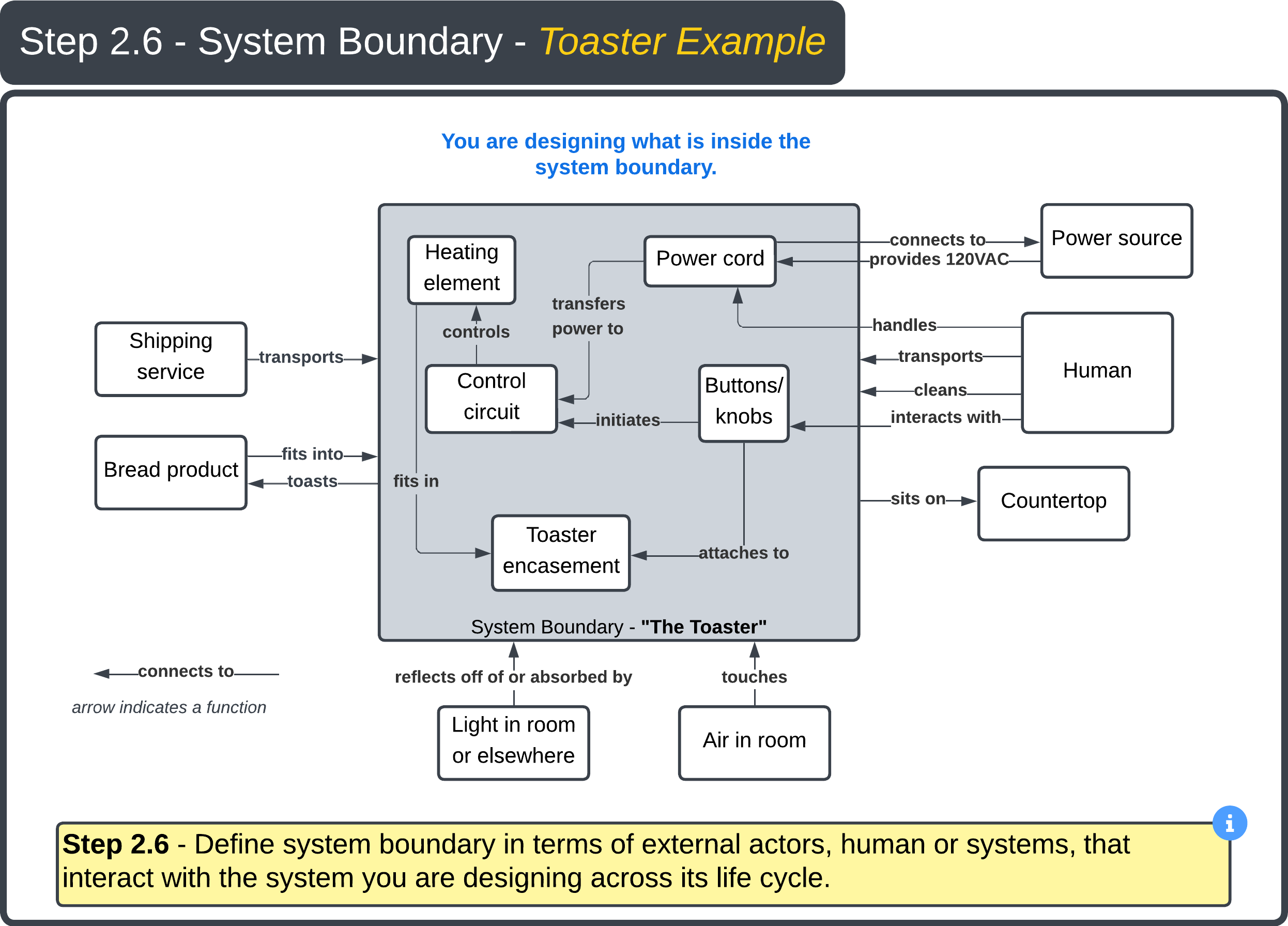
Step 2 - Problem Statement
Step 2.6 Example
Step 2.6 Example — System Boundary diagram for faucet
Step 2 - Problem Statement
Step 2.7
Why this slide? Understanding what could go wrong at each interface uncovers FRs and PSs we hadn't thought of — address them before they become field failures.

Step 2.7 — For each interface on the system boundary diagram, identify points of failure.

Interface What Could Go Wrong
Power cord connects to power source Cord is not long enough; long power cord cannot handle the power consumption.
Power outlet provides 120 VAC to power cord Power source cannot deliver enough power.
Toaster sits on counter top Toaster does not fit due to length, width, or height.
Air to toaster Humidity / contaminants corrode or add friction to moving components.
Bread product to toaster Bread does not fit; toaster inadequately toasts bread.
Shipping service to toaster Toaster dropped in transit; crushed at bottom of shipping truck.
Power cord to control circuit Connection cannot handle power; connection weakens or breaks through use.
Key Points
  • Interfaces should map directly to the System Boundary diagram — one row per crossing.
  • There can be a 1-to-many relationship: each interface may have several failure modes.
  • Common causes: incompatible materials, dimensions, fittings, threads; insufficient strength or current capacity; incompatible voltages (high/low, AC/DC, phase, frequency).
  • Mechanical interfaces are also points of friction — failures may not show up until many cycles in.
Step 3 - Conceptual Design Alternatives and Selection
Step 3 Overview
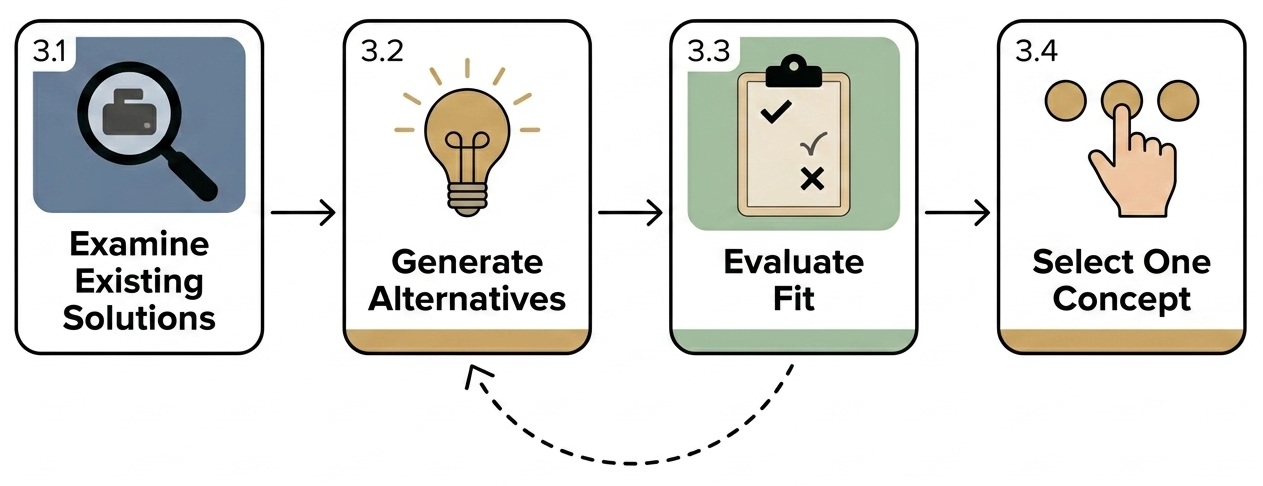
When we look at Conceptual Design Alternatives (CDAs), we first examine existing solutions to the problem statement — practicing humility and respecting what others have done before us. Step 3.1 covers those existing solutions, their deficiencies, and why we would solve the problem differently. Then 3.2 generate alternatives → 3.3 evaluate against what we know → 3.4 select one to take forward.
Step 3 timeline — 3.1 Examine Existing Solutions → 3.2 Generate Alternatives → 3.3 Evaluate Fit → 3.4 Select One Concept; with iteration loop from 3.3 back to 3.2
The dashed arrow from 3.3 → 3.2 is the iteration loop — if the fit matrix surfaces a weakness, generate another concept.
Your project may differ — same framework. The deck uses a faucet and toaster as running examples, but Steps 3.1–3.4 work for any complexity level. Worked example: an autonomous lunar robot.
3.1 Existing rovers (Curiosity, Perseverance, VIPER); deficiencies (limited autonomy, Earth-link latency).
3.2 CDAs: tracked rover, legged walker, hopping drone, swarm of micro-rovers.
3.3 Score each CDA against lunar-day survival, mass < 500 kg, regolith handling, comms blackout tolerance.
3.4 Pick one (e.g., legged walker for craters); justify why and why-not the others.
Key Points
  • Begin with humility — existing solutions reveal proven approaches and the deficiencies you can target.
  • Step 3 is iterative — if 3.3 surfaces a weakness, loop back to 3.2 and add another concept.
  • The selected CDA from 3.4 becomes PS0 — the parent solution decomposed in Step 4.
Step 3 - Conceptual Design Alternatives and Selection
Step 3.1

Complete the "Existing Solution" templates below by addressing the following questions:

3.1a — How are other people solving the problem (as stated in Steps 1.1 and 2.1)? Include pictures, drawings, links, textual descriptions, etc.

3.1b — Are there any deficiencies in the current solutions that you would like to overcome?

3.1c — Why would you solve the problem any differently than the existing solutions?

Existing Solution 1
Description of Solution
Deficiencies
Why would you solve the problem differently?
Existing Solution 2
Description of Solution
Deficiencies
Why would you solve the problem differently?
Existing Solution 3
Description of Solution
Deficiencies
Why would you solve the problem differently?
Key Points
  • Existing solutions reveal proven approaches and the deficiencies you can target.
  • Three solutions is a starting point — add more Existing Solutions if the breadth and depth of the design space isn't covered.
  • The "why differently" answer becomes part of your value proposition (Step 2.4).
Step 3 - Conceptual Design Alternatives and Selection
Step 3.1 Example
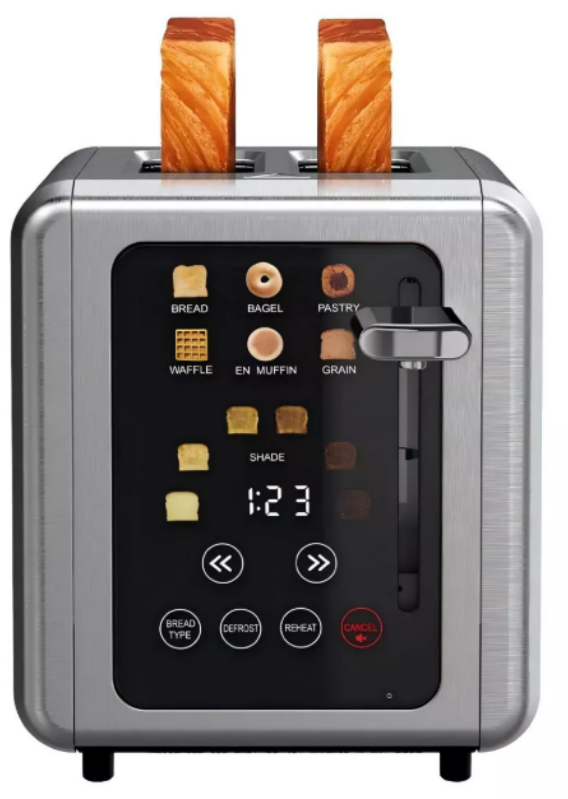
Existing Solution 1 — WHALL 2-Slice Smart Touchscreen Toaster (Target)
Description of Solution
WHALL Smart Toaster
  • Touchscreen digital control; extra-wide 1.5″ slots
  • Removable crumb tray; high-lift lever for short bread
  • Bagel / Defrost / Cancel functions; 6 shade settings
  • Self-centering bread carriage; customizable sound alerts
  • 850 W stainless steel; cost ~$50–$60
Deficiencies
  • Multiple reviews say bread only toasts on one side — reviewers would return the toaster.
  • Water / contaminants on the user's hands make the touchscreen hard to use.
  • Interface not intuitive — bread types are at the top but the "Bread type" button is at the bottom; needs training (poor fit for hotels, Airbnbs, guests).
Why Would You Solve the Problem Differently?
  • Bread should toast on both sides — the basic job must work first.
  • UI should be simpler and usable without training.
  • Users may want more than 2 slices, or to control each slice independently.
Step 3 - Conceptual Design Alternatives and Selection
Step 3.2

Step 3.2 — Using what you know about the problem from Steps 1 and 2, and what you have learned about existing solutions, generate at least 3 conceptual design alternatives. You may have one design in mind, but challenge yourself to think about other ways to solve the problem.

A conceptual design is a solution approach — high-level, not detailed. Capture the approach, not the explicit system. For example: write "space-based fire detection," not "6U CubeSat."

Conceptual Design 1
Description of Conceptual Design 1
Conceptual Design 2
Description of Conceptual Design 2
Conceptual Design 3
Description of Conceptual Design 3
Key Points
  • Generating multiple alternatives forces the team to consider different approaches rather than defaulting to the first idea.
  • Detail comes later (Step 4 onward); at this stage, the goal is breadth of thinking.
Step 3 - Conceptual Design Alternatives and Selection
Step 3.3
Goal: Evaluate each Conceptual Design from 3.2 against what we already know (Steps 1–3.1). Score each cell ✓ / Partial / ✗; what you cannot answer becomes an open question.
met · Partial some evidence, gaps remain · not met / violated.
Conceptual Design Fit Matrix
Criterion Group What to Evaluate (Source) Concept A Concept B Concept C
Hard Constraints Given requirements (1.4), cost ceiling (1.5), standards (1.6), safety (1.7)
FR0 Performance Fit FR0 + FRm thresholds (2.0–2.2) — concept hits the performance level?
Use Case Fit Each Use Case / Step (2.3, 2.5) — concept enables the flow?
Boundary Fit System Boundary + Interface failures (2.6, 2.7) respected and mitigated?
Closes Existing Gaps Deficiencies of existing solutions (Step 3.1)
Open Questions What we still don't know — log on the List of Questions slide
Key Points
  • Every concept must answer to something already documented — no FRs needed yet (those come in Step 4).
  • This matrix (or table) forces traceability and surfaces the weakest concept before Step 3.4 selection.
  • Empty cells are not failures — they're questions to log in the List of Questions and resolve before selection.
Step 3 - Conceptual Design Alternatives and Selection
Step 3.3 Example
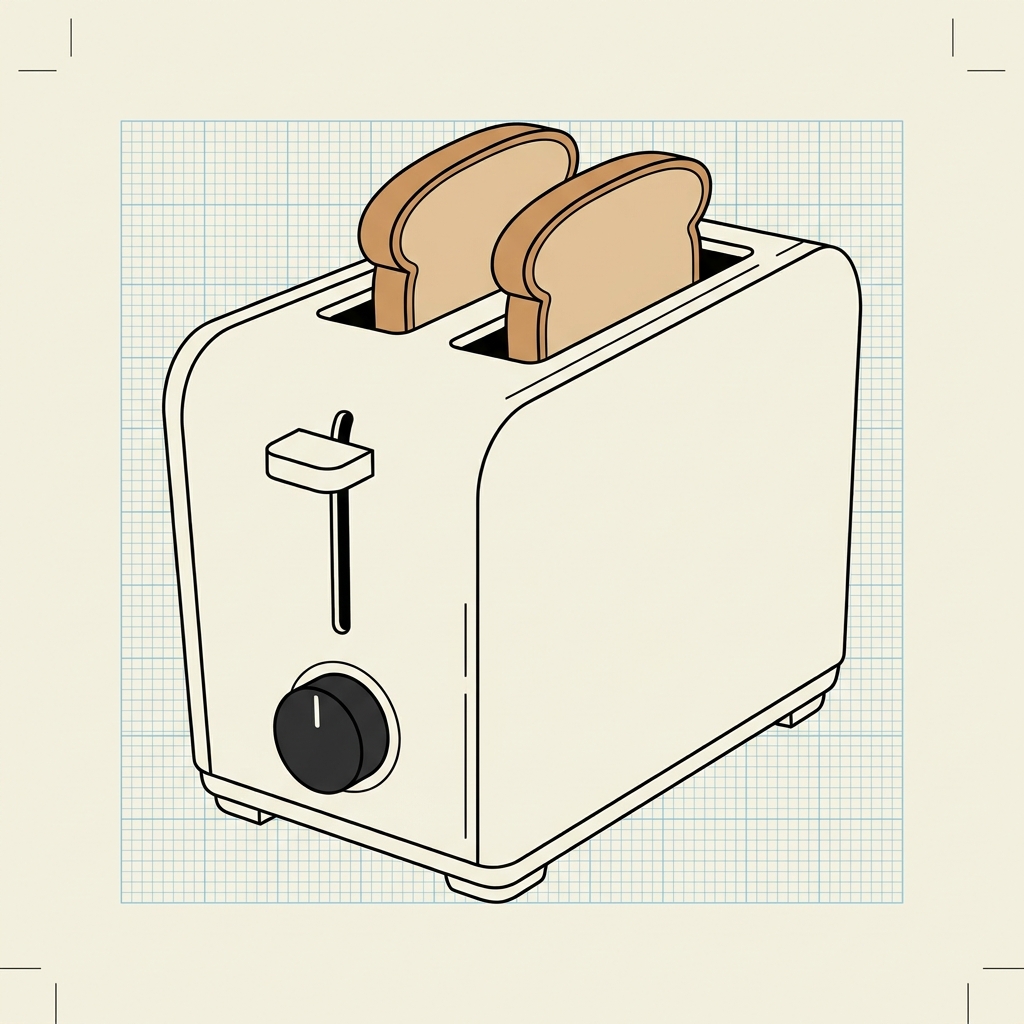
Scenario: Three conceptual toaster designs evaluated against everything known from Steps 1–3.1. Use cases: toast bread · toast a bagel · store · clean.
Conceptual Design Fit Matrix — Toaster
Criterion Group What to Evaluate (Source) A — Vertical Pop-up (4-slice, dials) B — Conveyor (continuous belt) C — Halogen Drawer (horizontal grill)
Hard Constraints Given req's (1.4), cost (1.5), standards (1.6), safety (1.7) ~$60, UL listed, well under $100. commercial units >$300, over budget. Partial BOM ~$80–$110, on the edge.
FR0 Performance Fit FR0 + FRm thresholds (2.0–2.2) — even doneness in target time? Partial vertical elements risk one-side under-browning. both faces toast at once, even browning. halogen above + below; meets time threshold.
Use Case Fit All Use Cases & Steps (2.3, 2.5) — bread, bagel, store, clean covers all four; familiar, stores easily. large footprint hurts storage; cleaning is messy. Partial drawer eases cleaning; bigger than pop-up.
Boundary Fit System Boundary & Interface failures (2.6, 2.7) standard countertop fit; shippable. exceeds countertop length budget (2.7). Partial drawer pull-out needs counter clearance.
Closes Existing Gaps WHALL deficiencies from 3.1 (one-side, wet-hand UI, 2-slice, no per-slice) Partial dials fix UI; per-slice possible; one-side issue persists. both-side inherent; physical controls; >2 slice throughput. both-side solved; 4–6 slices; per-zone control feasible.
Open Questions What we still don't know — route to List of Questions Per-slice independent doneness worth dial complexity? Can a conveyor be miniaturized to residential price? Halogen energy draw + bulb life vs nichrome?
Which concept emerges?  Concept C — Halogen Drawer scores ✓ on the highest-priority rows (FR0 Performance Fit and Closes Existing Gaps) and only Partial elsewhere. Concept B hits two hard ✗ on Hard Constraints and Use Case Fit — auto-rejected. Concept A is the cheapest but doesn't close the one-side-browning gap the project exists to fix. Full why-and-why-not is on Step 3.4 (next slide).
Step 3 - Conceptual Design Alternatives and Selection
Step 3.4
Step 3.4: Choose one of your conceptual designs from Step 3.2. Justify why you chose it — reference the Step 3.3 fit matrix — and explain why not the others.
Selected Concept — C: Halogen Drawer Toaster
Why C wins:
  • FR0 Performance Fit (✓): halogen heat above and below produces even browning — meets the FR0 doneness threshold without form-factor compromise.
  • Closes Existing Gaps (✓): solves the one-side browning failure documented in Step 3.1; drawer holds 4–6 slices with per-zone control feasible.
  • Partial scores addressable downstream: the BOM gap closes in Step 7 (DFM / Cost Reduction); drawer-clearance becomes an Interface in Step 4 decomposition.
Why NOT A — Vertical Pop-up
Cheapest, fits all use cases — but vertical elements do not solve the one-side browning problem. Selecting A leaves the customer with the same deficiency the project exists to fix.
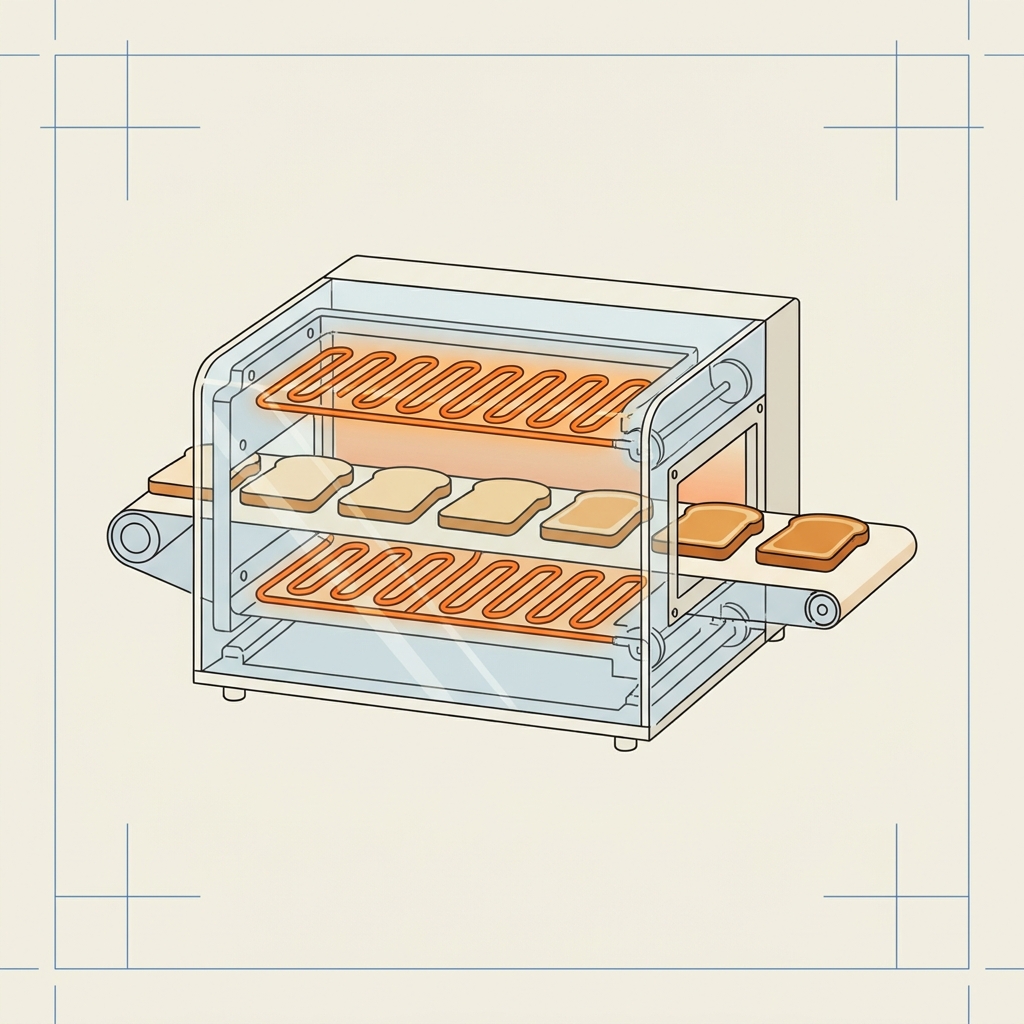
Why NOT B — Conveyor
Best at FR0, but fails three of five criterion groups: exceeds budget (>$300), exceeds countertop length, and breaks "store when not in use." Two hard ✗ — cannot proceed without total redesign.
Concept A — Vertical 4-slot pop-up toaster
A — Vertical Pop-up
Concept B — Conveyor toaster
B — Conveyor
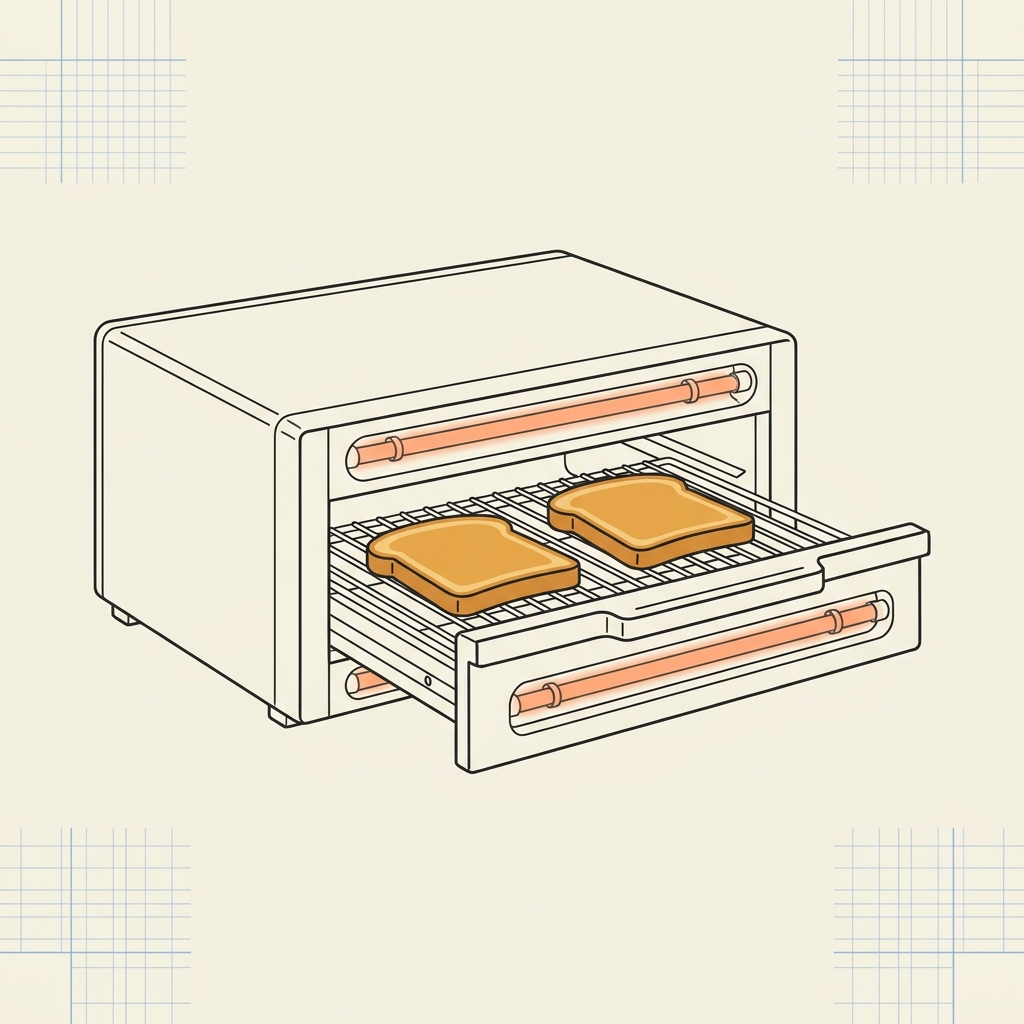
Concept C — Halogen drawer toaster (selected)
C — Halogen Drawer ✓
Step 4 - Design Decomposition
The CSD Algorithm
1 — Start with What You Already Have
  • Copy FR0 & FRm0 from Step 2; copy PS0 from Step 3.4.
2 — Decompose to the Next Level
  • List FRs the parent PS must deliver — consider its SBFIL: Structure, Behavior, Footprint, Interface, Lifecycle.
  • For each FR, write FRm(s)Threshold (acceptable) and Goal (desired ultimate).
  • For each FR, list candidate PSs (PSa, PSb, PSc…).
  • Coupling check — Does picking PS for FR1 affect the achievement of FR2? Decouple before deciding.
  • Choose the best PS for each FR via decision analysis.
3 — Repeat 2 Decompose

For each child PS, repeat 2 Decompose to drop down another level. Stop when the PS is atomic — you know enough to buy or build it.

4 — Back Every Claim with Evidence

Every chosen PS claims it will achieve its FR (to the FRm threshold). Back the claim with prototypes, simulations, cited research, data sheets, or models. Without evidence, the claim is a guess.
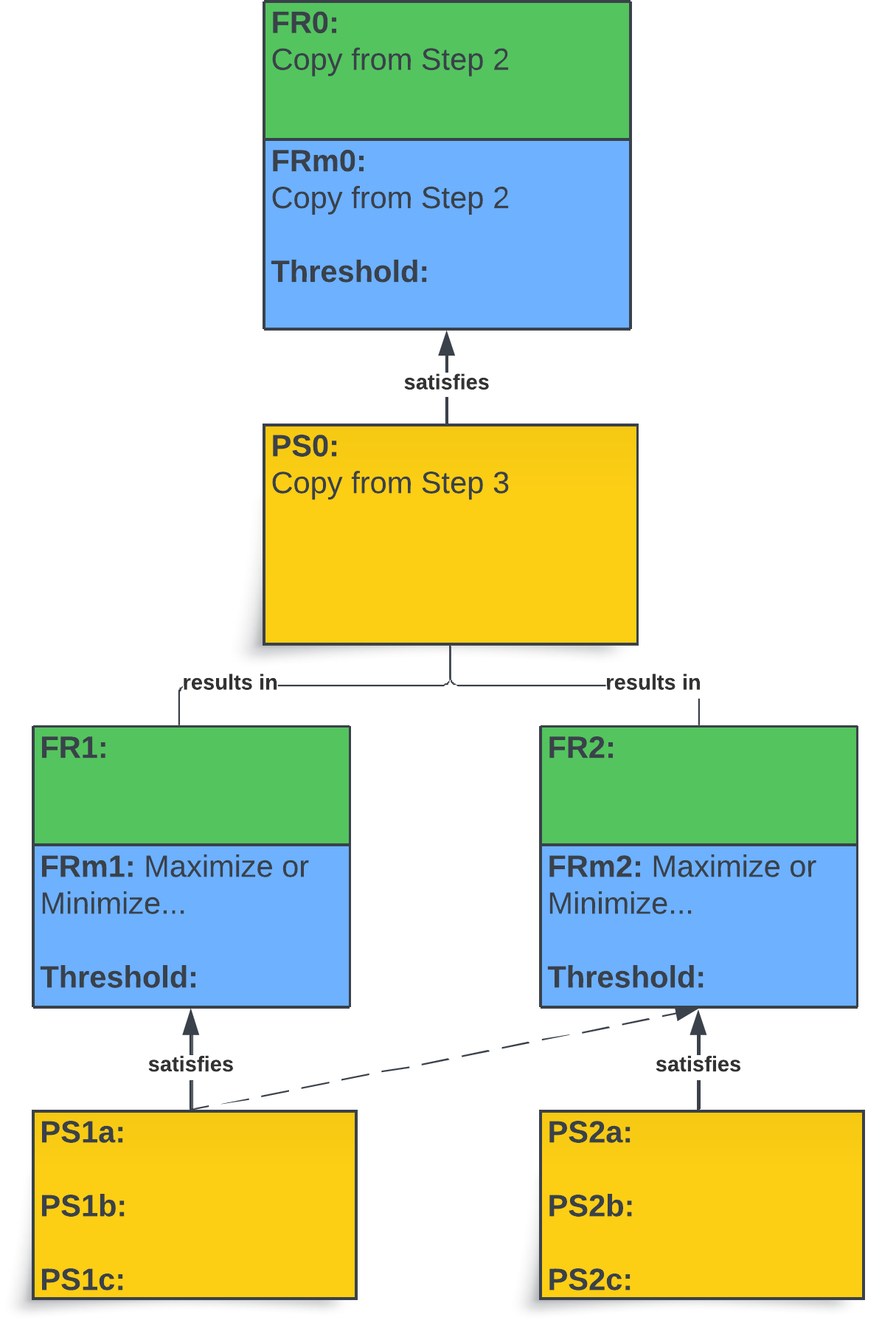
Basic decomposition tree — parent FR0/FRm0/PS0 with two child siblings FR1 and FR2
Key Points
  • The CSD Algorithm repeats — the chosen child PS becomes the next parent PS of the next-lower-level FRs (minimum 2 FRs) and runs through 2 Decompose again.
  • A level isn't done until every child has FR + FRm + Threshold + PS; anything missing means the level is incomplete.
  • Run the coupling check before decision analysis to choose PS — decoupling is what makes the rest of the process work.
Step 4 - Design Decomposition
Types of Designs
Axiom 1 — The Independence Axiom: Maintain Independence of Functional Requirements. The mapping {FR} = [DM]{PS} should be diagonal — each PS affects only one FR. When this holds (or when [DM] is upper- or lower-triangular), the design is predictable.
KEY QUESTION FOR AXIOM 1
"Does the choice of PSj affect the achievement of FRi within a branch at a specific level?"
Remember: FRs are independent to start with — it is the choice of physical solution that breaks (or preserves) that independence.
✓ ACCEPTABLE — Independence Preserved
X
O
O
X
FR1 FR2 PS1 PS2
Uncoupled
Each PS controls exactly one FR. Tune any FR independently.
→ Predictable
X
O
X
X
FR1 FR2 PS1 PS2
Path Dependent
PS1 affects both FRs. Set in sequence: FR1 first.
→ Predictable (in order)
✗ UNACCEPTABLE — Violates Axiom 1
X
X
X
X
FR1 FR2 PS1 PS2
Coupled
Every PS affects every FR. Tuning one breaks the others.
→ Not Predictable
X
O
O
O
FR1 FR2 PS1 ?
Incomplete
A required FR has no PS to satisfy it.
→ Misses FRs
X
X
FR1 PS1 PS2
Redundant
Two or more PSs solve the same FR.
→ Added Cost / Time
Step 4 - Design Decomposition
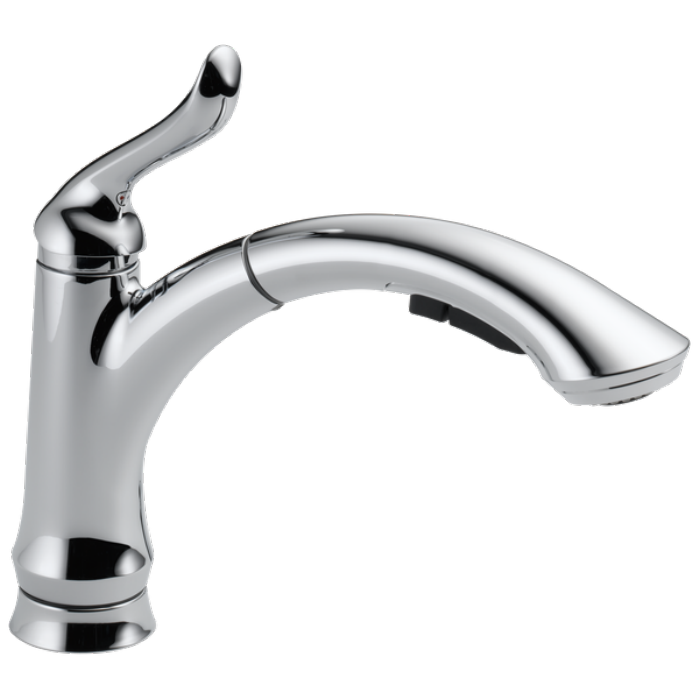
Faucet Example
Functional Requirements (shared by both designs):
FR1: Control the water flow rate Q (without affecting water temperature)
FR2: Control the water temperature T (without affecting flow rate)
✗ COUPLED — Two-Handle Faucet
Two-handle faucet (coupled design)
PS1 = Φ1: Hot Water Valve Adj.
PS2 = Φ2: Cold Water Valve Adj.
Each handle changes both flow and temperature.
QT =
X
X
X
X
Φ1Φ2
FR1 FR2 PS1 PS2
✓ UNCOUPLED — Single-Handle Faucet
Single-handle faucet (uncoupled design)
PS1 = Φ1: Handle lifting
PS2 = Φ2: Handle moving sideways
Lift = flow only. Swivel = temperature only.
QT =
X
O
O
X
Φ1Φ2
FR1 FR2 PS1 PS2
Lesson: The FRs were independent to start. The two-handle PS choice coupled them; the single-handle PS choice preserved their independence. Same problem, different design quality — driven entirely by the physical solutions.
Step 4 - Design Decomposition
Barn Beam Example
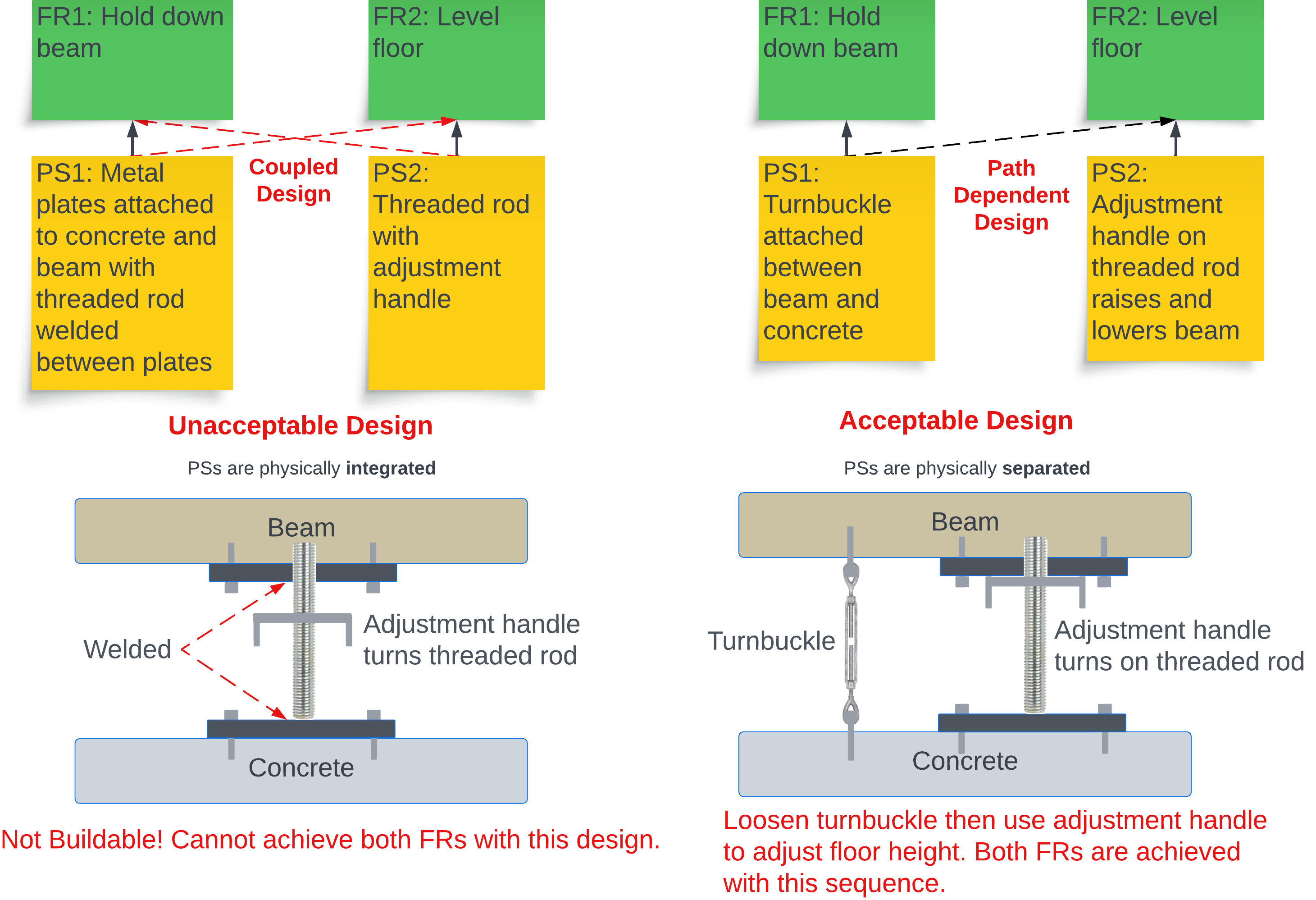
Functional Requirements:  FR1: Hold down the beam  ·  FR2: Level the floor
Barn beam coupled vs path-dependent design comparison
✗ UNACCEPTABLE — Rod welded at beam and plate
Threaded rod is hard-welded to both the plate and the beam — one rigid assembly. To level the floor (FR2) you'd have to change rod length, but the rod is locked by the welds. Unweld and the beam is no longer held down (FR1). Both FRs cannot be satisfied at once.
✓ ACCEPTABLE — Rod NOT welded at beam or plate
The threaded rod is free-floatingturnbuckle (PS1) and adjustment handle (PS2) are separate parts. Loosen the turnbuckle → adjust handle to level → re-tighten turnbuckle. Sequence matters — but both FRs are achieved. Path Dependent (Acceptable).
Key Insight: Independence is not just about choosing different mechanisms — it requires that the physical solutions can be manipulated independently. Welding (integrating) parts couples them; separating them preserves independence. The PS choice creates the coupling, even when the FRs themselves are independent.
Step 4 - Design Decomposition
Two Origins of Coupling

The previous two examples both produced full off-diagonal entries in the design matrix — but for genuinely different reasons. Naming the difference helps you spot coupling earlier and choose the right fix.

Inherent Coupling

The PSs cannot, by the nature of the chosen mechanism, target a single FR. The coupling is visible from the design spec itself — no implementation needed to see it.

Recall the faucet: each valve is a “restriction on a flow path.” By construction, turning either valve changes both flow rate and mix temperature — the spec already shows two FRs running through one knob.
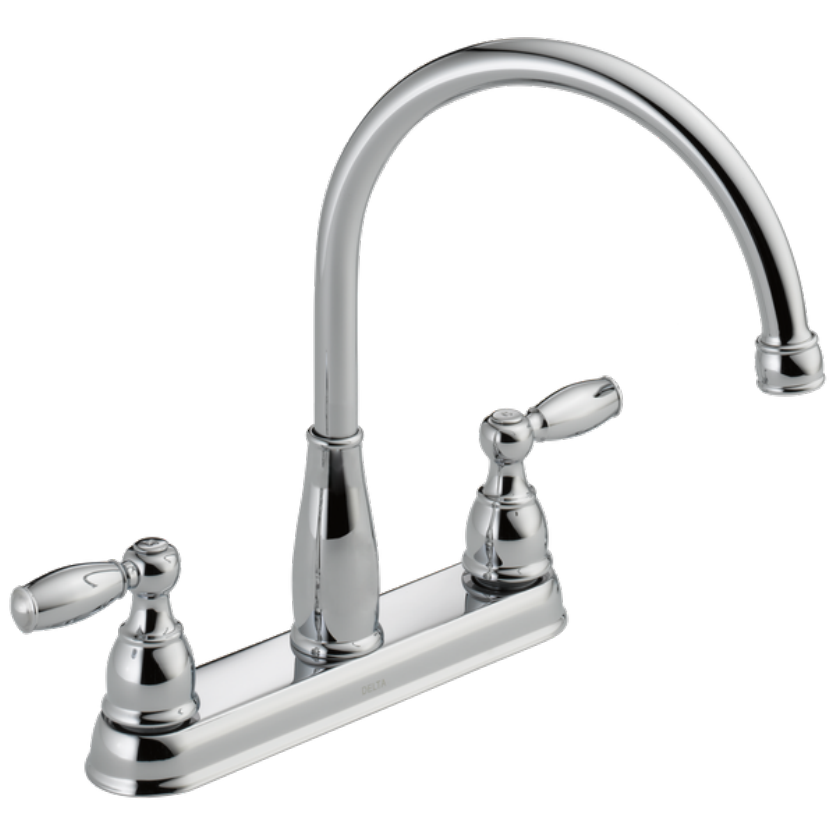
Two-handle faucet — each valve simultaneously affects flow rate and mix temperature
Emergent Coupling

The PSs are intended as single-FR controls, but implementation physics introduces unintended cross-effects that only appear once the system is built or analyzed.

Recall the barn beam: two beams designed to carry two independent loads — until the welded implementation creates a shared structural response. The coupling appears only after the build choice.
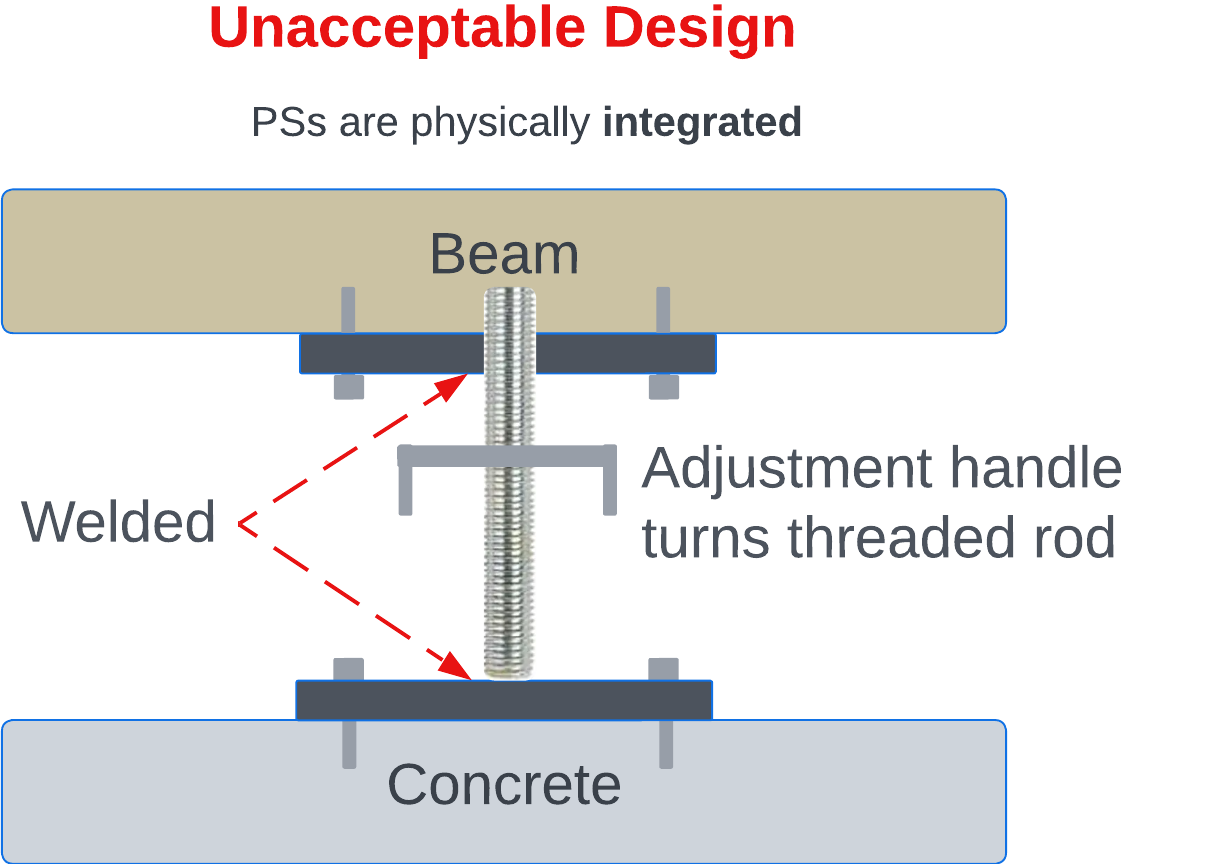
Welded vs un-welded barn beams — implementation physics introduces the coupling
Why the distinction matters:
  • Inherent coupling can be caught at the spec stage — the design matrix flags it before any prototype. Fix by re-choosing the mechanism.
  • Emergent coupling is what the design matrix is genuinely built to discover — physics or geometry introduces an off-diagonal that the abstract decomposition didn’t anticipate.
Step 4 - Design Decomposition
Procedural Errors
  1. 1
    Incorrect FR wording: An FR begins with a verb — an action or transformation.
  2. 2
    Incorrect PS wording: A PS begins with a noun — something observable / quantifiable that achieves an FR.
  3. 3
    Unacceptable cases: Check for coupled, incomplete, redundant, not process-capable within a branch before the next level.
  4. 4
    Inadequate branching: A design only decomposes if two or more FRs expand on the preceding PS.
  5. 5
    PS → FR across levels: Relationship arrows must not cross levels.
  6. 6
    PS → FR across branches: PS-to-FR only within the same branch, same level.
  7. 7
    Incorrect arrow: Arrows = PS → FR within branch + level. Lines (no head) = PS decomposed into child FRs.
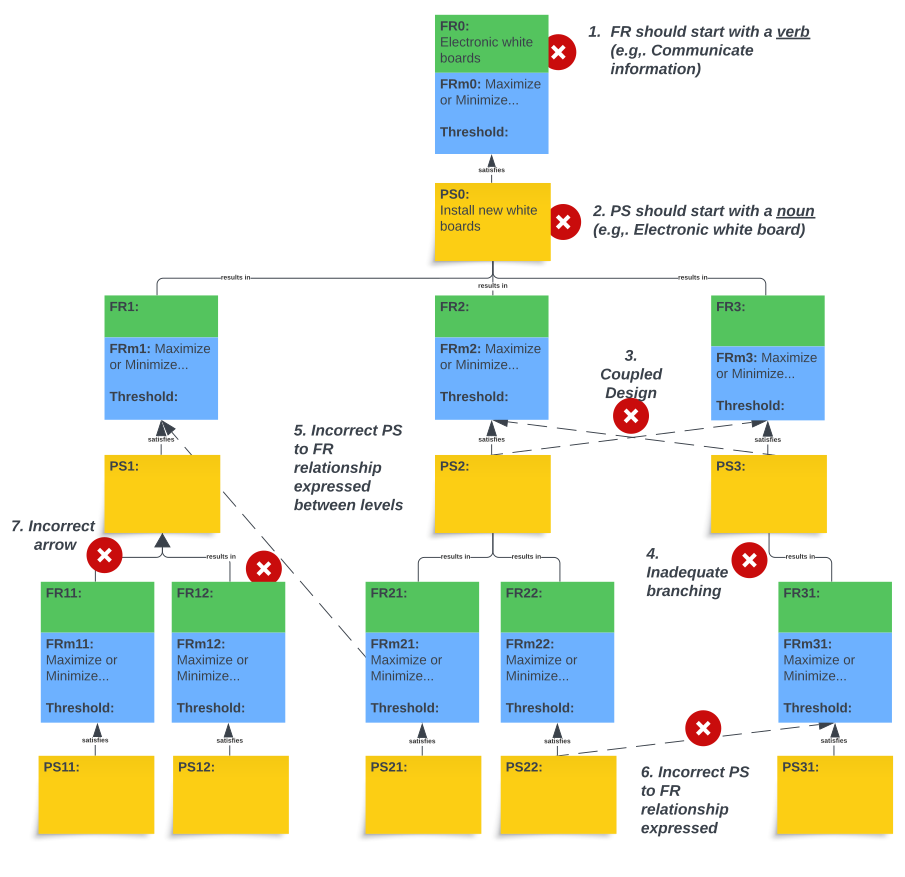
Decomposition tree annotated with 7 common procedural errors
Step 4 - Design Decomposition
Decomposition Issues
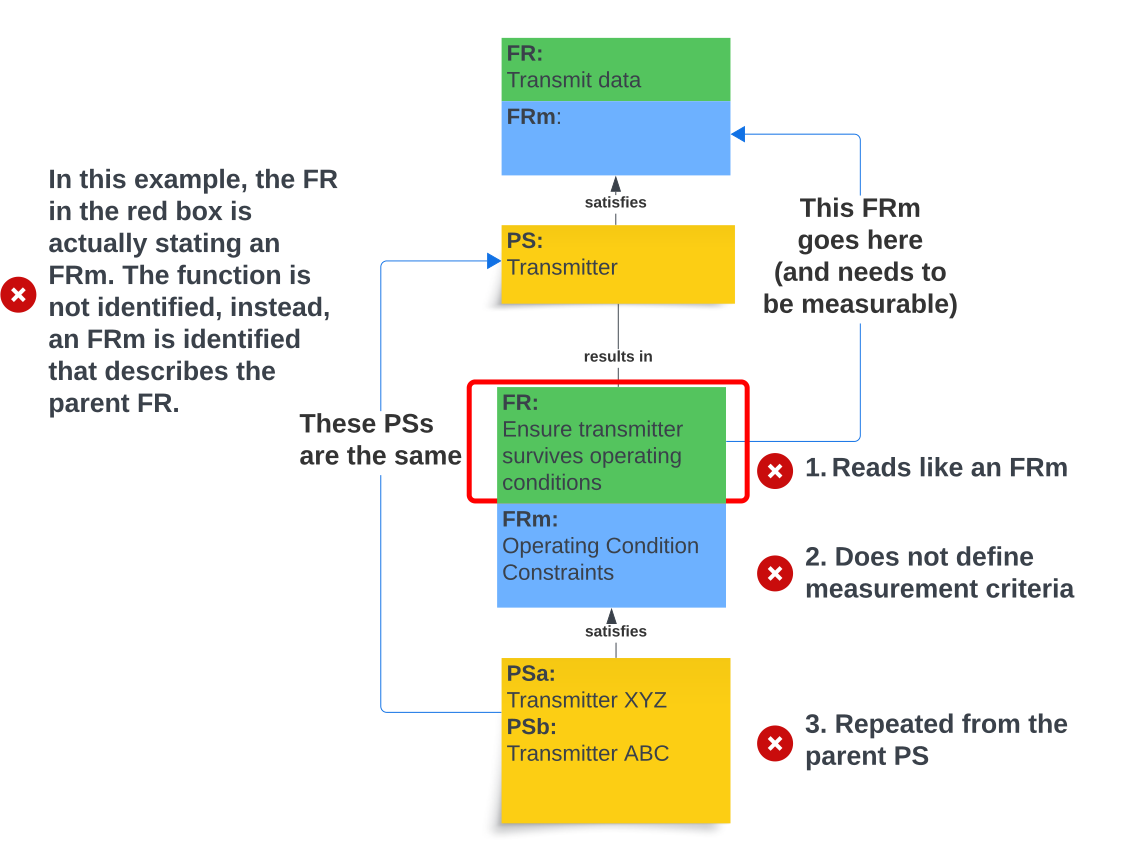
Annotated decomposition tree showing three common issues: an FRm written as an FR, missing measurement criteria, and a child PS repeated from the parent
Key Point: A decomposition should represent a real, buildable system. If any of these errors are present, it cannot.
READING THE EXAMPLE
Parent: "Transmit data" (FR) → "Transmitter" (PS). Three errors break the decomposition:
  1. "Ensure transmitter survives operating conditions" reads like an FR but is actually an FRm.
  2. The FRm below ("Operating Condition Constraints") has no measurable threshold — a label, not a measurement.
  3. Child PSs (Transmitter XYZ, Transmitter ABC) just rename the parent PS — product selection, not decomposition.
Step 4 - Design Decomposition
Decomposition Fix
CASE A — Cart Before the Horse
FR0: Cool the CPU
PS0: Brand-X 92 mm PWM Fan (SF-9200)
↓ decompose
FR1: Spin @ 2000 RPM
FR2: Fit 92×25 mm bracket
FR3: Accept PWM @ 25 kHz
PS1: SF-9200 motor
PS2: SF-9200 frame
PS3: SF-9200 driver
What's wrong: PS0 is a specific commercial product. The "FRs" derived aren't real system functions — they're constraints inherited from that product. The team is locked in.
CASE B — System Designer
FR0: Cool the CPU
PS0: Cooling System (function-bearing assembly)
↓ decompose
FR1: Move air across heat sink
FR2: Conduct heat from CPU
FR3: Mount to chassis
PS1: Fan / pump / liquid loop…
PS2: Heat sink / vapor chamber…
PS3: Bracket / clip / screws…
Why this works: PS0 is named for what it does, not what it is. Each child FR is a real system function — multiple candidate PSs can be evaluated.
How to fix Case A: instead of naming a specific commercial part as PS0, ask "what does it do?" — that function-bearing answer becomes PS0 (Case B). Then decompose the functions of that subsystem — not the constraints of one off-the-shelf product.
Step 4 - Design Decomposition
Cooling System Example
Designer's Thinking: What does the cooling system have to do? Look at an existing system and identify the parts typically required — in most cases, each part performs a unique function.
Each PART or PART Feature (PS) = 1 Function (FR)
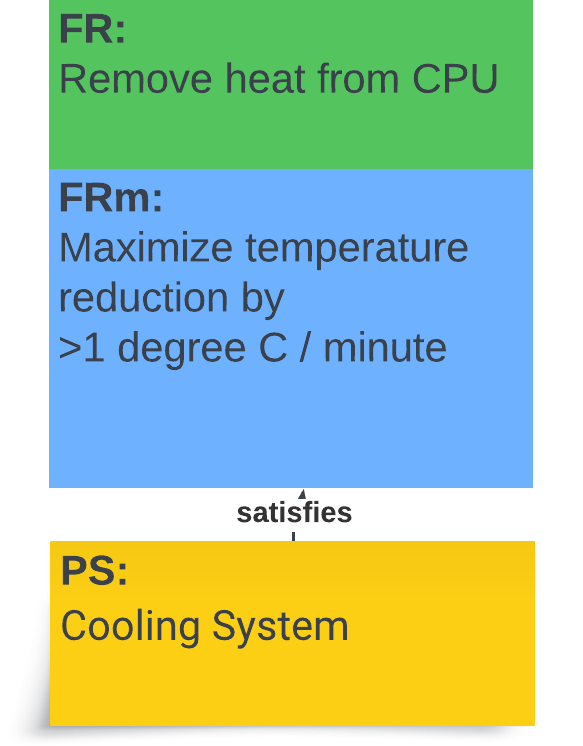
Parent FR / FRm / PS triplet — Remove heat from CPU; Maximize temperature reduction >1°C/min; Cooling System (satisfies)
In the designer's mind while decomposing the "Cooling System" PS:
Power Supply
provides power to
Cooling System
Fan
Wires
Connectors
Heat Sink
Thermal Paste
Fasteners
Temp Sensor
removes heat from
fits inside
CPU
System Enclosure
Level 2 — Cooling System decomposed (each part = one function):
Part FR — what it does PS — candidate solutions
Fan FR1.1: Move air across the heat sink Axial fan · centrifugal fan · liquid pump
Heat Sink FR1.2: Conduct heat from CPU surface to airflow Aluminum finned · copper finned · vapor chamber
Thermal Paste FR1.3: Bridge the CPU↔heat-sink thermal interface Silicone paste · phase-change pad · liquid metal
Wires FR1.4: Carry power to the fan Twisted-pair AWG18 · ribbon cable
Connectors FR1.5: Connect fan to motherboard / power JST 3-pin · 4-pin PWM header
Fasteners FR1.6: Secure cooling system to motherboard / chassis Spring-loaded screws · push-pin clips · backplate
Temp Sensor FR1.7: Sense CPU / fan temperature Thermistor · on-die DTS · thermocouple
For each part the designer asks: What is its purpose (FR)? · Does my system need this function? · Is there a better PS to consider?
Step 4 - Design Decomposition
Decision Analysis
To facilitate the designer's systemic thinking, we quantify the derived FRs and PS-ALTs into a decision analysis spreadsheet. The next slide walks through how it is read — Threshold, Goal, 0–5 score per FRm. Fillable template in the 12-Step Lucid template.
Decision Analysis FUNCTIONAL
REQUIREMENT
(FR):
State FR here PS-ALT: PS-ALT: PS-ALT:
PS-ALT
Description:
PS-ALT
Description:
PS-ALT
Description:
Criteria PERFORMANCE
Weight Source FRm
Number
FRm Description FRm
THRESHOLD
GOAL
ESTIMATED
PERFORMANCE
BASIS OF ESTIMATE
Score Weighted
Score
ESTIMATED
PERFORMANCE
BASIS OF ESTIMATE
Score Weighted
Score
ESTIMATED
PERFORMANCE
BASIS OF ESTIMATE
Score Weighted
Score
Threshold Estimate here Estimate here Estimate here
Goal Basis of estimate here Basis of estimate here Basis of estimate here
Threshold
Goal
Threshold
Goal
Threshold
Goal
Legend
Weight 1 to 5 scale
Score 0 to 5 scale
Weighted Score Weight × Score
Total Score Total Score Total Score
RISK ASSESSMENT
Failure Mode Failure Mode Failure Mode
Selection / Rejection Rationale Accept or Reject? Why? Accept or Reject? Why? Accept or Reject? Why?
Step 4 - Design Decomposition
Decision Analysis Scoring
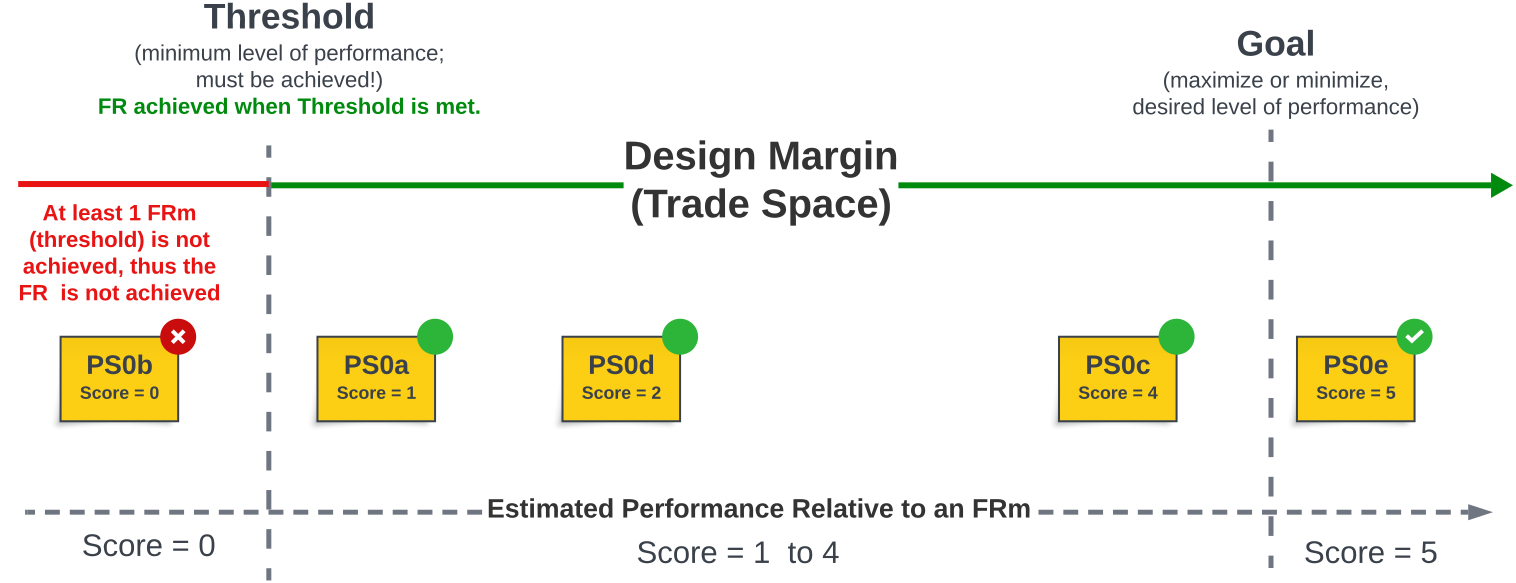
Scoring scale showing Threshold and Goal: Score 0 (below threshold), Score 1-4 (design margin / trade space), Score 5 (meets or exceeds goal)
QUALITATIVE FRm — Likert Rubric Example
FR: Enable user control.
FRm: User-perceived ease of use (1–5 Likert).
Threshold: ≥ 3 (acceptable — most users complete tasks unaided).
Goal: ≥ 4.5 (delight — users complete tasks confidently and recommend).
Survey 5+ users; use the median Likert score as the FRm value.
Rubric (anchor each Likert level)
5 — ExcellentUser completes all tasks quickly, no training needed.
4 — GoodTasks completed; brief moments of hesitation.
3 — AcceptableTasks completed with manual / one nudge.
2 — PoorTasks attempted; user gives up on at least one.
1 — FailingUser cannot complete the task.
Key Points
  • Score on a 0–5 scale: 0 = unacceptable (below threshold — auto-rejects the alternative); 1–4 = inside the trade space (between threshold and goal); 5 = meets or exceeds the Goal.
Step 4 - Design Decomposition
Decision Analysis Example
Example FR: Transport humans and belongings from point A to point B PS-ALT: PS0a: Tesla Model S Plaid PS-ALT: PS0b: BMW M3 PS-ALT: PS0c: Toyota Corolla
PS-ALT Description:
Fully electric vehicle designed for high performance
PS-ALT Description:
Internal combustion engine sports car designed for high performance
PS-ALT Description:
Compact car with internal combustion engine designed for fuel efficiency and reliability
Criteria PERFORMANCE
Weight Source FRm
Number
FRm Description FRm
THRESHOLD
GOAL
ESTIMATED
PERFORMANCE
BASIS OF ESTIMATE
Score Weighted
Score
ESTIMATED
PERFORMANCE
BASIS OF ESTIMATE
Score Weighted
Score
ESTIMATED
PERFORMANCE
BASIS OF ESTIMATE
Score Weighted
Score
3 Owner /
Driver
FRm0a: Maximize
acceleration
0 to 100kmh
< 3.5 sec
(>7.94 m/s²)
THLD
2.3 sec
(12.08 m/s²)
5 15 3.4 sec
(8.17 m/s²)
3 9 7.3 sec
(3.81 m/s²)
0 0
0 to 100kmh
(>8.96 m/s²)
GOAL
Stated Goal Stated Goal Stated Goal
4 Owner /
Driver
FRm0b: Minimize
refueling /
recharge time
< 35 min
THLD
~30 min
(DC fast charge)
1 4 ~5 min
(gas pump)
5 20
< 10 min
GOAL
Stated Goal Stated Goal
5 Family FRm0c: Minimize
stopping
distance
Threshold 45m 3 15 45m 3 15 Stated Goal
Goal Stated Goal Stated Goal
Legend
Weight 1 to 5 scale
Score 0 to 5 scale
Weighted Score Weight × Score
Total Score 34 Total Score 44 Total Score REJECTED
RISK ASSESSMENT
Failure Mode Failure Mode Failure Mode
Charger not available on a long road trip Gov. restricts access to premium fuel
Selection / Rejection Rationale Rejected — barely meets refueling threshold; long charge times limit point-A-to-point-B use, lower Total Score Accepted — highest Total Score (44); meets all FRm thresholds with acceptable risk Rejected — Score 0 on FRm0a (acceleration); per scoring rules, alternative is immediately disqualified and not evaluated further
Step 5 - Design and Process FMEA
Step 5 Overview
Next we use FMEA — Failure Mode and Effects Analysis — to identify approaches to mitigate risk for both the Design (DFMEA) and the Process (PFMEA). FMEA helps us identify possible FRs and PSs that must be included in the design to mitigate identified risks.
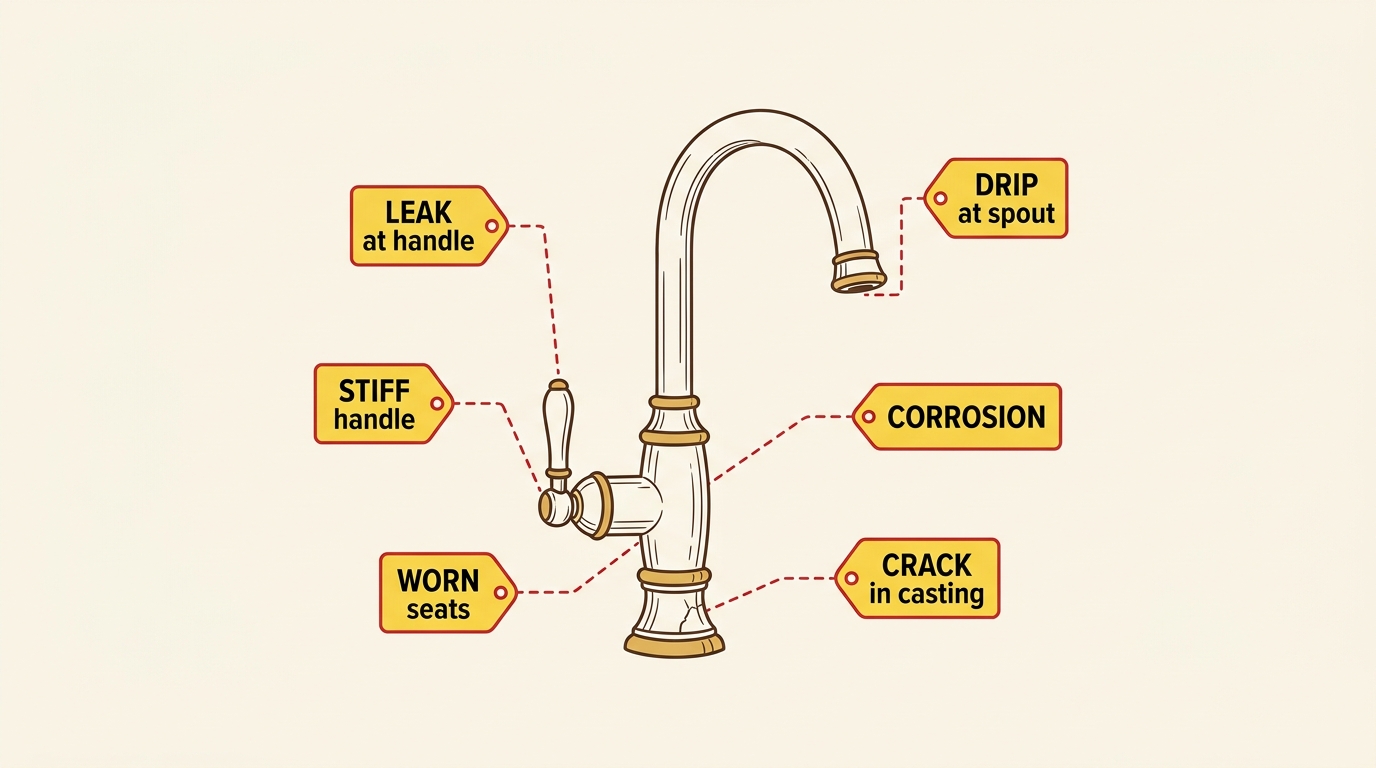
Faucet surrounded by labeled failure modes — leak, drip, corrosion, crack, worn seats, stiff handle
DFMEA — Design FMEA
Targets failures introduced by the chosen physical solution. Asks: "How could this PS fail to satisfy its FR?"
PFMEA — Process FMEA
Targets failures introduced by the process that produces the design. Asks: "How could this manufacturing step fail to produce the design as intended?"
Terminology
Failure Mode, Failure Cause, Mitigation, RPN inputs.
RPN Scale
Severity, Likelihood, Detectability scoring.
Worked Example
DFMEA & PFMEA for the water faucet.
Key Points
  • FMEA is predictive — it surfaces failure modes before they occur in the field.
  • Each Failure Mode and its Mitigation may add new FRs and PSs to the design that must be included to manage the identified risk.
  • DFMEA and PFMEA together cover both design-introduced and process-introduced failures.
  • Loop-back trigger: if FMEA surfaces a Mitigation that adds a new FR, loop back to Step 4 and decompose it into the design.
Step 5 - Design and Process FMEA
Terminology

The objective of FMEA is predictive failure prevention.

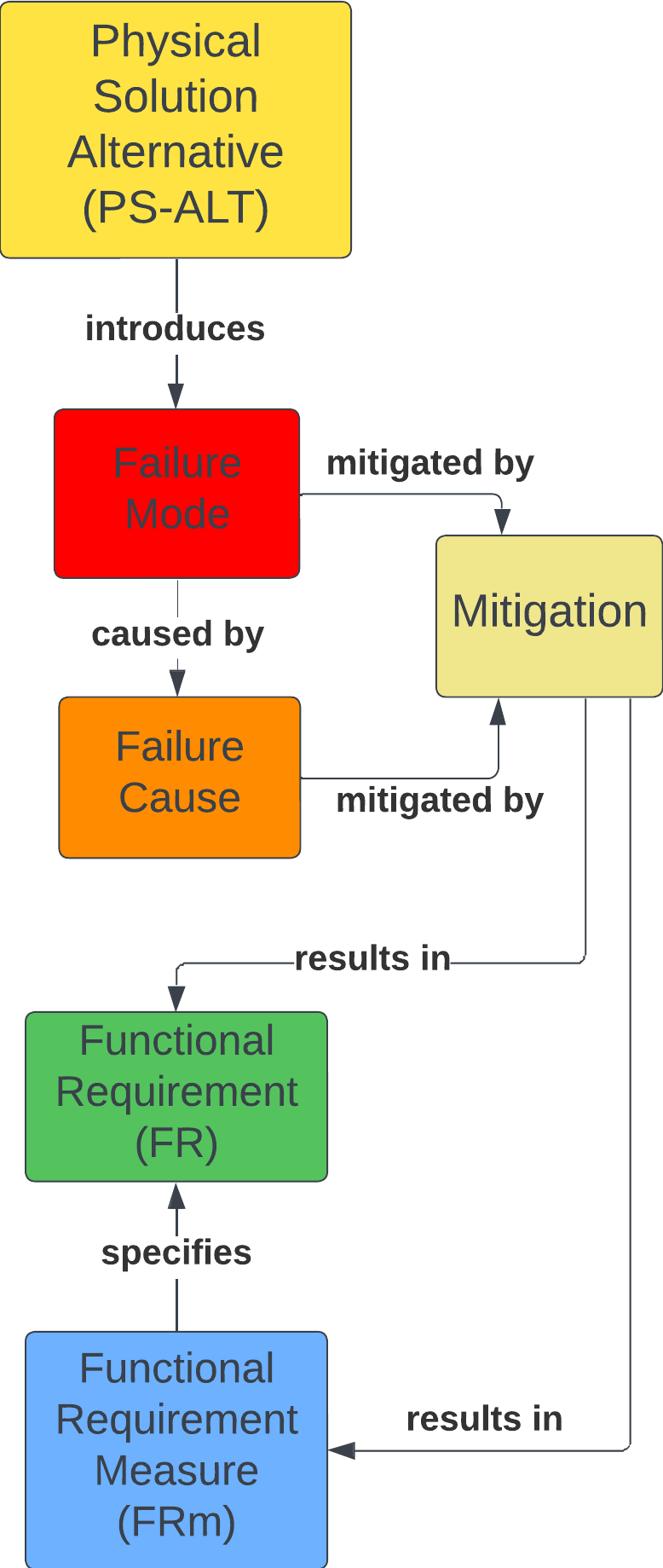
A PS-ALT introduces a Failure Mode, caused by a Failure Cause and mitigated by Mitigation.

FMEA: Failure Mode and Effects Analysis — a risk-mitigation approach to surface ways a product / system / service can fail and identify methods to mitigate.

Failure Mode: the actual failure. e.g., "brakes do not stop the moving car."

Failure Cause: what caused the failure. e.g., "low brake fluid level."

Mitigation: planned method to prevent the cause. e.g., "low-fluid sensor."

RPN = Severity × Likelihood × Detectability

Severity: consequences of the failure mode (1–10).

Likelihood: how likely the failure occurs (1–10).

Detectability: can the failure mode be detected? (1–10).

FMEA Class Diagram — excerpt from the Information Model
Excerpt from the Information Model, specific to FMEA.
Key Points
  • The PS-ALT chosen introduces the Failure Mode — failures are not pre-existing properties of the FR; they appear with the choice of physical solution.
  • The class diagram on the right is an excerpt from the Information Model, specific to FMEA — it shows the same FR / FRm / PS-ALT relationships, with Failure Mode / Failure Cause / Mitigation added.
Step 5 - Design and Process FMEA
RPN
Ranking Severity Likelihood of Failure Detectability
1 No effect Remote: Failure is unlikely Almost certain detection
2 Minor defect noticed by discriminating customers Very high chance of detection
3 Minor defect noticed by some customers Low: Relatively few failures High chance of detection
4 Minor defect noticed by most customers Moderately high chance of detection
5 Reduced secondary function performance Moderate: Occasional failures Moderate chance of detection
6 Loss of secondary function Low chance of detection
7 Reduced primary function performance High: repeated failures Very low chance of detection
8 Loss of primary function Remote chance of detection
9 Hazardous with warning Very high: failure is almost inevitable Very remote chance of detection
10 Hazardous without warning resulting in serious injury or death Cannot detect

⚠ A Severity of 9 or 10 requires corrective action regardless of the RPN Number.

Adapted from: Roessingh, Jan & Kist, Richard. (2016). Optimal Staffing for Future Military Operations - Implications for the Maritime Domain.

More ranking criteria/descriptions can be found here.

Key Points
  • Designs fail because the PS-ALT does not achieve the intended FR or exhibits undesirable behavior in the process.
  • Risk identification and mitigation needs to be considered during the design approach.
  • Risk mitigation can be employed for both the design (Design FMEA) and the process (Process FMEA) to manufacture the design.
  • Score by team consensus — if any team member's score differs by more than 2 points, document each rationale in the FMEA Notes column before settling on a final score.
Step 5 - Design and Process FMEA
DFMEA & PFMEA
Failure Identification As-Is Risk Assessment After Mitigation
FMEA Type PS-ALT Failure Mode Failure Description S Failure Cause P Detection
Method
D RPN Improvement to mitigate Failure Cause Improvement to mitigate Failure Mode New P New D New RPN
DFMEA
design
failure
Single-Handle Faucet Leakage at handle-body interface Water leaks at 2-axis handle-body interface 8 Worn seats and springs 7 Visual test 6 336 Extended-life Type Y seats and springs.
FR: Ensure seats and springs exceed useful life of product.
2 6 96
PFMEA
process
failure
Casting Process Physical crack in faucet body Mfg. process results in a cracked faucet body 8 Incorrect ratio in mixture 5 Visual test 9 360 Standard Work for mixing powdered alloy ingredients.
FR: Mix alloy ingredients. FRm: Maximize repeatability of alloy ingredient mixing.
Crack-detection process.
FR: Check for casting integrity.
2 2 32
Legend: S = Severity  ·  P = Likelihood (Probability)  ·  D = Detectability  ·  RPN = S × P × D
Design Failure (DFMEA) — introduced by the chosen physical solution. Mitigations change the design.
Process Failure (PFMEA) — introduced by the manufacturing process. Mitigations change process controls.
Key Points
  • Notice that the Failure Severity does not change between the DFMEA and PFMEA case — the failure is the failure. What changes is where it's caused (in the design vs. in the manufacturing process).
  • DFMEA targets failures introduced by the chosen physical solution; PFMEA targets failures introduced by the process that produces the design.
Step 6 - Detailed Design
Step 6
  • What are all the parts of the system?
  • How do the parts fit together (and perform FR0)?

Detailed Design translates the Logical Design (Decomposition) into the Physical Architecture.

Derive Physical Architecture Components from the Decomposition; capture as a Bill of Material (BOM). Components come from your PSs — one PS may yield multiple components.

Example: a "toolbox" PS may include a socket wrench, 10/12 mm sockets, flat-head screwdriver, etc.


Step 6 Detailed Design figure
Component Spec Qty Ord? Recv?
Supply Connections 3/8" comp. on faucet, 1/2" female NPT on supply 2 2 Yes
Power Supply 110 VAC in, 12 VDC out, >200 W 1 1 No
Key Points
  • Detailed Design translates Logical Design (Decomposition) into Physical Architecture.
  • Step 6.1 — Components are derived from the PSs and captured in a Bill of Material (BOM).
  • One PS may yield multiple components depending on level of decomposition.
Step 6.2 — Communicate the Physical Architecture
Step 6.2

Determine what diagrams/methods are appropriate to communicate your design. Use these diagrams/methods to arrange the BOM components to communicate the physical architecture — i.e., how do these components fit together to implement the PSs to achieve the FRs?
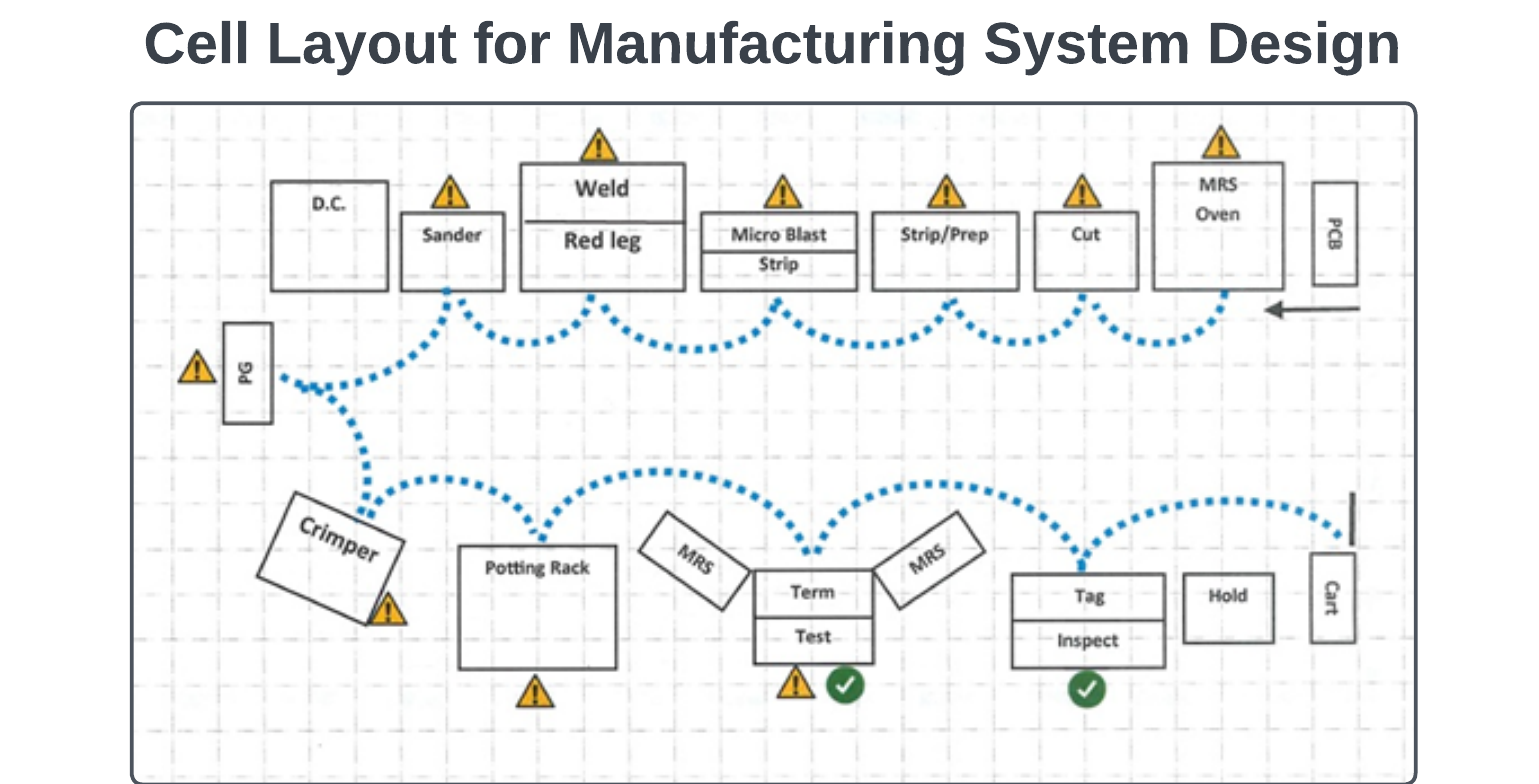
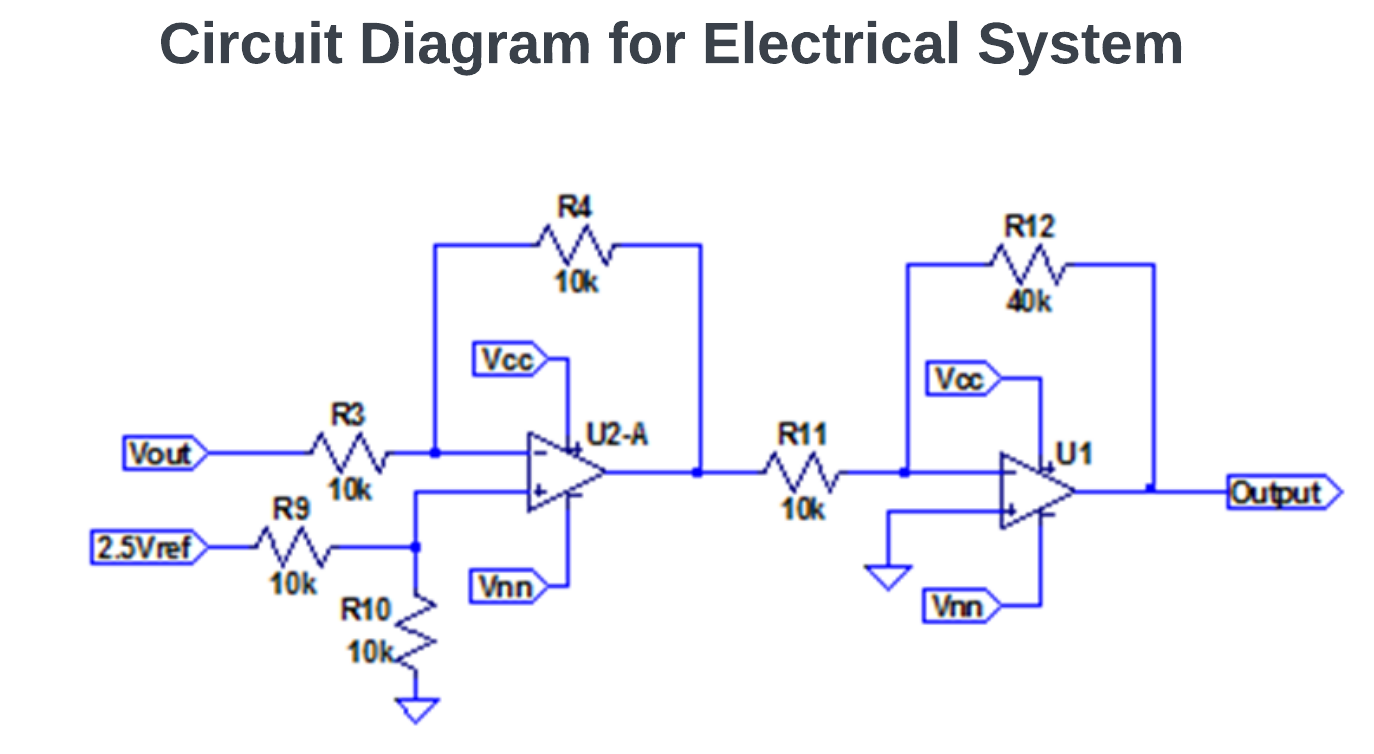
Step 6.2 Figure 1 Step 6.2 Figure 2 Step 6.2 Figure 3 Step 6.2 Figure 4
Key Points
  • Pick diagrams/methods that effectively communicate how the components fit together.
  • Goal: show how components implement the PSs to achieve the FRs.
Step 7 - Design For X (DFX) Methods
7.1 From Detailed to Refined

In Step 6 you produced a detailed design and bill of materials — parts, dimensions, tolerances, materials, and interfaces.

Step 7 refines that design through one or more Design For X (DFX) lenses — each lens is a design viewpoint that examines the design from one stakeholder's concerns. X is whatever quality matters most for your project (assembly, manufacturability, cost, serviceability, etc.).

Every project context is different. You decide which DFX method(s) to apply based on:

  • The customer's primary concern (cost, quality, lead time, ease-of-use).
  • What Step 5 FMEA revealed about likely failure modes.
  • How the design will be made, assembled, serviced, and updated.

No single DFX method covers every concern — combine the lenses that matter for your design.

A central product design surrounded by multiple Design For X inspection lenses
DFA — Assembly
DFM — Manufacturing
DFAM — Additive Mfg.
Software Design
MSD — Mfg. System
Cost Reduction
Key Points
  • Step 7 refines the detailed design from Step 6 — it doesn't replace it.
  • Apply only the DFX methods that fit your project context — not every method applies to every design.
  • The DFX lens you skip becomes the design risk you carry forward.
Step 7 — Design For Assembly (DFA)
7.2 DFA

Reduce the number of components and interfaces — resulting in fewer parts and fewer assembly steps.
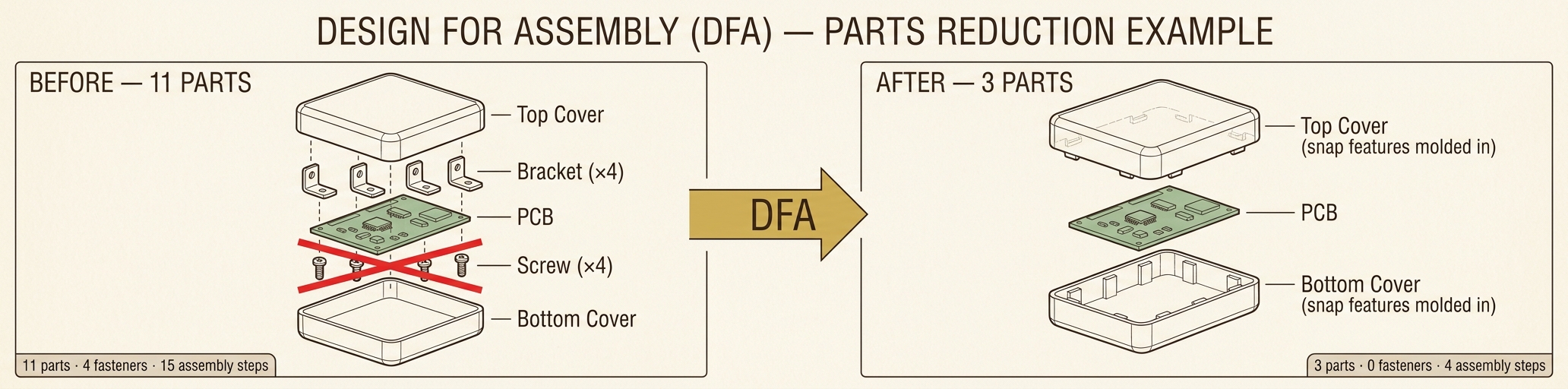
DFA before/after example — an electronics enclosure goes from 11 parts (top cover, 4 brackets, PCB, 4 screws, bottom cover) to 3 parts (top cover with snap features molded in, PCB, bottom cover with snap features molded in). 4 fasteners and 11 assembly steps eliminated.
# Question Answer (Y / N)
1 Does the component have to move relative to other components in the assembly?
2 Is the component made of different material for aesthetic or functional reasons?
3 Does the component have to be separate to guarantee access for repair, maintenance, or other components?

If the answer is "no" to all three questions, the part should most likely be combined with an adjacent part.

Key Points
  • DFA refines an existing design to reduce complications and cost during assembly.
  • Goal: fewer parts and interfaces → fewer assembly steps, lower cost, simpler BOM.
  • Three reasons to keep a part separate: relative motion, different material, or required service access.
Step 7 — Design For Manufacturing (DFM)
7.3 DFM

Reduce unnecessary design complexities that impact manufacturing in terms of quality, cost, lead time, etc.

# Question Answer
Material
1 What are the applicable material choices for your design?
2 What material did you choose for your design and why?
3 What impact does your material choice have on the manufacturing process?
Process Considerations
4 What manufacturing process/technology will you use to produce your design to achieve the desired cost?
5 List (or illustrate) the manufacturing processes/operations required to produce your design.
Design Considerations
6 What characteristics of your design affect the manufacturing processes?
7 Based on your understanding of the manufacturing processes, how have you removed unnecessary complexity in your design?
Environment
8 What impact does the operating environment have on your design?
Compliance and Testing
9 What standards must your design meet?
10 Identify the basic tests that your design must undergo.
Key Points
  • DFM addresses complexity that drives quality issues, cost, and lead time during manufacturing.
  • Five categories to evaluate: Material, Process, Design, Environment, and Compliance/Testing.
  • The questions force explicit decisions about material, process, and design — informing the manufacturing strategy.
Step 7 — Design For Additive Manufacturing (DFAM)
7.4 DFAM

Assess the potential quality of a part to be made using an Additive Manufacturing (AM) process by giving intuitive feedback and indirectly suggesting changes to improve the design.
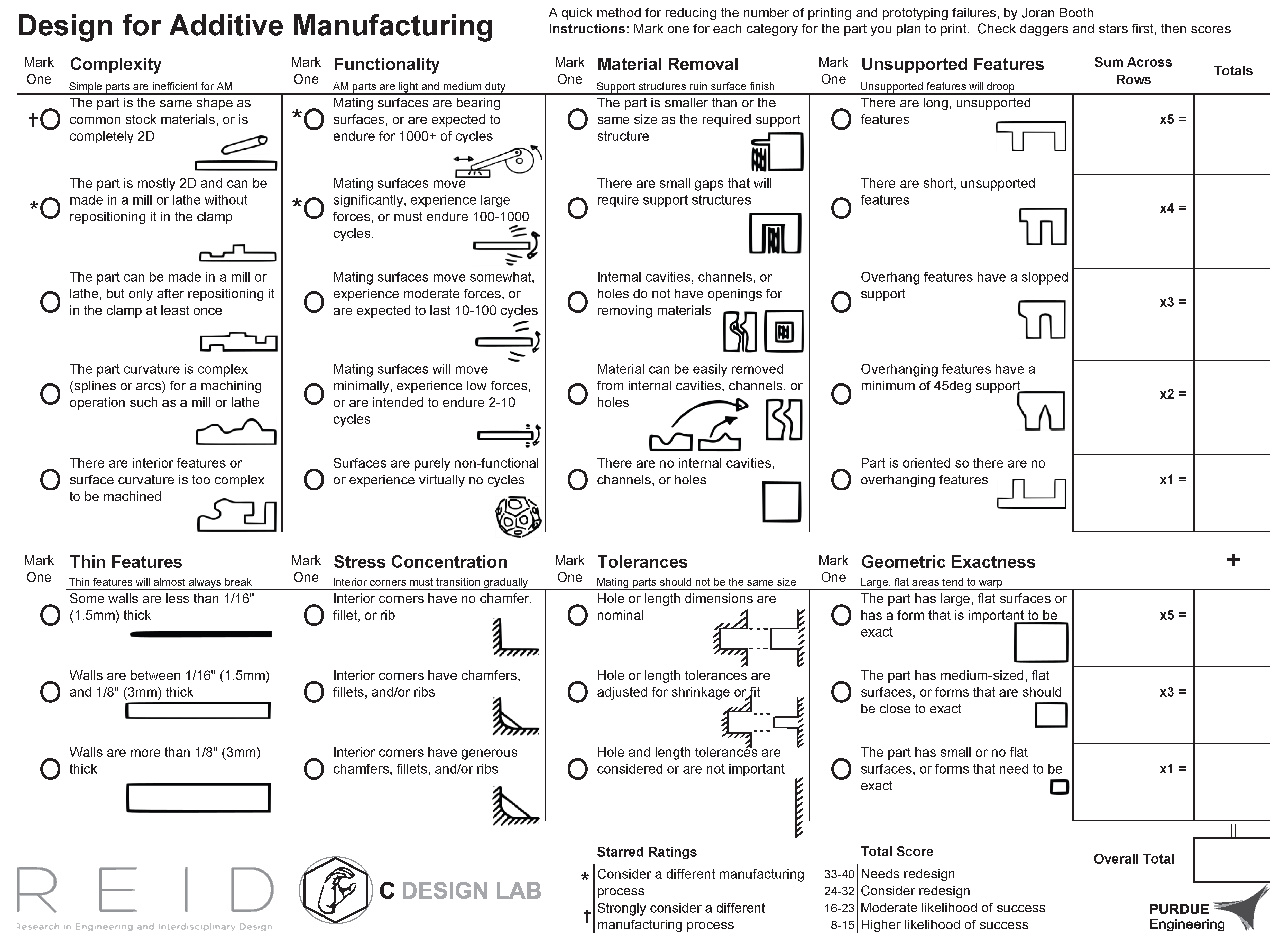
DFAM Worksheet — eight scoring categories with totals

Worksheet figure available in Lucid Chart for full readability. Reference: Booth, Alperovich, Reid, & Ramani (2016). DETC2016-60407 [PDF]

Key Points
  • DFAM helps novice and intermittent AM users avoid common print and prototyping failures.
  • Eight worksheet categories — mark one option per category, sum across rows for an overall score.
  • Total score maps to a recommendation: needs redesign, consider redesign, moderate likelihood, or higher likelihood of success.
Step 7 — DFX: Software Design
7.5 Software

Create a blueprint that outlines the structure, behavior, and interactions of the software components needed to achieve the desired functionality — while meeting quality attributes such as reliability, scalability, and maintainability.

Principle Question Answer
Modularity How will you break the system into smaller parts for easier understanding and reuse?
Separation of Concerns How will you organize the system for simpler maintenance and testing?
Correctness How will you ensure the software behaves as intended?
Efficiency How will you make the software perform tasks effectively?
DRY (Don't Repeat Yourself) How will you avoid repeating code to keep things clear and reusable?
Scalability How can we ensure the software functions as designed in spite of increased demand?
Key Points
  • Software Design is the DFX equivalent for software-bearing systems — a blueprint of structure, behavior, and interactions.
  • Six principles guide the blueprint: Modularity, Separation of Concerns, Correctness, Efficiency, DRY, and Scalability.
  • Each principle pushes a specific quality attribute — reliability, maintainability, performance, or scalability.
Step 7 — Manufacturing System Design (MSD)
7.6 MSD
Objective: form a team to choose solutions that achieve all 7 FRs reliably first. Then work to improve solutions to achieve the least cost without compromising the achievement of the FRs.
FR0: Continually Improve
PS0:
FR1: Provide a Safe and Healthy Work Environment
PS1:
FR2: Produce the customer-consumed quantity every shift
PS2:
FR3: Produce the customer-consumed mix every shift
PS3:
FR4: Do not advance a defect to the customer of your work
PS4:
FR5: Immediately identify abnormal conditions and resolve them for the long term
PS5:
FR6: Achieve FR1 through FR5 in spite of variation
PS6:
Discussion Questions

Q1: Do you agree with the 7 FRs? Would you add or remove any?

Q2: State your PSs for achieving the FRs of your Manufacturing System Design.

Key Points
  • Manufacturing System Design specifies the FRs (functional requirements) the production system must meet.
  • The objective is to form a team to choose solutions that achieve all 7 FRs reliably first; then work to improve solutions to achieve the least cost without compromising the achievement of the FRs.
  • Each FR drives a corresponding PS (physical solution) — the means by which the requirement is achieved.
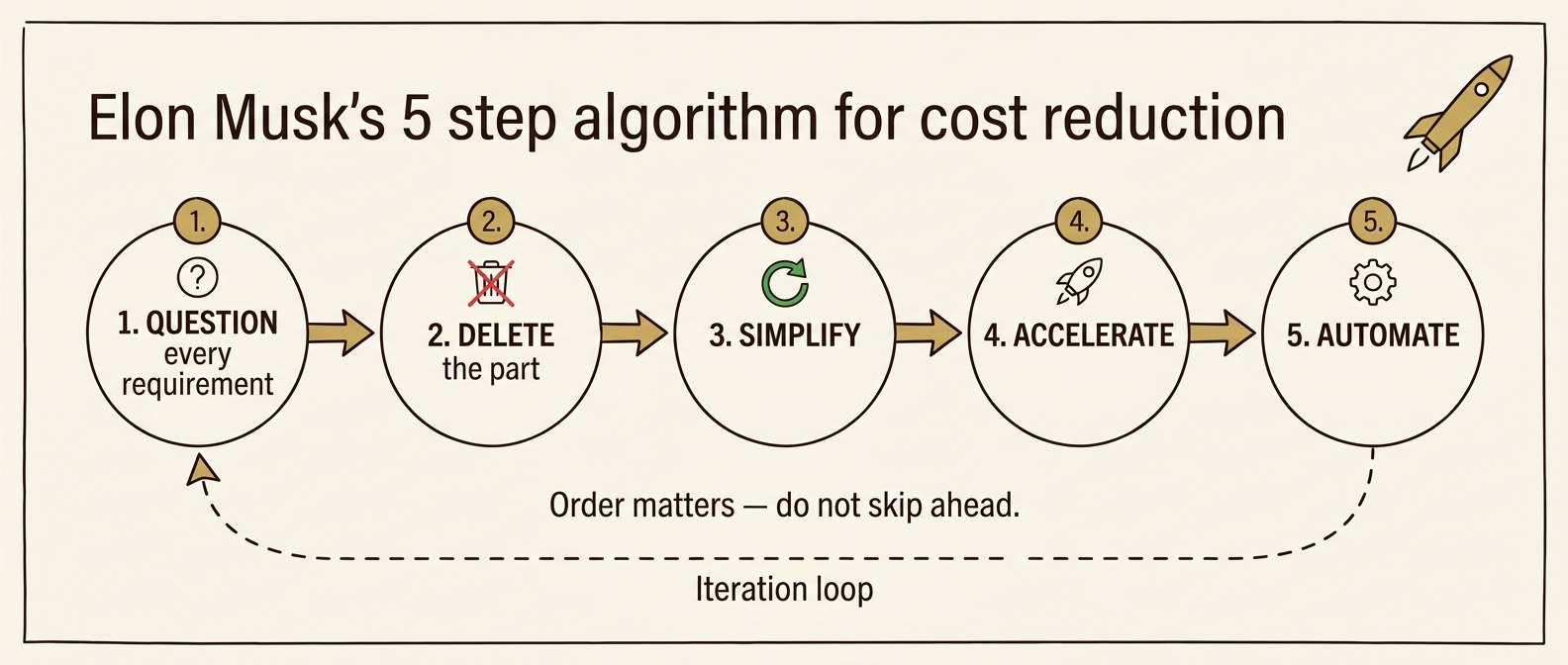
Step 7 — The Elon Musk Algorithm for Cost Reduction
7.7 Cost Reduction
Elon Musk's 5-step algorithm: Question, Delete, Simplify, Accelerate, Automate — with iteration loop

Five sequential steps for reducing complexity and cost — popularized by Elon Musk. Order matters: do not skip ahead.

# Step Description
1 Every requirement traces to a named owner Every requirement must come from a named person responsible for the requirement — not a department (not "the legal department" or "the safety department"). Requirements from smart people are the most dangerous because they're less likely to be challenged. Make them less dumb.
2 Delete any part or process you can You may have to add them back later. If you don't end up adding back at least 10%, you didn't delete enough.
3 Simplify and optimize Only after Step 2 — a common mistake is to simplify or optimize something that shouldn't exist.
4 Accelerate cycle time Every process can be sped up — but only after the first three steps. "I mistakenly spent a lot of time accelerating processes that I later realized should have been deleted."
5 Automate Comes last. Don't automate before requirements have been questioned, parts/processes deleted, and bugs shaken out.

Reference: Isaacson, W. (2023). Elon Musk. Simon & Schuster.

Key Points
  • Order is critical — most cost-reduction failures come from automating or optimizing what shouldn't exist.
  • Step 1 is people-driven: every requirement must trace to a named person who can be questioned.
  • If you don't add back ∼10% of what you deleted in Step 2, you didn't delete enough.
Step 8 - Verification Test Plan
Step 8

Verification is a set of activities that determines whether a system as built achieves the required characteristics and design specifications.

Two key questions:

  • Did we build the product / system correctly — to the design specifications?
  • Does the design meet specifications (FRms)?

Verification Requirement — defines the characteristic of the system to be verified.

Verification Event — the specific event (test) that satisfies the requirement.

Test Configuration — items, devices, software, and people required to run the test.

Test Procedure — the step-by-step process to conduct the verification event.

Functional
Requirement Measure
(FRm)
verified by
Verification
Requirement
verified by
Verification
Event
employs
Test
Configuration
Test
Procedure
Key Points
  • Verification answers two questions: Did we build it right? and Does it achieve the FRm's?
  • Verification compares the system as built to its design specifications — not to user needs (that's Validation, Step 9).
  • Each FRm gets a Verification Requirement, Event, Configuration, and Procedure.
  • Loop-back trigger: if a verification test fails, loop back to Step 6 / 7 — and may also include Steps 2–5 — to revise the design choices that produced the failing PS.
Step 8 — Verification Example: Faucet Leak Test
Step 8
FR3.2: Control water outflow rate.
FRm3.2a: Maximize number of successful (leak-free) valve cycles.
Threshold: >20k cycles
Verification Requirement
Verify no water leaks from faucet.
Verification Event
Faucet Leak Test
Conducted By
Joe Smith
Test Configuration
  • Dual-Handle Faucet
  • 360° Lighted Test Stand
  • Handle-Adjustment Robot
  • Handle-Gripping Fixture
  • Hot & Cold Water Supply Lines
  • Water Colorizer
  • Leak-Test Operator
Test Procedure (Standard Work)
  1. Mount faucet in leak test stand
  2. Connect test supply lines
  3. Activate colorizer
  4. Test hot water leakage:
    1. Check leakage with faucet off (30 s, all angles); document status
    2. Repeat 30 s inspection at 20%, 40%, 60%, 80%, and 100% flow rate
    3. Robotically cycle 10k times (full-open ↔ full-closed)
    4. Repeat incremental flow rate test at 10k cycles
    5. Cycle 10k more times; repeat incremental flow rate test
  5. Repeat steps 4a–4e for cold water
Key Points
  • Each FRm traces to a Verification Requirement → Event → Configuration → Procedure.
  • The Test Procedure is detailed enough that a different operator could repeat the test and reach the same results.
  • The Test Configuration enumerates everything needed to run the test: hardware, fixtures, software, and people.
Step 9 - Validation Test Plan
Step 9

Key question: Does what we built do what the customer needs / wants?

Validation is the process of determining if the product / system / service meets the needs and wants of the customer.
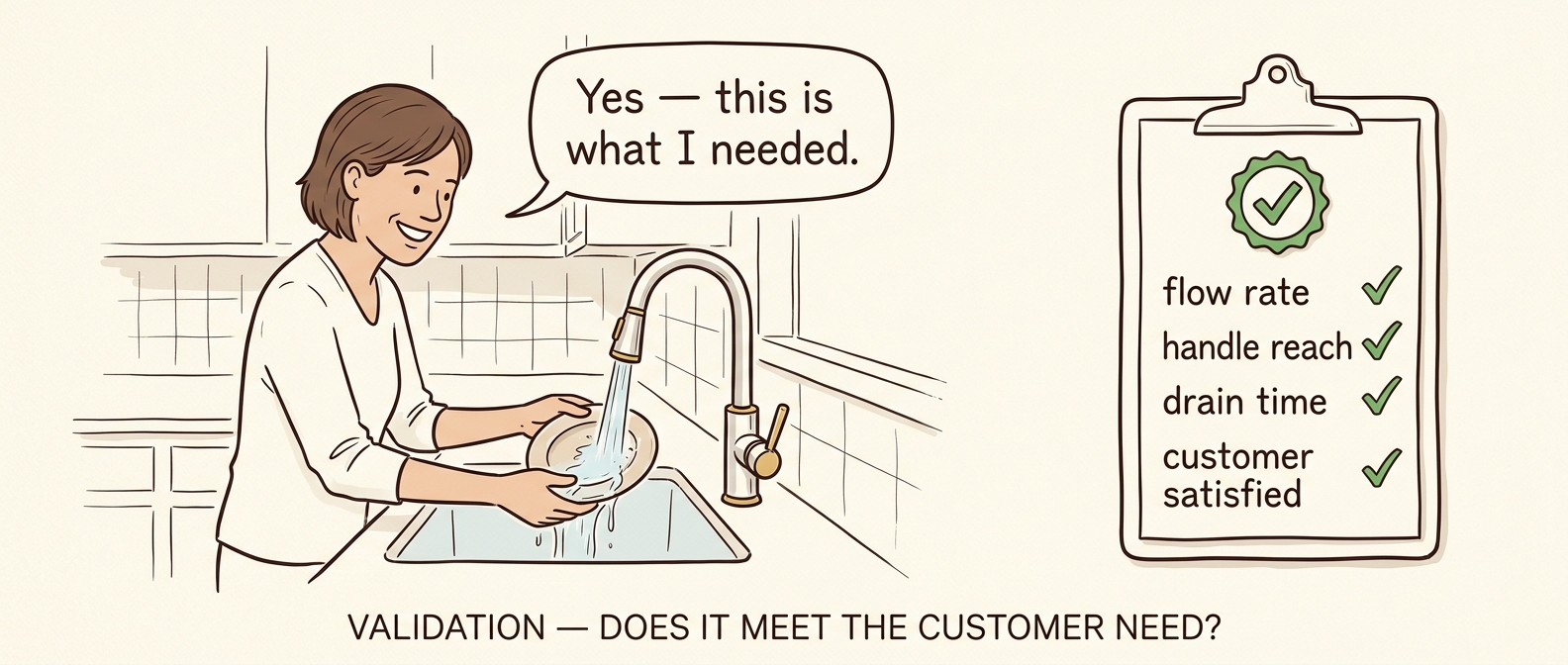
A homeowner using a finished faucet to wash a dish — 'Yes, this is what I needed' — alongside a clipboard with green checkmarks
Objective of Test
Gather user feedback regarding use of faucet.
Validation Event
User Feedback: Standard Operation of Faucet
Conducted By
Joe Smith
Conducted With
Shahab Shah
Onkar Sonur
Test Configuration

Event space, faucet installed in sink basin.

Test Procedure
  1. Organize and host an event.
  2. Simulate the different use cases.
  3. Ask specific, pointed questions tied to the FRm's.
  4. Capture all observations and answers.
Test Results

Both users agreed that the faucet met their need and functioned as expected.

Design Validated?

Yes. Customer signature required.

Key Points
  • Validation (Step 9) answers "Did we build the right thing?"Verification (Step 8) answered "Did we build it right?"
  • Validation is conducted with the customer/user, not by the engineering team alone.
  • A "Yes" decision should be backed by a customer signature on the validation record.
  • Loop-back trigger: if Validation reveals the customer's needs were misunderstood, loop back to Step 1 (and possibly Step 2 use cases) — refine the FRs/FRms and re-run the affected downstream steps.
Step 10 - Build a High-Quality Solution
Step 10

Use these planning questions to confirm you are ready to build — and to surface gaps in skills, tools, and help before the build starts.

  1. Step 10.1 —What do you not know regarding how to build your design?
  2. Step 10.2 —Do you have the necessary skills? What else will you require?
  3. Step 10.3 —Do you have the necessary tools? What else will you require?
  4. Step 10.4 —What parts of the build will require additional help or skill? Who will you need help from, and what is the required timing for that help?
  5. Step 10.5 —Put together a timeline to build and test your high-quality solution. Include who is responsible for each task and by when. Allow ample time to troubleshoot and revise the design and prototype — estimate how long the build will take, then multiply by 3.
  6. Step 10.6 —Follow the timeline and build the high-quality solution.
  7. Step 10.7 —Notify project advisors and/or course instructor when you are not meeting the timeline.
Key Points
  • Build planning starts with what you don't know — the goal is to surface gaps in skills, tools, and help before the build begins.
  • A realistic timeline budgets time for troubleshooting and revision, not just for the build itself — because stuff happens.
  • Communicate early when the timeline is slipping — advisors, instructors, and clients can help recover, but only if they know.
Step 11 - Standard Work Instructions
Step 11

Use the Standard Work Template to provide the customer with the instructions required to facilitate each Use Case. Use Cases may include assembly, maintenance, installation, normal use, etc.

Standard Work defines the normal method for conducting a process.

It describes the content, sequence, and timing of all work.

Standard Work for: Name of Use Case Here
Step # Work Element Key Point Info-graphics
1 Description of Step 1 Key point regarding Step 1
2
3
Key Points
  • Standard Work represents the best way we know how to do the work right now.
  • Standard Work is a record of all problems that have already been solved.
  • Standard Work provides the foundation for improving the work methods — because we know how the work is done right now, we can make improvements to better achieve the desired outcomes.
Step 11 — Standard Work Example: Water Faucet
Step 11
Standard Work for: Installation
Step # Work Element Key Point Time (sec)
1Turn off hot and cold supply lines.Turn knobs counter-clockwise.
2Remove old faucet if required.Supply lines may still have water that will leak.
3Remove new faucet from packaging.Be careful not to lose the gaskets or mounting screws.
4Mount new faucet to counter top with supplied fasteners.Pass supply lines through the counter-top holes one at a time if clearance is tight.
5Connect supply lines to Hot and Cold valves.Do not over-tighten. Snug the connections and check for leaks.
Standard Work for: Operation
Step # Work Element Key Point Time (sec)
1Turn on Hot and Cold valves as desired.Hot water may initially be cold due to the location of the water heater.2
2Adjust temperature and flow with the valves.To increase temperature, decrease cold flow or increase hot flow.5
3Proceed with planned activity with water.varies
4Turn off hot and cold valves.Make sure valves come to a physical stop so the faucet does not drip.2
Key Points
  • The same product needs multiple Standard Work documents — one for each Use Case (Installation, Operation, Maintenance, ...).
  • The Key Point column captures the why — the failure mode that gets prevented by doing the step correctly.
  • Standard Work is written from the customer's perspective: it must let a first-time user complete each Use Case without prior training.
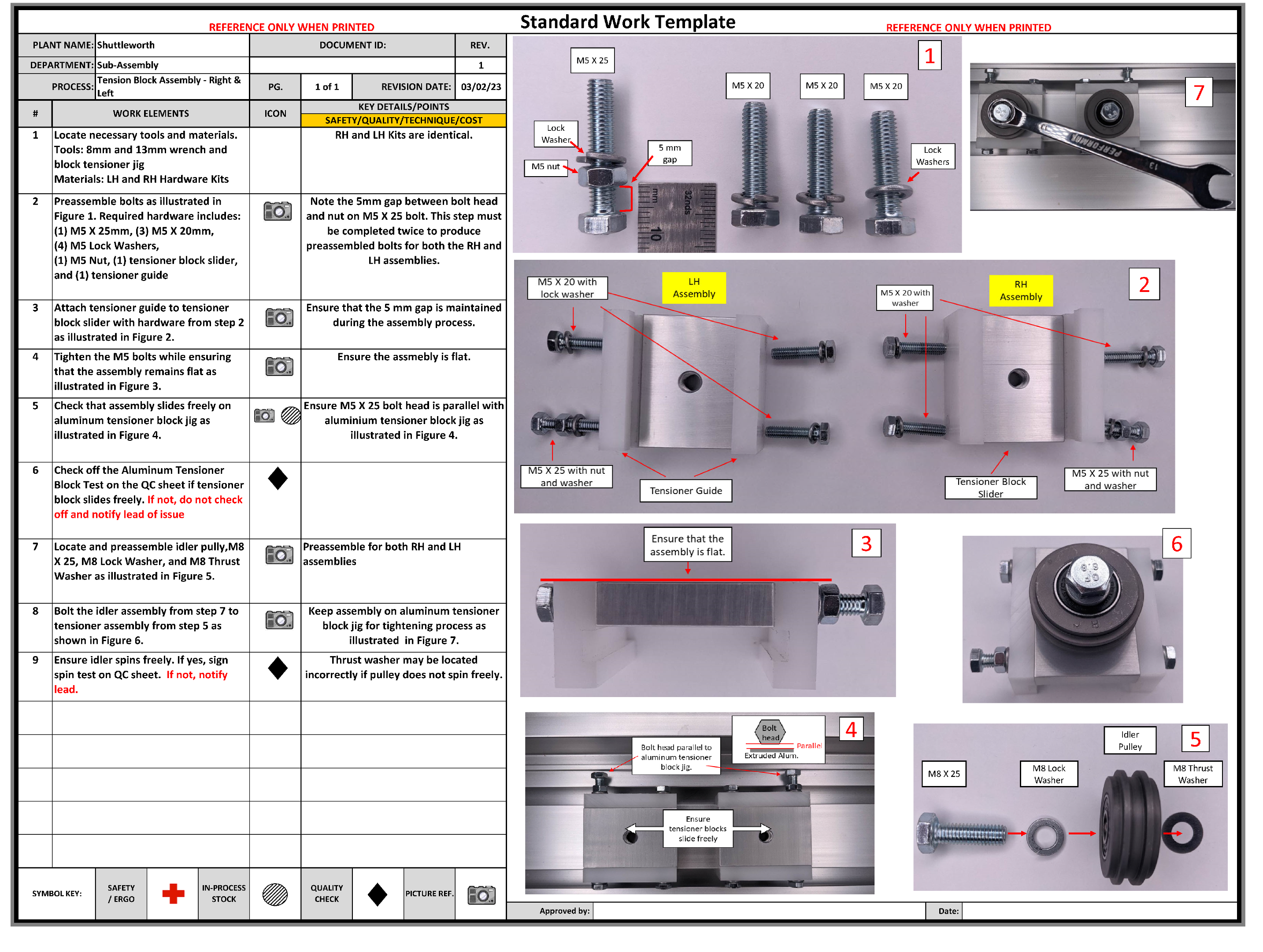
Step 11 — Mechanical Assembly Example
Step 11
Step 11 Standard Work Mechanical Assembly Example
Step 12 - Verification, Validation, and Final Cost
Step 12
  1. Step 12.1 — Conduct your verification tests as outlined in your Verification Test Plan, on schedule.
  2. Step 12.2 — Conduct your validation tests as outlined in your Validation Test Plan, on schedule.
  3. Step 12.3 — List all improvements you would like to make to the design going forward. Are there additional Use Cases that must be included?
  4. Step 12.4 — Write down Lessons Learned during the design / build / test process. Capture the best practices and Standard Work to follow on the next project.
  5. Step 12.5 — Complete the Final Cost Considerations Table.
1Price the market will supportFrom Step 1.6
2Desired profit $/unitFrom Step 1.6
3Required manufacturing cost the market will support
4Estimated cost to manufacture one unitYour estimate
5How much must you reduce manufacturing cost to meet market price and desired profit?A negative number is a surplus — good.
— OR —
6How much is the client willing to pay for the solution? (project budget)
7What was the total cost to produce the High-Quality Solution?
8What methods will you use to reduce manufacturing cost and be environmentally sustainable?
Key Points
  • Step 12 is the execution wrap-up: run the verification + validation tests, then finalize the cost.
  • 12.3 is the project's improvement backlog — future-state designs and any missed Use Cases get captured here.
  • Two parallel cost paths — market-price (consumer goods) or client-budget (custom builds). Capture whichever applies.
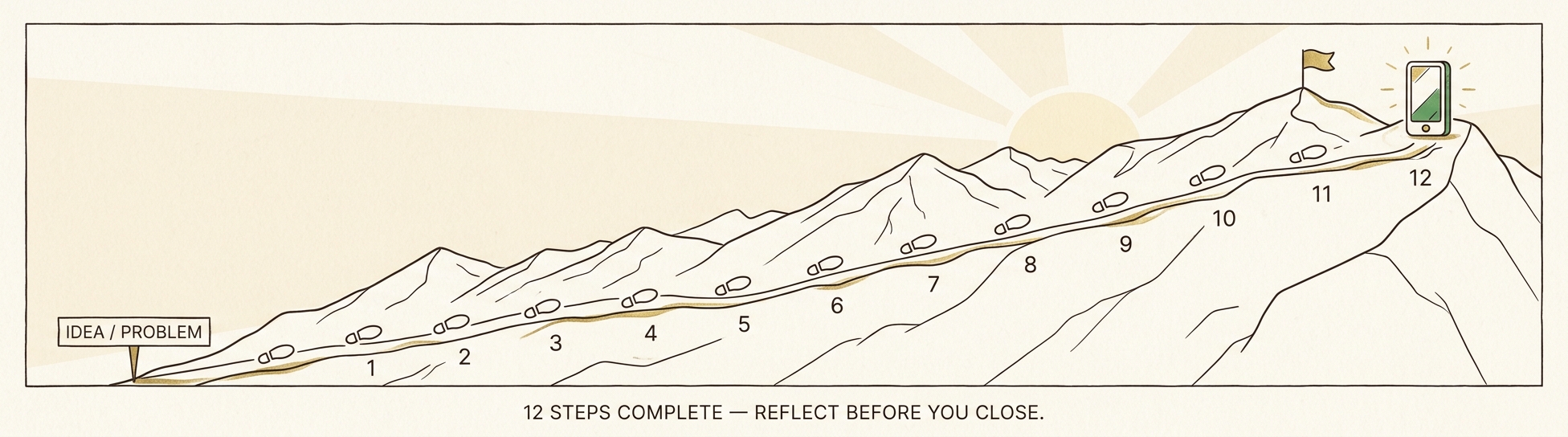
12 Steps Complete
Reflection
A mountain with 12 numbered footprints rising from 'IDEA / PROBLEM' to a summit flag — 12 steps complete, reflect before you close
You walked the design from a fuzzy customer need to a verified, validated, built system — all in one common language. Take a moment to reflect before we close.
What changed in your design as you walked through the steps? Where did iteration loop back (FMEA → Step 4? Verification → Step 6/7? Validation → Step 1?)?
Which FR / FRm was hardest to nail down? Which PS-ALT was the toughest to choose between?
Did the team converge on a collective understanding of the design? Where did agreement break down — and how did you recover?
If you started over, what would you do differently in Step 1 that would have saved time downstream?
Next: the Why FRs? section steps back from the methodology and asks the deeper question — why does designing around Functional Requirements, instead of unit cost, lead to better systems?
Why FRs?
CSD Language Recap
Quick Recap: The CSD Language... gives every member of the team the same words and the same relationships. The four terms below — Function, FR, FRm, PS — are the foundation.
FUNCTION — what the system must do
via collective agreement
FRm
how well
FR
agreed-to function
PS
physical solution
  • Function — what the system must do.
  • Functional Requirement (FR) — the function the team agrees MUST be implemented for the design to be successful.
  • Functional Requirement Measure (FRm)how well the FR is achieved (can be more than one FRm per FR).
  • Physical Solution (PS) — what thing implements the FR.
  • The designer chooses the PS to achieve the FR — it is a decision.
Why FRs?
For the Design of Systems
Where do FRs come from? FRs are derived from Use Cases, Customer Needs, Risk Mitigation, and Constraints (the non-FRs). Enterprise Systems and Product Design have similarities — both translate FRs into PSs — but they diverge in how those PSs are implemented.
(Reminds me of Art Linkletter — "Where do babies come from?")
FOR ENTERPRISE SYSTEMS — e.g., manufacturing systems and product-development systems — BMW, SpaceX, Purdue Univ., healthcare systems
Enterprise Systems rely on Standard Work to implement the chosen PSs. Standard Work defines the normal operating condition and establishes:
  • Contentwhat we do; "the work"
  • Sequence — the steps of the work
  • Time — process time relative to demand
    • Cycle Time (CT) · Takt Time (TT) · CT ≤ TT
Standard Work — Mechanical Assembly Example
FOR PRODUCTS — e.g., wet-floor sensor, reusable launch vehicle, aircraft, a hammer
For products, the PSs must achieve the FRs and their FRms — the "how well." The FRm set is also called:
  • Design Specification
  • Design RangeSuh
  • Performance RequirementsINCOSE
Example product — kitchen faucet
Why FRs?
The Trap — Pouring Fresh Water into Salt Water
Existing culture — driven by unit cost of one operation rather than the functions of the system — pulls every action back toward salt water. FR language is the antidote: stating the function explicitly — and the FRm that makes it measurable — surfaces the unconscious thinking behind common solutions before it shapes the design.
Fresh Water (Lean / TPS / New Methodology) being poured through a funnel into a tank of Sea (Salt) Water — the Existing Enterprise / Manufacturing System
Examples — Actions Driven by Unconscious Thinking
Action / Solution Unconscious Thinking
High Speed Machines"The more the better" — Unit Cost Equation
Outsource to Low-Wage CountriesReduce Labor Cost
AutomationAbsorb less overhead, reduce labor cost
ERP SystemsComputerization of existing inventory & accounting practices
AI in Higher Education"Let's use the shiny new technology"
In every case above, the implementation of the Action / Solution resulted from unconscious thinkingNOT from defining and understanding the function first, and its collective-agreement FR.
Why FRs?
Case Example — Salt Water PSs
FR: Glaze cups.
As the team drives unit cost down, each FRm target steers them toward a particular PSs — watch where they converge.
UNIT COST EQUATION (Glazing op)
Cost Unit  (op) =  MTL + LABOR + OVHD n
OVERHEAD ABSORPTION
OVHDop = (OVHD Cost Pool) · DL_Time(opi) Σi=1n DL_Time(opi)
FRm: "the more the better" n → ∞  ·  PSs: High Speed Machine
FRm: Labor Cost (LC), LC → 0  ·  PSs: Low-wage country  and/or  Automation
FRm: Direct-Labor Time per Operation, DL_Time(opi) → 0  ·  PSs: Automation  — tied to OVHD absorption: DL_Time(opi) drops ⇒ OVHD per op pushed onto remaining ops.
Cup glazing production line
Cup Line — parts produced fast
Warehouse — 6 months of inventory
Cup factory flow — Forming / Grinding / Glazing departments
Forming / Grinding / Glazing departments
Why FRs?
The Message
The false & unconsciously held assertion
Min(Total Cost)  =  n Σ i = 1  Min(Unit Cost(opi))
Minimizing each operation in isolation does NOT seek to improve the functions of the system.
Shot peen department interior — Sterling MI plant
Shot Peen, Sterling MI — "WELCOME TO HELL" sign at the dept. entrance
EXAMPLES — CAN YOU THINK OF OTHERS?
Plastic bottles at "low cost" — while filling up the oceans (300-mile Pacific Garbage Patch). [citation]
Making cups really fast — while hurting workers, poor quality, long lead times, and a warehouse of potentially obsolete parts.
Shot Peen, Sterling MI — the "WELCOME TO HELL" sign (above) is the worker's-eye view of single-op optimization.
WHY DO WE KEEP MESSING UP?
No language for system design that defines functions first, before unit cost of an operation.
The false belief shown above is held unconsciously — teams act on it without questioning.
We are not conscious of our normative / normalized behaviors.
Why FRs? By defining the FRs we establish the criteria to evaluate the entire system against customer needs — instead of local sub-optimization driven by the Unit Cost Equation. Compare the two plants below: red / yellow mark FRs not yet achieved; green marks FRs satisfied.
Plant M — Before
Plant M MSDD — many FRs unmet (red, yellow, orange)
Plant L — After
Plant L MSDD — most FRs achieved (green)
Why FRs?
Pathways to a Better Design
Design is about decision making — understanding the functions to meet, then choosing how to meet them. Two paths drive every improvement:
PATH 1 — NEW FUNCTIONS
Identify new FRs the system must perform — functions that didn't exist before, or weren't being satisfied.
Example — Musk & Mars
FR: Ensure the long-term survival of human consciousness by making humanity a multiplanetary species.
PS: Self-sustaining, large-scale colony — Mars.
SpaceX-style spacecraft approaching Mars
PATH 2 — BETTER PSs
Keep the same FR, but choose a better physical solution — one that achieves the function more effectively.
Example: FR: Obtain water — better PS = electric motor for water pump
USE CASE — We have a well, and need to obtain water
PS Option 1 — Hand Pump
Hand pump Manual lever pumps water from the well. FR satisfied, but it's labor-intensive.
PS Option 2 — Electric Pump
Electric submersible pump Electric motor automatically moves water. Same FR — better PS.
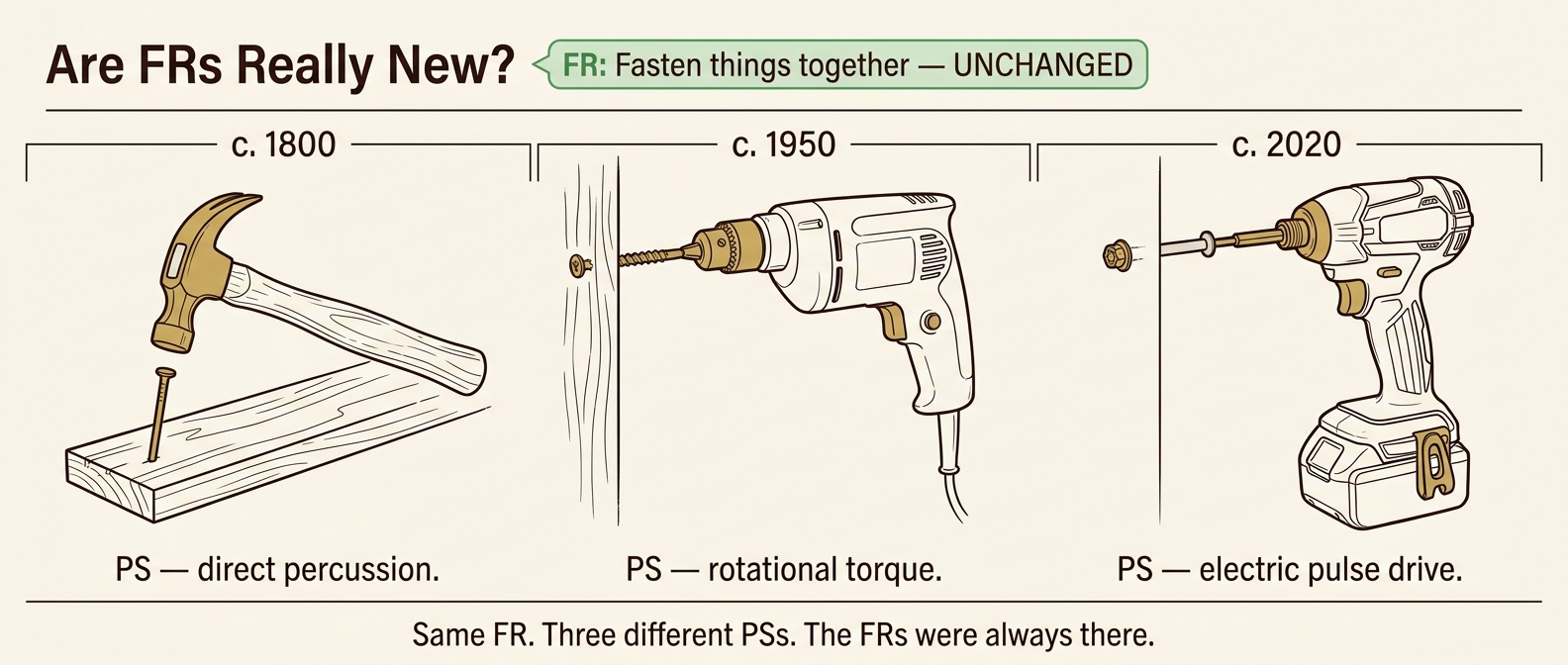
Why FRs?
Are FRs Really New?
Three fastening implements across time: hammer + nail (1800), power drill + screw (1950), cordless impact driver (2020) — all satisfying the same FR 'fasten things together'
The provocation: when we say we have a "new design," we often mean a new PS. The high-level FR underneath almost never changes.
EXAMPLE — Fasteners & Hammers
A new kind of fastener (PS) → a new kind of hammer (PS)...
High-level FR: Insert fastener / fasten together
— did not change.
MFG CASE STUDY REITERATES
There are solutions that achieve the core MFG functions — and solutions that don't.
The FRs were the same in both cases. What differed was the PS choice.
So: Maintain independence of FRs means:
  • FRs are constant.
  • We as humans don't always know them.
  • We have solutions that couple, are redundant, or are incomplete — and we "dance on the mess" by changing FRms instead of fixing the underlying design.
[ Nam did not say this here — an extension to Suh's framework. ]
FRs are timeless. PSs are our latest attempt to satisfy them.
Why FRs?
The 7 FRs of MSD
So what is the alternative to the Unit Cost Equation being used to drive system design and investment decisions?
Walla!  —  The CSD Language and the collective agreement of the FRs that a system MUST achieve.
Tada!  —  The 7 FRs of Manufacturing System Design:
FR0: Continually Improve
FR1: Provide a Safe and Healthy Work Environment
FR2: Produce the customer-consumed quantity every shift
FR3: Produce the customer-consumed mix every shift
FR4: Do not advance a defect to the customer of your work
FR5: Immediately identify abnormal conditions and resolve them for the long term
FR6: Achieve FR1 through FR5 in spite of variation
PS0:
PS1:
PS2:
PS3:
PS4:
PS5:
PS6:
Takt Zeit: not "more is better."
Match the demand pace, don't maximize output. This is the reason for enterprise-design FRs.
The recurring question (Axiom 1):
"Does PSj affect the achievement of FRi?"
Why FRs?
Path-Dependent Enterprise
Most enterprises are large systems — many people, many elements. The enterprise design itself is path-dependent: the order in which the 7 FRs are addressed determines whether downstream FRs are achievable at all.
✓ PATH-DEPENDENT (TRIANGULAR)
X
O
O
X
X
O
X
X
X
FR1 first →
FR2 next →
FR3 next →
Predictable when set in order.
✗ THE TRAP

Without recognizing path-dependency, teams default to "reduce inventory" as the PS for "Become Lean."

But the real FRs are the 7 FRs of MSDFR4 (don't advance defects), FR5 (identify abnormal conditions), and FR6 (achieve in spite of variation) must be in place before FR2 / FR3 / FR0 are achievable.

Key Point
  • Without recognizing path-dependency, people focus on reducing inventory as the PS for FR: "Become Lean" — when the real FRs are the 7 FRs of MSD, sequenced.
Why FRs?
For Products — Evolving Designs
The context of product use must be understood. Most product designs evolve to satisfy:
• FRms becoming more stringent
• PSs adopting new tech and innovation
USE CASE 0 — The well
FR: Provide access to water · FRm: Drinkable water · PS: Well
A and B evolved based on "Well" as the original PS.
USE CASE A — At the well
FR: Provide access to water
FRm: Don't freeze going outside to well in winter
PS: Indoor Plumbing System
Decomposed into:
FR1: Remove H2O from earth
PS1: Hand Pump (path-dependent)
FR2: Ensure water flow to tap
PS2: Indoor Plumbing
Hand pump
PS1: Hand Pump
USE CASE B — Water inside the house
FR: Provide access to water
FRm: Don't freeze going outside in winter; latency < 1 sec
PS: Indoor Plumbing System
Decomposed into:
FR1: Remove H2O from earth
PS1: Electric Motor (path-dependent)
FR2: Ensure water flow to tap
PS2: Indoor Plumbing
Electric submersible pump
PS1: Electric Motor
Glossary
1 of 2 — Core CSD Terms
Function — what the system must do.
Functional Requirement (FR) — a function the team has agreed the system must perform. Begins with a verb.
Functional Requirement Measure (FRm) — a measurable performance target on an FR. Includes units, a direction (max / min), a Threshold, and a Goal.
Threshold — the acceptable level of performance for an FRm. Below threshold = unacceptable.
Goal — the desired ultimate performance for an FRm. Meeting the goal = excellent.
Physical Solution (PS) — the chosen physical thing that delivers an FR. Begins with a noun.
PS-ALT — an alternative Physical Solution candidate evaluated alongside others before one is chosen.
Use Case — a scenario in which the customer interacts with the system to achieve an outcome.
Use Case Step — one action within a use case — what the user or system does next.
System Boundary — the line that defines what is inside the design and what stays outside (and crosses as inputs / outputs).
Interface — a crossing of the system boundary; a connection between the design and an external element.
Decomposition — breaking a parent PS into its child FRs and child PSs across multiple levels.
Coupled Design — one PS affects multiple FRs at once; design behavior is unpredictable.
Uncoupled Design — each PS affects exactly one FR; behavior is predictable.
Path-Dependent Design — PSs are independent only when adjusted in a specific sequence; acceptable but fragile.
Conceptual Design Alternative (CDA) — a high-level approach to solving the problem (Step 3.2). One of several to evaluate.
Failure Mode — a way the design or process could fail (e.g., "valve leaks").
Failure Cause — the underlying reason for a failure mode.
Mitigation — the design or process change that prevents the failure cause or detects the failure mode.
Stakeholder — any person with an interest in the system (customer, operator, maintainer, regulator, …).
Glossary
2 of 2 — Methodology & Acronyms
FMEA — Failure Mode and Effects Analysis. A predictive failure-prevention technique used in Step 5.
DFMEADesign FMEA — failures introduced by the chosen physical solution.
PFMEAProcess FMEA — failures introduced by the manufacturing / assembly process.
RPN — Risk Priority Number = Severity × Likelihood × Detectability (each scored 1–10).
Severity — how bad the failure mode's consequences are (1–10).
Likelihood — how often the failure is expected to occur (1–10).
Detectability — how easy it is to detect the failure before it harms the customer (1–10).
Axiomatic Design — Suh's design framework. Two axioms: Independence and Information Content.
Process Capability (Cpk) — statistical measure of a process's ability to stay within spec limits (USL / LSL).
USL / LSL — Upper / Lower Specification Limits.
Information Content (I)I = log2(System Range / Common Range) — lower I means a more capable design.
V & VVerification ("did we build it right?") + Validation ("did we build the right thing?").
DFX — Design For X (Step 7). X = Assembly (DFA), Manufacturing (DFM), Additive Manufacturing (DFAM), Manufacturing System Design (MSD), Software, Cost, etc.
Standard Work — documented best-known method for a recurring task; defines content, sequence, and time (Step 11).
Takt Time — available production time ÷ customer demand — the rate at which work must flow.
Cycle Time (CT) — time taken for one repetition of the work; CT ≤ Takt = balanced.
BOM — Bill of Materials; the complete parts list of a design (Step 6.1).
KPI — Key Performance Indicator; a measure of an organization's progress against a goal. KPIs should derive from FRms.
ISO/IEC/IEEE 42010 — the international standard establishing the multi-viewpoint principle for system architecture.
INCOSE — International Council on Systems Engineering — publishes the SE Handbook referenced for performance-requirements language.
TPS — Toyota Production System — the lean-manufacturing tradition Standard Work / Takt are drawn from.
SME — Subject Matter Expert.
CDA — Conceptual Design Alternative (Step 3).
Thank You
12 Step Design Process Primer
Collective System Design at Purdue University Fort Wayne
Authors
Prof. David S. Cochran, Ph.D.
Joseph J. Smith
Center
Center of Excellence in
Systems Engineering
Purdue University Fort Wayne
Live deck
sysdesign.org
Questions?
dscochra@purdue.edu
Feedback always welcome.
Now go build something that achieves all the FRs — for the least cost, without compromise.